
AI Small App
Training a model from scratch can cost a fortune and take months, and for most products you do not need to. Today you can build a small AI app by connecting to models that already exist. This approach powers many practical LLM-powered tools, from writing assistants to document analyzers, and it is the path Technexia recommends for most early-stage ideas. This guide covers the APIs available, how to connect them, and how to keep costs low.
Can You Build a Small AI App Using Existing Models?
Yes. Pretrained models are available through hosted APIs, so your app sends a request and receives a result. You can build a small AI app this way in days, because the model handles the hard AI work while you focus on the product.
Here is what you need:
- A narrow idea: One task, done well
- A model API: Access to text, image, or speech models
- Basic app skills or a visual builder: Enough to create an interface and connect services
- Your own prompts or data: Instructions and content that make results relevant to your users
Many successful LLM-powered tools work exactly like this, combining a strong model with a focused product experience.
Which APIs Are Available?
The options keep growing, and most fall into a few categories:
- Language model APIs: Text generation, summarization, extraction, chat, and code assistance
- Image and vision APIs: Generate images or analyze photos and documents
- Speech APIs: Transcribe audio and generate natural voices
- Embedding APIs: Power search and question answering over your own documents
- Hosted open-source models: More control and flexible pricing
- Specialized APIs: Translation, text recognition, and content moderation
Compare providers on quality, price, speed, data policies, and documentation. Pricing changes often, so check current rates before committing.
How Do You Connect an LLM?
Reliable AI API integration follows a simple pattern. To build a small AI app that works smoothly, follow these steps:
- Get an API key: Create an account, then store the key securely on your server and never in front-end code
- Send a request: Include the model name, your instructions, and the user’s input
- Handle the response: Read the output, format it, and display it clearly
- Add context: Include relevant documents or conversation history so answers fit the task
- Manage errors: Plan for timeouts, rate limits, and unexpected outputs
- Stream results: Show text as it arrives so the app feels faster
Should You Use Visual Builders or Custom Code?
No-code AI apps let non-developers connect models using visual builders and automation tools. Custom code gives you more control. Each has its place:
- Visual builders: Fastest to start, ideal for prototypes and internal tools
- Low-code platforms: A balance of speed and flexibility
- Custom code: Best for unique features, larger scale, and tighter security
Many teams begin with no-code AI apps to test demand, then move to code once they know what users value.
Steps to Launch Your First Version
Here is a simple path to build a small AI app and release an AI app MVP in weeks:
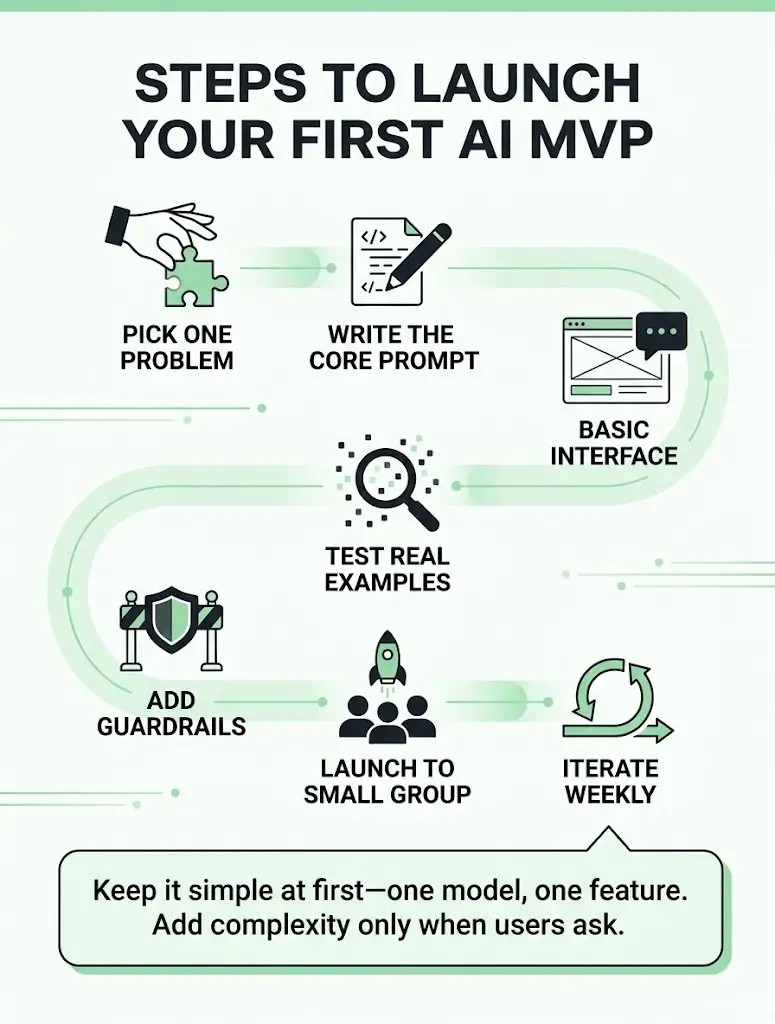
- Pick one problem: Choose a task users already struggle with
- Write the core prompt: Give clear instructions, examples, and output rules
- Create a basic interface: A simple form or chat window is enough
- Test with real examples: Use realistic inputs, including messy and unexpected ones
- Add guardrails: Set limits, filters, and fallback messages
- Launch to a small group: Gather feedback from real users
- Iterate weekly: Improve prompts, features, and reliability
Keep your AI API integration simple at first, with one model and one feature, and add complexity only when users ask for it.
How Can You Reduce Inference Costs?
Inference costs grow with usage, so plan early. To build a small AI app that stays affordable, try these tactics:
- Match model size to the task: Use smaller, cheaper models for simple jobs
- Shorten prompts: Remove context the model does not need
- Cache repeated answers: Reuse results for common questions
- Limit output length: Ask for concise responses when detail is not required
- Queue non-urgent work: Process background tasks in batches
- Set usage limits: Cap requests per user or per plan
- Monitor spending: Use dashboards and alerts to catch surprises early
How Technexia Can Help
Technexia helps founders and teams build a small AI app the right way, from choosing models and planning AI API integration to testing and launching a reliable first version. Whether you want to begin with a quick prototype or a custom build, Technexia offers practical guidance so you can move fast, control costs, and learn from real users.
Conclusion
You do not need to train a model to build a small AI app. With existing models, a narrow focus, and careful cost control, one person can launch something useful in weeks. Start with a simple AI app MVP, learn from real feedback, and improve from there. Ready to turn your idea into a working product? Reach out to the Technexia team to plan your first step.
Frequently Asked Questions
Do I need machine learning experience?
No. Working with APIs requires standard development skills, or even none if you use visual tools.
How much does it cost to start?
Early costs are usually small: model usage, hosting, and a domain. Spending grows with your user base.
Is my data safe when I use an API?
Review each provider’s data policies, avoid sending unnecessary sensitive information, and use encryption and access controls.
Which model should I choose first?
Start with a capable, affordable model and test alternatives on your real tasks before deciding.