
AI & Automation
Few terms are used as often, and understood as little, as AI automation. Leaders hear it in every meeting, vendors promise it in every pitch, and teams wonder whether it will help them or replace them. So what is AI automation, really? In plain language, it is the use of artificial intelligence to carry out tasks, make decisions, and manage workflows with little or no human input. Unlike older tools that follow rigid rules, it can read, learn, adapt, and improve over time.
This guide answers what is AI automation from every angle: how it works, what it can handle, the benefits, the risks, how to start, and how to measure success. It is written for decision-makers who want clarity rather than hype, and it shows how AI business automation is already reshaping daily operations across industries. Each section stands alone, so use it as a reference hub and jump to what matters most to you.
What Is AI Automation?
AI automation combines two ideas. Automation means software performs tasks on its own. Artificial intelligence means systems that can understand language, recognize patterns, and make predictions. Together, they turn software from a simple order-follower into a flexible helper.
A useful way to picture what is AI automation is a capable assistant who never tires. Show it how to handle one invoice, and it can handle thousands. Teach it what a good support reply looks like, and it drafts replies around the clock, improving with feedback. This is the heart of intelligent automation: systems that don’t just execute steps but interpret information and decide what to do next.
Key traits include:
- Understanding unstructured information such as emails, documents, images, and voice
- Making decisions based on patterns rather than fixed rules
- Learning from corrections and new data
- Handling exceptions instead of stopping at the first surprise
- Working across multiple tools and systems at once
- Logging what it did so humans can review it
AI Automation vs. Traditional Automation: 7 Smart Tips
AI automation and traditional automation serve different purposes, and understanding their differences can help businesses choose the right solution for their needs. Traditional automation is effective for predictable, rule-based tasks, while AI automation can handle more complex activities involving language, data interpretation, and changing inputs. To understand what AI automation is, how it works, and where it can deliver the greatest value, explore the broader guide to AI automation and its practical applications across business operations.
How Does It Work?
Every setup follows a similar pattern, whether it is a small email sorter or a company-wide system. Knowing the building blocks makes what is AI automation easier to grasp in practice rather than theory. Here is the typical flow:
- Data input: The system receives information from emails, forms, databases, sensors, or customer messages.
- Understanding: AI models interpret the input, such as identifying intent, extracting key details, or classifying a document.
- Decision: Based on rules, predictions, and confidence scores, the system chooses what should happen next.
- Action: Through integrations, it updates a CRM, sends a reply, creates a ticket, or triggers an approval.
- Review and learning: Results are checked, and corrections feed back so performance improves over time.
Most AI automation tools bundle these steps into one platform, often with visual builders so teams can design workflows without writing code. Behind the scenes, several technologies do the heavy lifting:
- Machine learning: Finds patterns in data to predict outcomes
- Natural language processing: Reads, understands, and writes human language
- Computer vision: Interprets images, scans, and handwritten documents
- Large language models: Summarize, draft, translate, and answer questions
- Workflow engines: Connect steps and trigger actions across applications
- APIs and integrations: Let the AI read from and write to your existing software
AI Agent vs. Chatbot: 7 Smart Differences to Know
Although AI agents and chatbots can both interact with users, they differ in how they understand requests, perform tasks, and support business workflows. Chatbots typically focus on answering questions and following conversational flows, while AI agents can work toward goals by taking actions, using tools, and completing multi-step processes within defined permissions. Understanding these differences is useful when exploring AI automation, as choosing the right technology depends on the complexity of the task, the level of autonomy required, and the business outcomes you want to achieve.
How Is It Different From Traditional Automation?
The two are often confused. Traditional automation follows fixed rules: when X happens, do Y. Robotic process automation, usually shortened to RPA, is the classic example. Software bots copy data and click through screens exactly as scripted, which works well for predictable tasks but breaks when a form changes or an email arrives in an unexpected format. Intelligent automation adds AI so the system can cope with messy, changing inputs. The contrast looks like this:
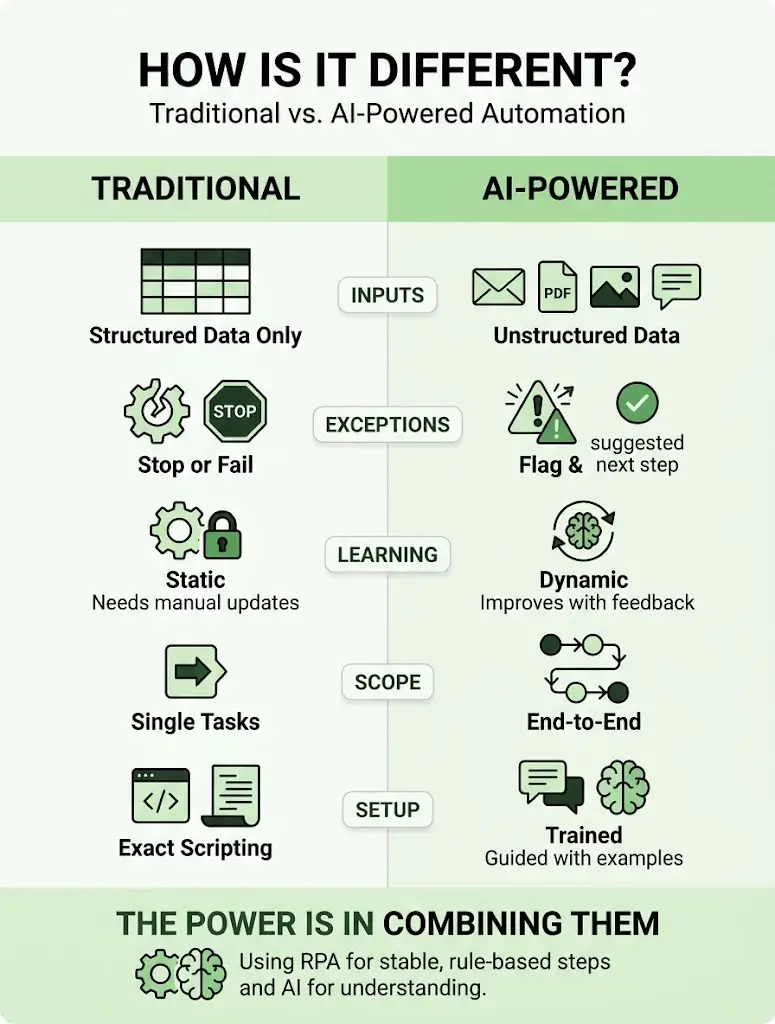
- Inputs: Traditional tools need structured data, while AI-powered systems handle emails, PDFs, images, and speech
- Exceptions: Traditional tools stop or fail, while AI-powered systems flag issues and suggest next steps
- Learning: Traditional tools stay the same until someone edits them, while AI-powered systems improve with feedback
- Scope: Traditional tools handle single steps, while AI-powered systems manage multi-step processes
- Setup: Traditional tools need exact scripting, while AI-powered systems can be guided with examples and plain-language instructions
Neither approach makes the other obsolete. Many companies combine robotic process automation for stable, rule-based steps with AI for the parts that need understanding. Seeing this relationship clearly is central to answering what is AI automation without the hype.
What Can AI Automate?
Almost any process that is repetitive, data-heavy, and guided by patterns is a candidate. Common examples include:
- Customer support: Answering FAQs, tagging and routing tickets, and drafting replies for agents
- Sales: Scoring leads, enriching CRM records, scheduling meetings, and writing follow-ups
- Marketing: Repurposing content, compiling campaign reports, and monitoring keywords and ads
- Finance: Matching invoices, flagging unusual expenses, and preparing monthly summaries
- HR: Screening applications, answering policy questions, and coordinating onboarding
- Operations: Tracking inventory, monitoring supplier deadlines, and routing approvals
- IT: Resetting passwords, categorizing incidents, and checking system health
- Reporting: Pulling numbers from several systems and writing plain-language summaries
- Document processing: Extracting data from invoices, contracts, and forms, then passing it along through robotic process automation
Tasks that rely on empathy, negotiation, strategy, or ethical judgment should stay with people. Any honest answer to what is AI automation today must also admit that capabilities expand every year.
What Are the Benefits?
The advantages of AI business automation fall into several groups:
- Efficiency: Routine work finishes in minutes, and systems run around the clock
- Accuracy: Fewer typos, missed steps, and duplicate entries
- Cost control: Lower cost per task and the ability to grow without hiring at the same pace
- Customer experience: Faster answers, personalized messages, and consistent service
- Employee experience: Less repetitive work and more time for meaningful tasks
- Better decisions: Real-time insights, forecasts, and early warnings
- Scalability: Sudden volume spikes no longer overwhelm the team
- Compliance: Automatic logging creates clear audit trails
These gains explain why more leaders are asking what is AI automation and how fast it pays off.
AI automation can improve productivity, but businesses need to measure its impact to understand whether those improvements are delivering real value. Tracking metrics such as time saved, task completion rates, error reduction, employee output, and operational costs helps organizations evaluate the effectiveness of their automation initiatives. By establishing performance benchmarks and reviewing results regularly, businesses can identify successful implementations, uncover areas for improvement, and make better decisions about scaling AI across their operations.
What Is a Custom AI Portal? 7 Smart Benefits to Know
Businesses looking to implement AI automation can go beyond standalone tools by integrating intelligent capabilities into a custom AI portal. These portals can bring together business information, automated workflows, AI-powered assistance, and access to relevant tools in one centralized environment. As part of a broader AI automation strategy, a custom portal can help employees access information faster, reduce repetitive tasks, and streamline daily operations. The right solution depends on your business requirements, existing systems, security needs, and the processes you want to improve.
Why Is Interest in AI Automation Growing So Fast?
Several forces are converging:
- Cost pressure: Manual processes are expensive and hard to scale
- Accessible tools: Platforms are cheaper, easier to use, and simpler to integrate than ever
- Data growth: Companies collect more information than teams can analyze by hand
- Customer expectations: People expect instant, personalized service at any hour
- Competition: Early adopters gain speed and efficiency advantages
That momentum is why what is AI automation has become a boardroom question rather than just an IT topic.
Examples by Industry
To make what is AI automation tangible, here is how it typically appears in industries Technexia serves:
- Tourism and hospitality: Booking portals, personalized itineraries, multilingual assistants, and demand forecasting
- Real estate: Lead qualification, property matching, automated follow-ups, and listing content
- Education: Admissions workflows, student support assistants, and progress insights
- Transportation and mobility: Quoting and booking portals, dispatch coordination, and customer status updates
- Healthcare and wellness: Appointment scheduling, patient intake, and secure information portals, with strict privacy controls
- Ecommerce and retail: Product recommendations, inventory forecasting, and automated customer service
- Finance: Document checks, expense monitoring, and automated reporting
Across all of them, AI business automation follows the same logic: find the repetitive step, remove it, and give people time back.
What Are the Risks and Limitations?
AI is powerful, but it is not magic. Keep these risks in mind:
- Inaccurate outputs: AI can sound confident while being wrong, so critical work needs review
- Bias: Models trained on skewed data can produce unfair results
- Data privacy: Sensitive information must be protected and access limited
- Over-automation: Removing humans from sensitive decisions can damage trust
- Integration challenges: Older systems may need modernization before they connect smoothly
- Change resistance: Employees may worry about their roles without clear communication
Responsible intelligent automation always includes human review for high-stakes decisions. Part of answering what is AI automation honestly is admitting where it falls short.
How to Get Started With AI Automation
Begin by asking what is AI automation supposed to solve in your business, then work through these steps:
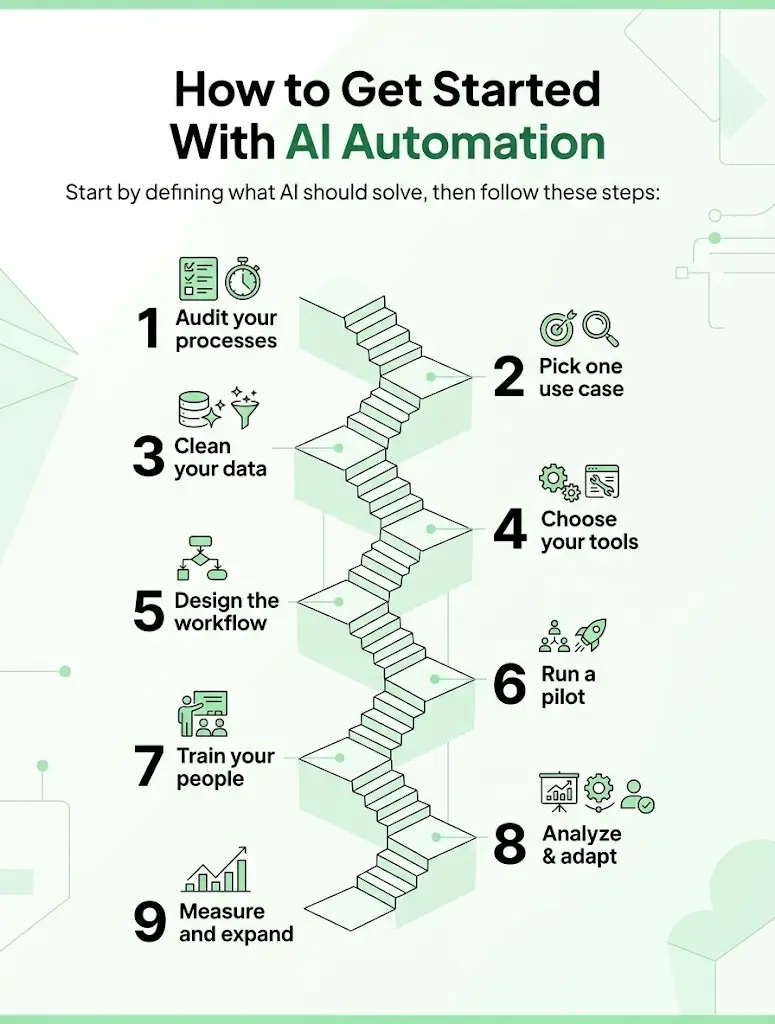
- Audit your processes: List recurring tasks and note how long each takes and how often it happens.
- Pick one use case: Choose something repetitive, frequent, and clearly defined.
- Clean your data: Accurate, organized information is the fuel for every workflow.
- Choose your tools: Compare AI automation tools based on integrations, security, and ease of use.
- Design the workflow: Map each step, decision, and exception, and decide where humans approve.
- Run a pilot: Test with a small team and compare results with your manual baseline.
- Train your people: Show employees how the new system helps them, and invite feedback.
- Measure and expand: Scale what works and retire what does not.
How to Choose the Right Tools and Partners
The market is crowded, so use clear criteria:
- Integrations: Does it connect to your CRM, accounting, and communication tools?
- Security: Look for encryption, role-based access, and audit logs
- Ease of use: Can non-technical staff build and adjust workflows?
- Transparency: Can you see what the system did and why?
- Support: Is there reliable help during setup and beyond?
- Pricing: Understand usage fees, per-user costs, and growth implications
When comparing AI automation tools, run a pilot with your own data rather than relying on polished demos. Any vendor you shortlist should also be able to explain what is AI automation for your specific use case in plain language.
How Do You Measure Success?
Without numbers, results are just impressions. Track:
- Hours saved: (old time per task − new time per task) × number of tasks
- Cost per task: Total cost divided by volume handled
- Error and rework rates: How often outputs need correction
- Cycle time: How long a process takes from start to finish
- Customer satisfaction: Ratings and feedback tied to the automated process
- Adoption: The share of eligible work actually handled by the system
Record a baseline before launch and review results at 30, 90, and 180 days. Tracking these numbers turns what is AI automation from an abstract idea into evidence your leadership team can trust.
Common Myths About AI Automation
Many misunderstandings come from never asking what is AI automation in the first place. Here are the most common:
- Myth: It will replace all jobs. Reality: It mainly removes repetitive tasks and shifts people toward higher-value work.
- Myth: It is only for large enterprises. Reality: Small teams often see quick wins because saved hours represent a bigger share of their capacity.
- Myth: It works perfectly out of the box. Reality: It needs clean data, testing, and ongoing tuning.
- Myth: It is a one-time project. Reality: The best results come from continuous improvement.
- Myth: More automation is always better. Reality: The goal is the right automation, with humans where judgment matters.
Clearing up these myths is part of answering what is AI automation clearly and honestly.
How Technexia Can Help
Technexia is an AI-powered digital innovation partner that integrates strategy, automation, data intelligence, and AI systems into scalable digital ecosystems. If you are still asking what is AI automation for your own business, our team can turn the answer into a working plan. Our Innovation Method moves through six steps: Insight and Discovery, Strategy and Architecture, Experience and Design, Intelligent Development, Performance and Optimization, and Growth and Evolution. Our services include:
- AI & Data: AI portals, automation, data science, intelligent solutions, and smart systems, including AI business automation workflows tailored to your processes
- Development: web and mobile platforms, AI-powered portals, and ecommerce ecosystems built with WordPress, .NET, React, Shopify, and Webflow
- UI/UX Design: prototyping, branding, and experience flows that make new systems simple to adopt
- Digital Growth: SEO, Google Ads, performance marketing, and analytics to turn operational gains into business growth
We also help teams select AI automation tools and blend robotic process automation with intelligent automation where each fits best. Our experience spans tourism and hospitality, real estate, education, transportation, and healthcare. Whether you are exploring what is AI automation or ready to deploy, we can guide you from discovery to launch and beyond.
The Future of AI Automation
The pace of change is not slowing. Watch these developments:
- AI agents: Software that plans and completes multi-step tasks across your tools
- Predictive operations: Forecasts that prevent problems rather than report them
- Conversational interfaces: Asking your data questions in plain language
- Deeper personalization: Experiences tailored to each customer in real time
- Stronger governance: Clearer rules on transparency, privacy, and fairness
Preparing now is easier when intelligent automation is already part of daily work. Teams that build skills and data foundations early will also adopt new AI automation tools faster. Companies that start asking what is AI automation today will have years of learning that latecomers cannot easily match.
Conclusion
Understanding what is AI automation is the first step toward using it well. It is not a single product or a threat to your team. It is a practical way to remove repetitive work, improve accuracy, and free people to focus on what they do best. Start with one process, measure honestly, combine robotic process automation with AI where it makes sense, and expand as results prove themselves. Done well, AI business automation becomes a lasting advantage rather than a passing trend.
Ready to turn the answer to what is AI automation into real results? Contact Technexia today to book a consultation and get a tailored roadmap for your business.
Frequently Asked Questions
How much does it cost to get started?
Costs depend on the tools, integrations, and complexity involved. Many businesses begin with a small pilot to prove value before committing to a larger investment.
Will it replace my employees?
It mainly takes over repetitive tasks, while people focus on judgment, creativity, and relationships. Most companies retrain and redeploy staff rather than reduce headcount.
How long before I see results?
Simple workflows can show improvements within weeks, while larger multi-department projects usually take a few months to reach full impact.
Is my company data safe?
It can be, if you choose vendors with strong security standards, restrict access by role, encrypt sensitive information, and share only the data each system truly needs.
Can it work with the software I already use?
In most cases, yes. Modern platforms connect to common CRMs, accounting tools, and communication apps through integrations and APIs.