
logotype
  • Home
  • About Us
    • Philosophy
    • Evolution
    • Profile
    • News
    • FAQs
    • Privacy
    • Terms
  • Services
  • Portfolio
  • Careers
Get in Touch
logotype
  • Home
  • About Us
    • Philosophy
    • Evolution
    • Profile
    • News
    • FAQs
    • Privacy
    • Terms
  • Services
  • Portfolio
  • Careers
Get in Touch

Menu

  • Home
  • About Us
    • Philosophy
    • Evolution
    • Profile
    • News
    • FAQs
    • Privacy
    • Terms
  • Services
  • Portfolio
  • Careers
  • Home
  • About Us
    • Philosophy
    • Evolution
    • Profile
    • News
    • FAQs
    • Privacy
    • Terms
  • Services
  • Portfolio
  • Careers

Social

  • Facebook
  • Instagram
  • Youtube
  • Tiktok
  • Twitter

Get In Touch

  • hello@technexia.com
Blog listing
HomeBlog listing
AI agent vs. chatbot explained in simple words: what each does, how they differ, and which one your business needs.
AI & Automation
October 23, 2026By Team Technexia

AI Agent vs. Chatbot: 7 Smart Differences to Know

Chatbots and agents are often mentioned together, and many people think they are the same thing. They are not. Knowing the AI agent vs. chatbot difference helps you pick the right tool and avoid wasted budget. A chatbot mostly talks, while an agent can plan and act. This guide explains both in simple words and shows how each fits into your business AI plans.

What Is a Chatbot?

A chatbot is software that talks with people through text or voice. It answers questions, shares information, and guides users through simple steps. Early versions followed scripts and menus. Today, an AI chatbot uses language models to understand free text and reply in a natural way.

Common uses include:

  • Answering frequently asked questions
  • Sharing opening hours, prices, and policies
  • Collecting basic details such as a name and email address
  • Passing the conversation to a human when needed

A chatbot is easy to launch, low in cost, and quick to answer. But it usually stays inside the conversation. It cannot complete tasks across several systems on its own, and it can lose track of context in long requests. Understanding these limits is the first step in the AI agent vs. chatbot comparison.

What Is an AI Agent?

An AI agent is a system that can pursue a goal. It plans steps, uses tools, and takes action with limited human help. Where a chatbot answers, an agent works. AI agents can search, read files, send emails, update records, and check their own results, then try again if something fails. This style of work is often called agentic AI.

Most agents have these parts:

  • A clear goal
  • A plan with steps
  • Access to tools such as email, calendars, or databases
  • Memory of what has already been done
  • A loop that checks results and adjusts

That ability to act is the heart of the AI agent vs. chatbot debate.

Can AI Agents Perform Actions?

Yes, within the limits you set. An agent connects to tools such as calendars, email, customer records, and ticket systems, so it can do real tasks. For example, it can:

  • Book a meeting after checking calendars
  • Refund a small order that fits your policy
  • Update a customer record
  • Draft and send a follow-up email
  • Create a support ticket and assign it

Because AI agents can act, they need clear rules:

  • Limit what the agent is allowed to access
  • Require human approval for big actions
  • Keep logs of everything it does
  • Test the agent before you launch it

This is where agentic AI needs more care than a chatbot, since mistakes can have real effects. In AI agent vs. chatbot decisions, action is the biggest difference.

7 Smart Differences Between an AI Agent and a Chatbot

The AI agent vs. chatbot differences are easiest to see side by side:
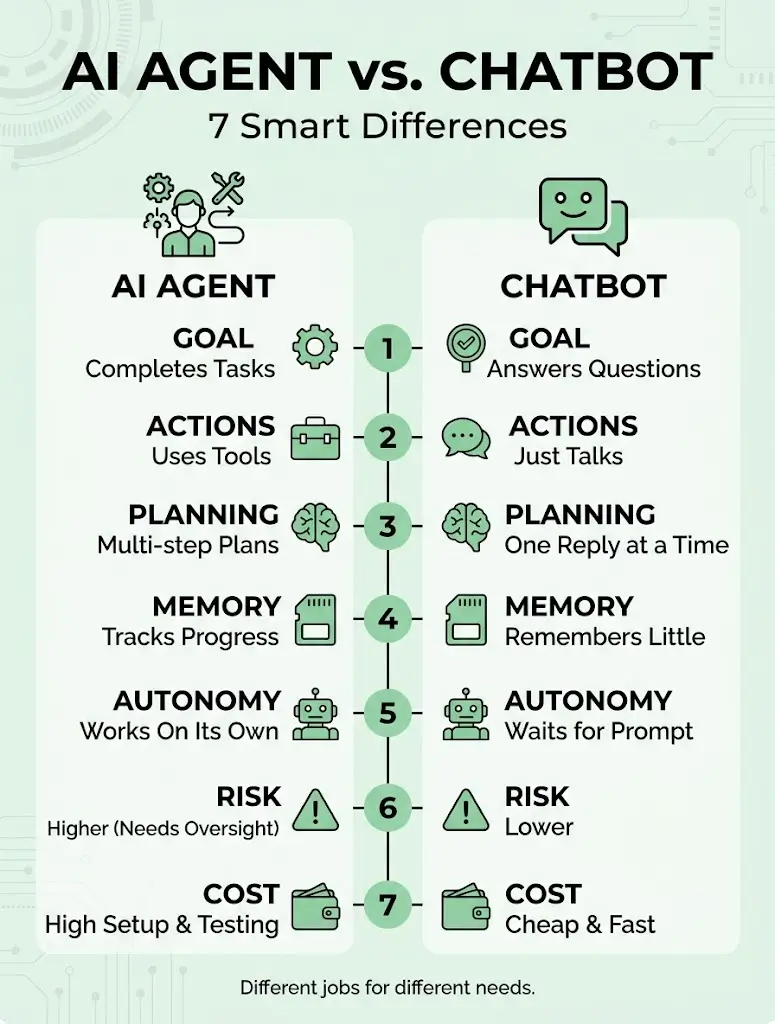
  1. Goal: A chatbot answers questions, while an agent completes tasks.
  2. Actions: A chatbot talks, while an agent uses tools to act.
  3. Planning: A chatbot replies one message at a time, while an agent plans several steps.
  4. Memory: A chatbot often remembers little, while an agent tracks progress toward its goal.
  5. Autonomy: A chatbot waits for each prompt, while an agent can work on its own within limits.
  6. Risk: A chatbot carries lower risk, while an agent needs closer oversight.
  7. Cost and setup: A chatbot is cheaper and faster to launch, while an agent needs more setup and testing.

A good AI chatbot can still be very useful. It simply does a different job.

When Should a Business Use Each?

Choose a chatbot when you need:

  • Quick answers to common questions
  • Simple customer support
  • Lead capture on your website

Choose an agent when you need:

  • Multi-step tasks that follow a goal
  • Work across several systems
  • Relief from repetitive back-office work

Many companies use both. The chatbot talks to the customer, and an agent works behind the scenes to complete the request. Many teams start with a chatbot and add AI agents later as part of a wider business AI plan. The best AI agent vs. chatbot choice depends on the job, not on the hype.

Common Mistakes to Avoid

  • Expecting a chatbot to complete complex tasks
  • Giving an agent too many permissions at once
  • Skipping testing before launch
  • Removing human review from important decisions
  • Starting without a clear goal
  • Ignoring data privacy rules

Most AI agent vs. chatbot problems come from using the wrong tool for the job.

Conclusion

A chatbot talks, and an agent acts. Both have a place, and the right choice depends on your goals, your risk level, and your budget. Start with a simple AI chatbot if you need quick answers, move to agents when you need real task completion, and keep humans in the loop for important steps. A clear view of AI agent vs. chatbot makes your business AI decisions simpler and safer.

Ready to choose the right tool? Contact our team today and get clear, practical guidance for your business.

Frequently Asked Questions

Is the line between an AI agent vs. chatbot always clear?

Not always. Some chat tools can take simple actions, and some agents have a chat window. The key question is whether the tool can plan and act toward a goal.

What is the difference between agentic AI and generative AI?

Generative AI creates content such as text or images. Agentic AI uses that ability, plus tools and planning, to complete tasks.

Is an agent more expensive than a chatbot?

Usually yes, because it needs more setup, testing, and monitoring. It can also save more time when it handles full tasks.

Are agents safe to use with company data?

They can be, if you limit access, keep logs, and follow your data protection rules. Always require approval for sensitive actions.

Can a chatbot be upgraded into an agent?

Often yes. You can connect a chatbot to tools and give it goals and rules, but you should test carefully before you let it act.

Read More
What is a custom AI portal? Learn how it works, how it differs from ChatGPT, and what your team can do inside one.
AI & Automation
October 22, 2026By Team Technexia

What Is a Custom AI Portal? 7 Smart Benefits to Know

Many companies start with public AI tools, but they soon face questions about privacy, control, and fit. That is why more teams ask what is a custom AI portal. In simple terms, it is a private web space built for your company, where employees use AI with your data and your rules. In this guide, you will learn how it works, how it differs from ChatGPT, and what your team can do inside one. We also cover how AI portal development usually works.

What Is an AI Portal?

An AI portal is a single, secure place where people access AI tools. A business AI portal is built for one company, with logins, roles, and rules that match how that company works. It connects AI to company knowledge such as documents, policies, and systems.

So, what is a custom AI portal? It is a version designed around your processes, your data, and your brand, rather than a generic tool. Typical parts include:

  • Login and user roles
  • An AI chat window and task tools
  • Connections to company documents and systems
  • Admin controls and settings
  • Usage logs and reports

How Is a Custom AI Portal Different From ChatGPT?

ChatGPT is a general public tool. It is powerful, but it is not built around your company. A custom portal can provide a secure AI workspace where AI works with your data and follows your rules.

Here are the main differences:

  • Data: A public tool starts with general knowledge, while a portal can connect to approved company documents
  • Control: A portal offers admin roles, access rules, and activity logs
  • Branding: A portal can carry your own name, design, and tone
  • Workflows: A portal can link to your processes and approval steps
  • Privacy: A portal can be set up to meet your data policies, but always check the terms of every provider involved

ChatGPT can still be useful, and many teams use both. Understanding what is a custom AI portal helps you see where each one fits.

What Can Employees Do Inside One?

Inside a portal, an internal AI assistant helps staff do daily work faster. Employees can:

  • Ask questions about policies, products, and procedures
  • Draft emails, reports, and proposals
  • Summarize long documents and meeting notes
  • Search across company knowledge in one place
  • Prepare data and fill in forms
  • Start approved workflows, such as support tickets or requests

Access depends on role, so people see only what they are allowed to see. This is the daily value behind what is a custom AI portal.

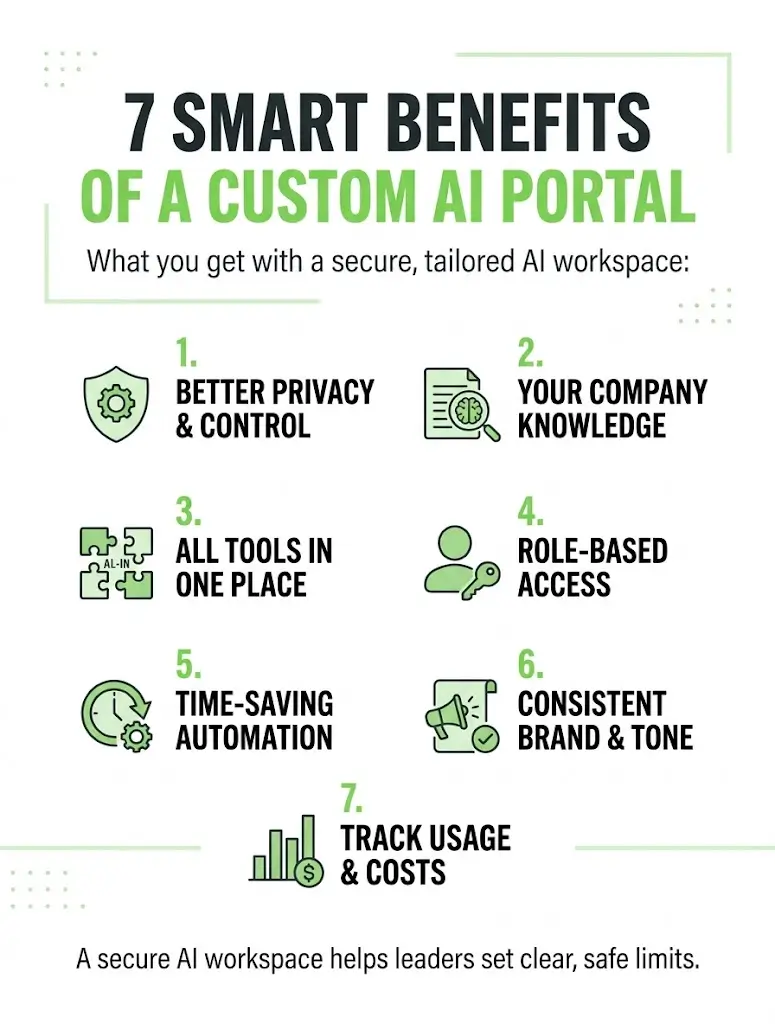
7 Smart Benefits of a Custom AI Portal

Teams that ask what is a custom AI portal usually want these benefits:

  1. Better privacy and control over how AI is used
  2. Answers based on your company knowledge, not only general information
  3. One place for many tools, so staff do not switch between apps
  4. Role-based access, so each person sees the right information
  5. Time savings on repeated work such as drafts and summaries
  6. Consistent brand and tone across everything the team writes
  7. Usage tracking and cost control, since a business AI portal gives managers one place to see how AI is used

A secure AI workspace also helps leaders set clear limits on what AI can and cannot do.

How a Custom Portal Is Built

AI portal development usually follows clear stages:

  • Define the goals and the users
  • List the data sources the portal should use
  • Choose the AI model and tools
  • Design access rules and security
  • Build the portal and connect it to your systems
  • Test with a small group
  • Launch, train staff, and improve over time

Before you start, decide what a custom AI portal for your company is: its goals, its users, and its limits. A good internal AI assistant is set up to use only approved sources and to show where its answers come from.

Common Mistakes to Avoid

  • Starting without a clear use case
  • Connecting messy or outdated data
  • Skipping access rules and permissions
  • Removing human review for important decisions
  • Forgetting to train staff
  • Trying to build everything at once

A business AI portal works best when it starts with one or two use cases and grows from there. Most teams that struggle with what is a custom AI portal skip the planning stage.

Conclusion

A custom AI portal gives your team a private, controlled place to use AI with company knowledge. It is not a replacement for every public tool, but it adds privacy, structure, and fit. Start small, set clear rules, and choose a partner for AI portal development who understands your goals. Then your internal AI assistant can save time every day. So, what is a custom AI portal? It is AI made to fit your business.

Ready to explore a portal for your team? Contact our team today and get a clear, practical plan for your business.

Frequently Asked Questions

Is a custom AI portal the same as a chatbot?

No. A chatbot is mainly a chat window. A portal is a wider workspace with logins, roles, tools, and connections to company data.

Does a portal replace ChatGPT?

Not always. Many people ask what is a custom AI portal and whether it replaces public tools. Many teams keep using both, and use the portal for work that needs company data and control.

Is a custom portal more private?

It can be, when it is set up with the right access rules and data policies. A secure AI workspace still depends on good setup and trusted providers, so review the terms carefully.

How long does it take to build one?

It depends on the scope, the data, and the number of tools involved. A small pilot is usually faster than a full rollout.

Can it connect to our existing tools?

Often yes. Portals can connect to documents, email, customer records, and other systems, depending on what those tools allow.

Read More
Wondering when to migrate to headless commerce? Learn the key signs, performance gains, and costs before you make the move.
AI & Automation
October 19, 2026By Team Technexia

When to Migrate to Headless Commerce: 7 Proven Signs

Online stores usually start on an all-in-one platform, and that works well for a long time. But as traffic, product ranges, and marketing ambitions grow, the platform can start to feel like a ceiling. Knowing when to migrate to headless commerce helps you move at the right moment, neither too early, which wastes budget, nor too late, which costs you sales. This guide explains what headless means, the signs it’s time, how it affects performance, what it costs, and how to plan the move.

What Is Headless Commerce?

Headless commerce separates the front end, which is what customers see, from the back end, which handles products, pricing, checkout logic, and orders. The two communicate through APIs, so you can change one without disturbing the other. Here is how the pieces fit together:

  • Front end: The website, mobile app, kiosk, or any other place customers shop
  • Back end: The product catalog, inventory, payments, and order management
  • API layer: The connection that delivers data between front end and back end
  • Content system: A separate CMS that manages pages, banners, and editorial content

In a traditional platform, these parts are bundled together. In a headless setup, they are independent. Understanding that difference is the first step in deciding when to migrate to headless commerce.

Traditional vs Headless: A Quick Comparison

  • Design freedom: Traditional stores rely on templates, while headless stores allow fully custom experiences
  • Channels: Traditional platforms focus on the website, while headless supports apps, social, and in-store screens from one back end
  • Speed to launch: Traditional is faster, while headless takes longer to build
  • Maintenance: Traditional is simpler, while headless means more components to manage
  • Cost: Traditional is lower upfront, while headless needs a higher initial investment
  • Flexibility: Traditional is limited by the platform, while headless lets you swap tools freely

When Should You Migrate?

The decision rarely hinges on one factor. These signs suggest it’s time to seriously consider when to migrate to headless commerce:

  • You sell across several channels and struggle to keep experiences consistent
  • Template limits stop your designers from building what they imagine
  • Pages remain slow even after repeated optimization
  • Stacked apps and plugins slow the site and create conflicts
  • You need personalized content and offers for different customer groups
  • International expansion demands different languages, currencies, and layouts
  • Every front-end change requires developer involvement
  • Complex integrations with ERPs, loyalty tools, or custom systems keep breaking

Staying on your current platform is perfectly reasonable when:

  • Your catalog and checkout are straightforward
  • You sell mainly through one website
  • Your team is small, with limited development resources
  • Budget is tight, and speed to market matters most

How Headless Storefronts Are Built

Many teams build the front end with React, and a React ecommerce storefront is one of the most popular headless approaches. Using frameworks built on React, developers can create fast, interactive shopping experiences with reusable components. A typical setup includes:

  • A React-based front end for product pages, search, and checkout
  • A commerce back end that manages catalog, pricing, and orders
  • A headless CMS for content editors
  • Third-party services for payments, search, and email
  • A content delivery network to serve pages quickly worldwide

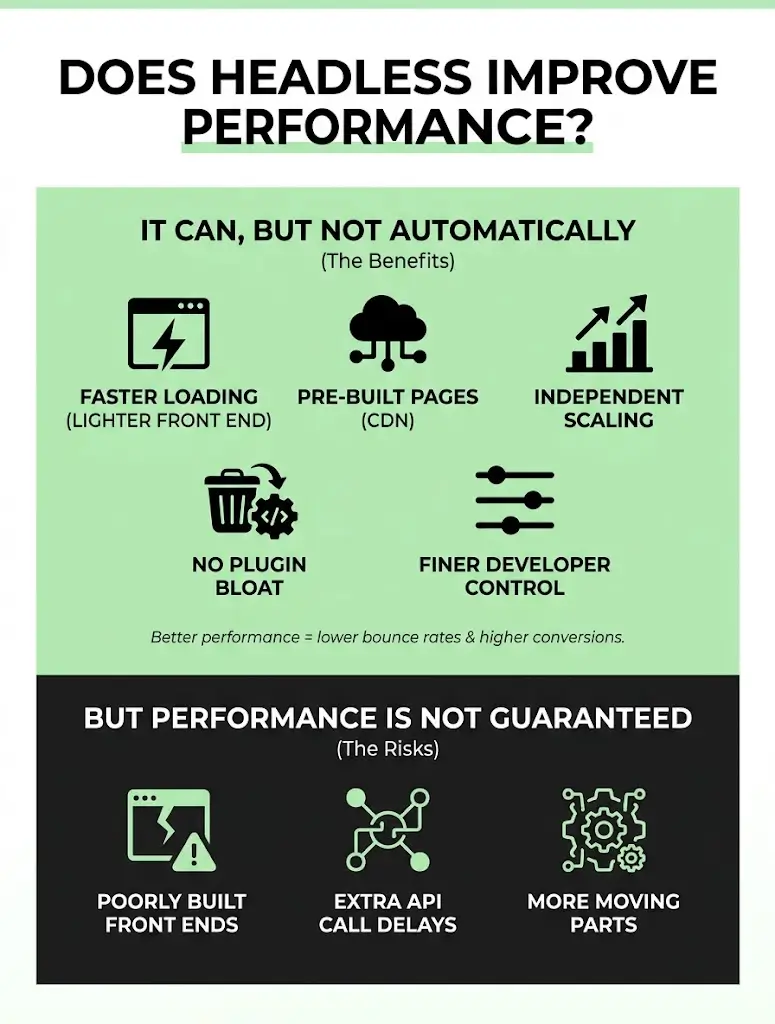
Does Headless Improve Performance?

It can, but not automatically. When built well, headless architecture helps in several ways:

  • Lighter front ends load faster than template-heavy pages
  • Pages can be pre-built and served from a content delivery network
  • Front end and back end scale independently during traffic spikes
  • Unused scripts and plugin bloat can be removed
  • Developers have finer control over images, fonts, and loading order

Better storefront performance often means lower bounce rates and higher conversion, which is why speed is one of the most measurable benefits. However, performance is not guaranteed:

  • Poorly built front ends can be slower than the platform they replaced
  • Extra API calls can add delay without proper caching
  • More moving parts require careful monitoring

Performance alone is rarely the only reason for when to migrate to headless commerce, but it is often the easiest benefit to prove.

What Are the Main Benefits?

  • Creative freedom: Design any experience without template restrictions
  • Omnichannel selling: Serve web, mobile apps, and in-store displays from one system
  • Faster iteration: Front-end teams can ship changes without touching the back end
  • Best-of-breed tools: Choose the best search, payments, and content tools for your needs
  • Future flexibility: Replace one component without rebuilding everything

Many companies pair this approach with composable commerce, where each function, such as search, checkout, or content, is a separate, replaceable service. It gives you maximum flexibility, but it also requires stronger technical planning.

What Are the Costs and Trade-offs?

Headless is an investment, and it comes with real trade-offs:

  • Higher upfront cost: Custom front-end development takes more time and budget
  • More moving parts: Several services must work together reliably
  • Ongoing maintenance: Updates, monitoring, and security span multiple systems
  • Skill requirements: You need developers comfortable with APIs and modern front-end frameworks
  • Lost conveniences: Some built-in previews, themes, and one-click apps may no longer apply

Weigh these costs against your growth plans and revenue upside when deciding when to migrate to headless commerce.

How to Plan Your Migration

A phased plan reduces risk and downtime:

  1. Audit your current store: List apps, integrations, traffic sources, and pain points.
  2. Define goals: Choose measurable targets such as page speed, conversion rate, or new channels.
  3. Select your stack: Decide on the front-end framework, commerce back end, and CMS.
  4. Design the experience: Prototype key pages before development begins.
  5. Migrate in phases: Start with one section, such as the homepage or product pages, then expand.
  6. Protect SEO: Map redirects, preserve metadata, and monitor rankings closely.
  7. Test thoroughly: Check speed, checkout, mobile behavior, and integrations.
  8. Launch and optimize: Track results against your baseline and refine continuously.

A clear plan turns when to migrate to headless commerce into a business decision rather than a technical gamble.

Common Mistakes to Avoid

  • Going headless because it is trendy rather than necessary
  • Underestimating ongoing maintenance and hosting costs
  • Neglecting SEO during the migration
  • Rebuilding everything at once instead of phasing the move
  • Skipping training for content and marketing teams
  • Forgetting to set performance and conversion baselines

How Technexia Can Help

Technexia is an AI-powered digital innovation partner that combines strategy, automation, data intelligence, and AI systems to build scalable digital ecosystems. Our services support every stage of your ecommerce evolution:

  • AI & Data: AI portals, automation, data science, intelligent solutions, and smart systems for personalization, recommendations, and demand insights
  • Development: web and mobile platforms and ecommerce ecosystems built with WordPress, .NET, React, Shopify, and Webflow, including React ecommerce storefronts and composable commerce architectures
  • UI/UX Design: prototyping, branding, and experience flows that turn browsers into buyers and improve storefront performance
  • Digital Growth: SEO, Google Ads, performance marketing, and analytics to protect rankings and grow revenue through the transition

We work across tourism and hospitality, real estate, education, transportation, and healthcare, as well as retail brands, helping each business understand when to migrate to headless commerce and how to do it safely.

Conclusion

Headless architecture is powerful, but it is not for everyone. If your store is hitting design limits, struggling with speed, selling across multiple channels, or fighting integration problems, it may be time to look closer. If your needs are simple, your current platform may serve you well for years. Evaluate your goals, budget, and team honestly, and phase the move carefully to understand when to migrate to headless commerce for your business.

Ready to find out if your store is ready? Contact Technexia today to book a consultation and get a tailored ecommerce roadmap built around your growth goals.

Frequently Asked Questions

Can I go headless gradually instead of all at once?

Yes. Many stores start by rebuilding a single section, such as product pages or the homepage, and expand once results are proven.

Will going headless hurt my SEO rankings?

It can if redirects, metadata, and page structure are not handled carefully. With proper planning, rankings can be preserved or even improved.

Is headless only for large enterprise brands?

No. Mid-sized stores with complex needs can benefit too, though smaller stores with simple requirements often do better on a traditional platform.

How long does a typical migration take?

Timelines vary by scope. A focused phase can take a few weeks, while a full rebuild commonly takes a few months.

What skills does my team need after launch?

You’ll need people comfortable with APIs and modern front-end development, or a development partner who can provide ongoing support and updates.

Read More
Learn how to measure AI productivity gains with the right KPIs, time-saving formulas, and quality checks that matter.
AI & Automation
October 17, 2026By Team Technexia

Measure AI Productivity Gains: 6 Winning Metrics

Rolling out automation is only half the job. The other half is proving it worked. Many businesses launch AI tools, feel like things are faster, and stop there, without ever confirming the impact with real numbers. If you want to measure AI productivity gains properly, you need a baseline, the right metrics, and a habit of checking results on a schedule. This guide walks through exactly how to do that.

Why Measurement Matters More Than the Rollout

Automation projects are easy to start and easy to overstate. Without clear numbers, “this saves us time” is just an impression, not a fact. Measuring results protects your budget, guides future investment, and gives your team credit for real improvements. It also reveals when a tool is underperforming, so you can fix it before it quietly becomes a sunk cost.

Which KPIs Should Businesses Track?

Not every metric matters equally. Focus on a short list that connects directly to business outcomes. Common automation KPIs include:

  • Time saved per task: The difference between old and new completion times
  • Cost per task or ticket: Total cost divided by volume handled
  • Error rate: How often the automated process needs correction
  • Cycle time: How long a full process takes from start to finish
  • Throughput: How many tasks or requests are completed per day or week
  • Adoption rate: The share of eligible tasks actually being automated
  • Customer satisfaction: Ratings or feedback tied to the automated process
  • Employee satisfaction: How staff feel about the tools they now use

Choosing two or three primary KPIs per project keeps reporting focused. Too many metrics make it hard to see what is actually changing, which defeats the purpose of trying to measure AI productivity gains in the first place.

How Do You Measure Employee Time Saved?

Time savings are usually the easiest and most convincing number to report. Follow these steps:

  1. Record the baseline: Time the manual process across a representative sample, not just one fast attempt.
  2. Time the new process: Measure the same task after automation, including any review steps.
  3. Calculate the difference: Subtract new time from old time per task.
  4. Multiply by volume: Multiply the time saved per task by how often it happens weekly or monthly.
  5. Convert to cost: Multiply total hours saved by the average hourly cost of the people involved.

A simple formula: Hours Saved = (Old Time per Task − New Time per Task) × Number of Tasks.

Be careful not to double-count. If automation removed a task entirely, count the full time. If it only sped up part of a task, count just that portion. This level of care is essential if you want to measure AI productivity gains in a way leadership will trust.

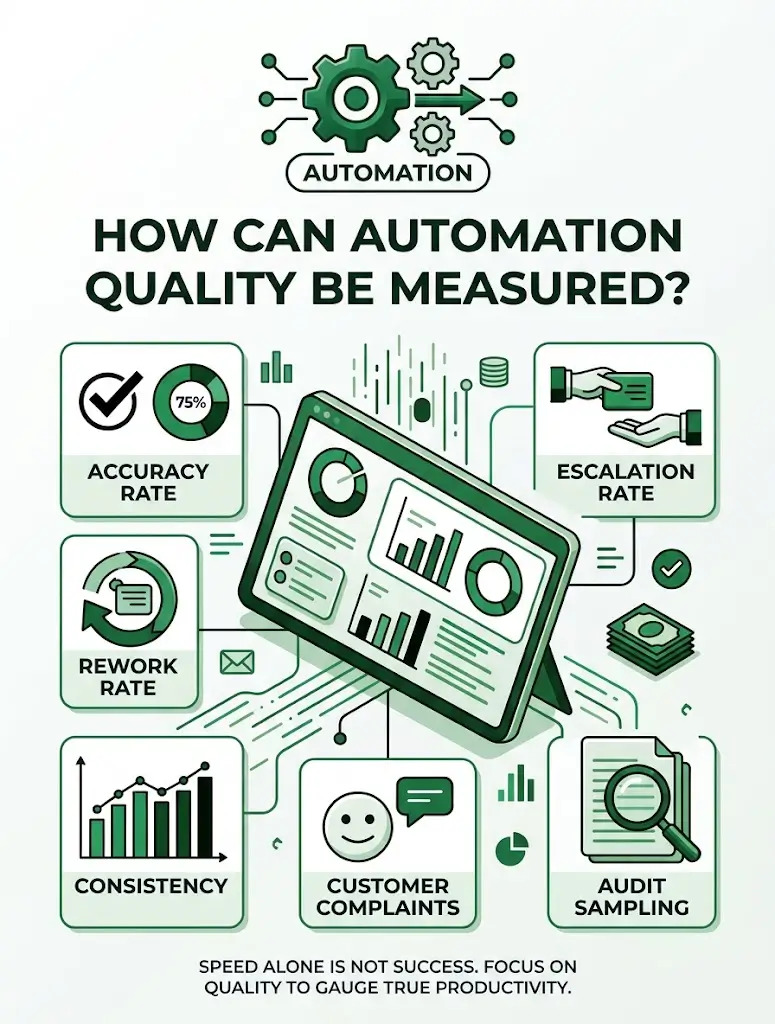
How Can Automation Quality Be Measured?

Speed alone is not success if quality drops. Automation quality can be tracked through:

  • Accuracy rate: The percentage of outputs that are correct without human correction
  • Escalation rate: How often a task still needs a human to step in
  • Rework rate: How frequently completed tasks must be redone
  • Consistency: Whether similar cases produce similar results
  • Customer complaints: Any rise in issues tied to the automated process
  • Audit sampling: Regularly checking a random set of outputs by hand

A tool that is fast but frequently wrong can cost more in cleanup than it saves in time. Quality checks are what make it possible to measure AI productivity gains honestly, rather than just celebrating speed.

Building a Simple Measurement Framework

A repeatable framework keeps every project consistent. Use this structure:

  • Set a goal: Define what success looks like before launch
  • Choose your metrics: Pick two or three KPIs tied directly to that goal
  • Record a baseline: Capture current performance before automation begins
  • Set review checkpoints: Plan check-ins at 30, 90, and 180 days
  • Report in plain language: Translate numbers into time, cost, and customer impact
  • Adjust based on findings: Fix what is underperforming instead of ignoring it

This structure works whether you are reviewing one workflow or an entire department, and it turns “we think it’s working” into evidence.

Using AI Productivity Metrics to Guide Decisions

Good AI productivity metrics do more than report the past. They guide what to automate next. Use your results to:

  • Identify which processes delivered the strongest returns
  • Spot workflows where automation underperformed and needs adjusting
  • Decide where to expand automation based on proven success
  • Justify budget for new tools with real, documented outcomes
  • Compare vendors or platforms using consistent, apples-to-apples data

Reviewing AI productivity metrics regularly, not just once after launch, is what separates a one-time project from an ongoing improvement habit.

Common Mistakes When Measuring Productivity

  • Skipping the baseline and comparing against guesses instead of real numbers
  • Tracking too many metrics, which buries the ones that matter
  • Ignoring quality while focusing only on speed
  • Measuring too early, before results have stabilized
  • Never revisiting numbers after the initial launch report

Avoiding these mistakes is essential if you want to measure AI productivity gains with confidence your team can act on.

How Technexia Can Help

Technexia is an AI-powered digital innovation partner that combines strategy, automation, data intelligence, and AI systems to build scalable digital ecosystems. Proving results is part of how we work, and our services support every stage:

  • AI & Data: AI portals, automation, data science, intelligent solutions, and smart systems built with reporting and metrics in mind from day one
  • Development: web and mobile platforms, ecommerce builds, and integrations using WordPress, .NET, React, Shopify, and Webflow
  • UI/UX Design: dashboards and interfaces that make performance data easy to read and act on
  • Digital Growth: SEO, Google Ads, performance marketing, and analytics to connect operational gains to business growth

We work across industries including tourism and hospitality, real estate, education, transportation, and healthcare, helping teams set up the right automation KPIs before a project even launches, so results are clear from the start.

Conclusion

Automation only proves its worth when you can measure it. Set a baseline, choose a small set of meaningful KPIs, track both speed and quality, and review your numbers on a regular schedule. When you consistently measure AI productivity gains this way, you turn a one-time project into evidence that supports every future investment.

Ready to prove the value of your automation? Contact Technexia today to set up the right AI productivity metrics for your business and get a tailored measurement plan.

Frequently Asked Questions

How soon after launch should results be measured?

Early numbers can be noisy, so an initial check at 30 days is useful, but a more reliable picture usually forms by the 90-day mark.

What if the numbers show automation isn’t helping?

That is valuable information. It points to where the process needs adjusting, whether that means better data, revised rules, or additional training.

Should every automated task be measured individually?

Not necessarily. Group similar tasks and track them together, then measure standout or high-cost processes individually for a clearer picture.

How do I present these results to leadership?

Translate technical metrics into business terms such as hours saved, cost avoided, and customer impact, since those numbers are easiest for decision-makers to act on.

Can measurement itself become too time-consuming?

It can, if tracked manually. Automating the reporting process itself, through dashboards or scheduled summaries, keeps measurement lightweight and sustainable.

Read More
See how AI automation business results show up in daily operations: tasks that vanish, time saved, and how to measure them.
AI & Automation
October 9, 2026By Team Technexia

AI Automation Business Results: 9 Amazing Changes

Ask any operations manager what a typical Monday looks like, and you will hear about inboxes, spreadsheets, approvals, and follow-ups. Now imagine the same day with much of that work handled automatically. That contrast is where AI automation business results become visible: fewer delays, fewer errors, and more time for work that matters. This guide compares daily operations before and after automation, shows which tasks disappear, and explains how to measure the gains.

What Changes After Automation?

The biggest change is not speed alone. It is how work flows. AI workflow transformation replaces stop-and-start handoffs with connected processes that move on their own. Here is the before-and-after picture:

  • Data entry: Retyped by hand → captured automatically from forms, emails, and invoices
  • Approvals: Chased through email → routed instantly with automatic reminders
  • Reporting: Built each week manually → generated and refreshed on a schedule
  • Customer replies: Written from scratch → drafted by AI and reviewed by staff
  • Scheduling: Endless back-and-forth → booked automatically based on availability
  • Follow-ups: Forgotten when busy → triggered at exactly the right time

Teams also notice cultural shifts: less firefighting, clearer ownership, and more time for planning. These changes explain why AI automation business results often go beyond simple time savings.

A Day in the Life: Before vs After

The difference is easiest to see across a single workday.

Before automation

  • 8:30 a.m. sorting emails and tagging requests by hand
  • 10:00 a.m. copying data from one system into another
  • 1:00 p.m. compiling a status report from three spreadsheets
  • 4:00 p.m. chasing colleagues for overdue approvals

After automation

  • Requests arrive already sorted, prioritized, and assigned
  • Systems sync data in the background
  • Reports appear ready, with a short AI-written summary
  • Approvals move forward with automatic nudges

The workday does not get shorter because people work faster. It gets lighter because software handles the routine parts. This shift is the practical face of AI automation business results.

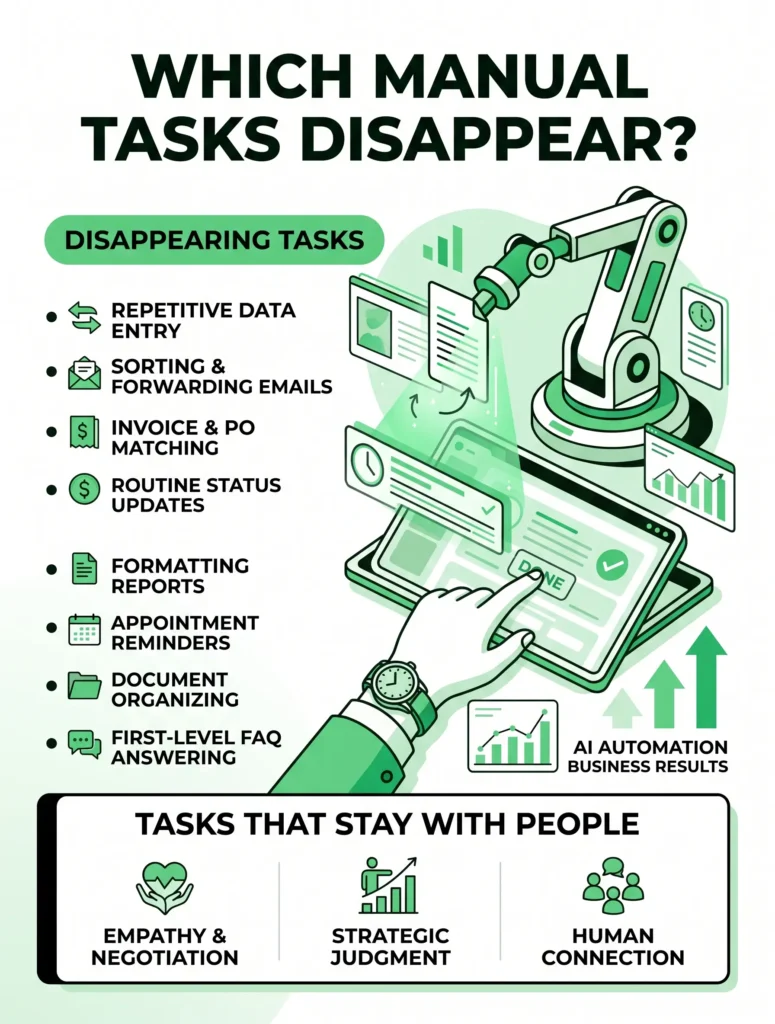
Which Manual Tasks Disappear?

Repetitive work is the first to go. Well-designed business process automation removes tasks that follow clear patterns, including:

  • Copy-and-paste data entry between tools
  • Sorting, tagging, and forwarding emails
  • Matching invoices to purchase orders
  • Sending routine status updates
  • Formatting weekly and monthly reports
  • Appointment confirmations and reminders
  • Naming, filing, and organizing documents
  • Answering first-level FAQs from customers and employees
See how AI automation business results show up in daily operations: tasks that vanish, time saved, and how to measure them.

This is manual task automation at its most useful. Some tasks vanish completely, while others turn into short review steps where a person checks the AI‘s work. Tasks that need empathy, negotiation, or strategic judgment stay with people. Removing repetitive work is where AI automation business results start to appear in daily numbers.

How Can Businesses Measure Time Savings?

Without measurement, improvement is just a feeling. To track operational efficiency and time savings, follow these steps:

  1. Record a baseline: Before automating, note how long each task takes, how often it happens, and how many people are involved.
  2. Track the same metrics after launch: Use identical definitions so the comparison is fair.
  3. Calculate hours saved: Use this formula: (old minutes − new minutes) × number of tasks.
  4. Convert time into money: Multiply hours saved by the average hourly cost of the team.
  5. Add quality measures: Track error rates, rework, and customer complaints alongside speed.
  6. Review at 30, 60, and 90 days: Early figures can be misleading, so look for steady trends.

Useful metrics to watch include:

  • Cycle time from request to completion
  • Average response or turnaround time
  • Tasks handled per employee
  • Error and rework rates
  • Size of the backlog

Sharing these numbers helps leaders see AI automation business results in concrete terms instead of vague promises.

What Other Benefits Show Up Beyond Time?

Time is only one part of the story. Companies often report:

  • Higher accuracy: Fewer typos, missed steps, and duplicate entries
  • Faster customer service: Shorter waits and more consistent answers
  • Better employee experience: Less boredom, less burnout, more meaningful work
  • Improved visibility: Real-time dashboards replace outdated reports
  • Easier scaling: Volume grows without a matching rise in workload

How to Get Started

You do not need to automate everything at once. A simple path looks like this:

  • Pick one process: Choose something repetitive, frequent, and clearly defined
  • Map every step: Write down who does what, using which tools
  • Check your data: Clean and organize the information the process depends on
  • Choose the right tools: Look for platforms that integrate with your existing software
  • Set guardrails: Decide where a human must review or approve
  • Run a pilot: Test with a small team and compare against your baseline
  • Expand gradually: Apply what you learn to the next process

Starting with one focused project inside your wider business process automation plan keeps risk low. Small pilots make AI automation business results easier to prove before you scale.

Common Mistakes to Avoid

  • Automating a broken process instead of fixing it first
  • Skipping the baseline, which makes success impossible to prove
  • Removing human review from high-stakes decisions
  • Ignoring employee training and communication
  • Choosing tools that do not connect to your existing systems

How Technexia Can Help

Technexia is an AI-powered digital innovation partner that integrates strategy, automation, data intelligence, and AI systems to build scalable digital ecosystems. Our services support every stage of your automation journey:

  • AI & Data: AI portals, automation, data science, intelligent solutions, and smart systems that connect your tools and remove repetitive work
  • Development: web and mobile platforms, ecommerce builds, and integrations using WordPress, .NET, React, Shopify, and Webflow
  • UI/UX Design: intuitive dashboards, portals, and experience flows that make new systems easy to adopt
  • Digital Growth: SEO, Google Ads, performance marketing, and analytics to measure impact on revenue

We work with industries including tourism and hospitality, real estate, education, transportation, and healthcare. Whether you need to improve a single workflow or transform AI workflows across departments, our team can design a solution around your goals and help you achieve reliable AI automation results.

Conclusion

Automation changes daily operations by removing routine work, connecting systems, and giving people time back. Start with one process, measure the baseline, and track manual task automation gains alongside quality and customer impact. Over time, steady improvements in operational efficiency add up to a business that runs faster and more smoothly.

Ready to see what automation can do for your team? Contact Technexia today to book a consultation and get a tailored plan for achieving real AI automation business results.

Frequently Asked Questions

Is automation only suitable for large companies?

No. Small teams often benefit quickly, because even a few hours saved each week represents a large share of their capacity.

What happens to employees whose tasks are automated?

Most move into analysis, customer relationships, and creative work. Training and open communication make this transition smoother.

How soon can a business expect results?

Simple workflows can show improvement within weeks. Larger, multi-department projects usually take a few months to reach full impact.

Can AI tools work with the software I already use?

In most cases, yes. Modern platforms connect to common CRMs, accounting tools, and communication apps through integrations or APIs.

How do I keep AI outputs accurate?

Use clean data, define clear rules, add human review for important steps, and monitor results regularly so errors are caught and corrected early.

Read More
Learn how to automate business reporting with AI to save hours, spot trends faster, and make confident decisions with accurate data.
AI & Automation
October 7, 2026By Team Technexia

Automate Business Reporting With AI: 7 Proven Ways

Every week, teams lose hours copying numbers between spreadsheets, formatting slides, and chasing colleagues for updates. If you want to automate business reporting with AI, you can hand that routine work to software and spend your time on decisions instead. Done right, reports arrive on schedule, numbers stay consistent, and insights surface without anyone digging through raw data.

This guide explains what AI can do, how to set it up, and how to keep the results accurate.

Why Businesses Should Automate Business Reporting With AI

Manual reporting is slow and easy to get wrong. AI reporting automation connects your data sources, processes the numbers, and delivers finished reports without repetitive effort. The main benefits include:

  • Time savings: Hours of weekly copy-paste work disappear
  • Fewer human errors: Formulas and data pulls run the same way every time
  • Faster insights: Trends and problems show up as soon as the data updates
  • Consistency: Every team works from the same metrics and definitions
  • Scalability: Adding a new region, product, or client doesn’t mean building a new report by hand
  • Better decisions: Leaders get clear summaries instead of overwhelming tables

Can AI Generate Business Reports?

Yes. Modern AI tools can pull data from multiple systems, calculate key metrics, and write a readable narrative around the results. Automated data analysis goes beyond simple number crunching, because AI can compare periods, detect patterns, and explain what changed. Common reports AI can produce include:

  • Weekly and monthly sales performance summaries
  • Marketing campaign and channel reports
  • Financial snapshots and expense breakdowns
  • Customer support and satisfaction reports
  • Inventory and operations updates
  • Executive briefings that condense many reports into one page

This is why more teams choose to automate business reporting with AI rather than rebuild the same documents every month.

How to Automate Business Reporting With AI: Step by Step

A structured approach prevents messy results. Follow these steps:

  1. Define the goal and audience: Decide who reads the report, what decisions it supports, and which metrics matter most.
  2. List your data sources: Include your CRM, accounting software, ad platforms, website analytics, and spreadsheets.
  3. Clean and standardize the data: Fix duplicates, inconsistent names, and missing values before automating anything.
  4. Choose your tools: You will typically need a data warehouse or connector, a BI or dashboard tool, an AI model for summaries, and a scheduler.
  5. Build templates and logic: Set up the layout, calculations, and rules for how the AI should describe results.
  6. Schedule and distribute: Send reports by email, Slack, or a shared portal at the right time for each audience.
  7. Review and refine: Collect feedback and adjust the templates as your business changes.

How Can AI Summarize Dashboards?

Dashboards are powerful but can be hard to read at a glance. AI can turn charts and KPIs into short, plain-language explanations. It can:

  • Read the key numbers and describe the story they tell
  • Highlight unusual spikes or drops and flag possible causes
  • Compare the current period to the previous one or to targets
  • Answer natural-language questions such as “why did revenue dip last week?”
  • Suggest follow-up actions based on the trends

To get useful summaries, give the AI context: metric definitions, target values, and the audience it is writing for. Summaries are a quick entry point if you want to automate business reporting with AI without rebuilding your existing dashboards.

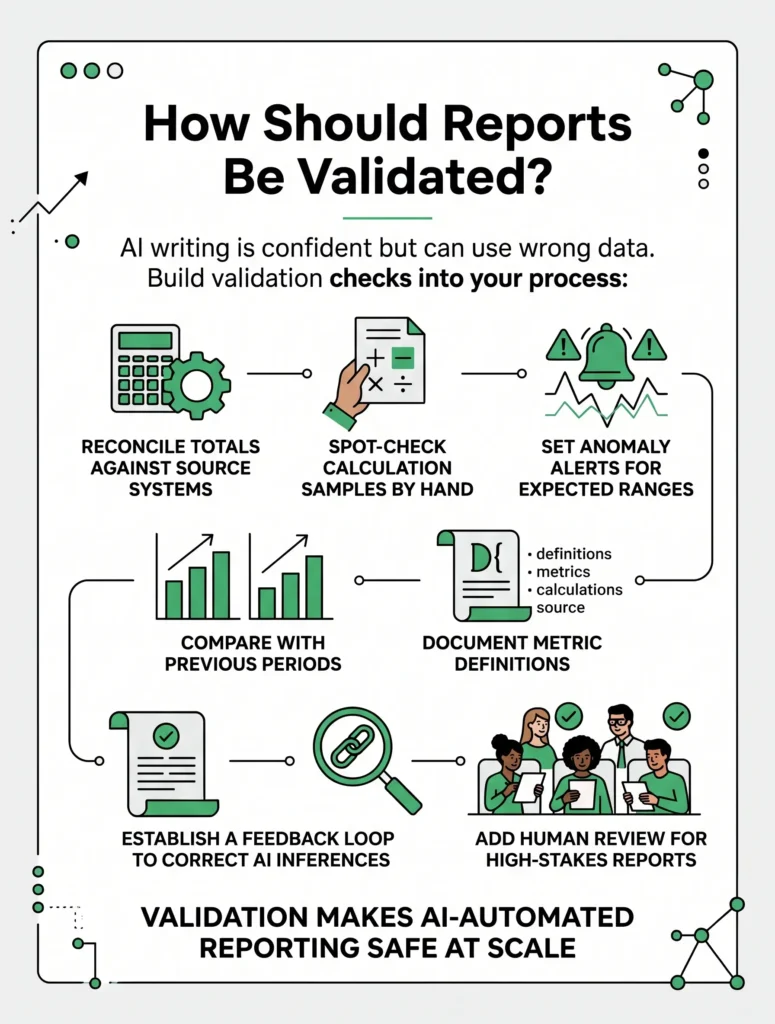
How Should Reports Be Validated?

AI can write confidently even when the underlying data is wrong, so validation isn’t optional. Build these checks into your process:

  • Reconcile totals against the source systems
  • Spot-check samples of calculations by hand each cycle
  • Set anomaly alerts for numbers that fall outside expected ranges
  • Compare with previous periods to catch sudden, unexplained changes
  • Document metric definitions so “revenue” or “active user” means the same thing everywhere
  • Keep an audit trail showing where each figure came from
  • Add human review for board reports, financial statements, and other high-stakes documents

Validation is what makes it safe to automate business reporting with AI at scale.

Which Reports Should You Automate First?

Start where the payoff is highest, and the risk is lowest. Good candidates are reports that are:

  • Recurring, such as weekly or monthly updates
  • Based on structured data from reliable systems
  • Time-consuming to build by hand
  • Read by many people, so a small improvement is multiplied

Leave one-off strategic analyses and sensitive documents for later, once your process is proven.

Common Mistakes to Avoid

  • Feeding messy, inconsistent data into the system
  • Skipping metric definitions, which leads to conflicting numbers
  • Trusting automated data analysis without any human checks
  • Creating too many reports that nobody reads
  • Leaving reports without a clear owner
  • Overlooking access controls and data privacy

Avoiding these pitfalls is essential when you automate business reporting with AI.

How Technexia Can Help

Building reliable reporting takes strategy, engineering, and thoughtful design working together, which is where Technexia fits in. Technexia is an AI-powered digital innovation partner that combines strategy, automation, data intelligence, and AI systems to build scalable digital ecosystems. Our services support every stage of the process:

  • AI & Data: AI portals, automation, data science, intelligent solutions, and smart systems that pull your data together and turn it into insight
  • Development: custom web and mobile platforms, ecommerce builds, and integrations using WordPress, .NET, React, Shopify, and Webflow
  • UI/UX Design: clean, intuitive dashboards and report layouts that people actually enjoy using
  • Digital Growth: SEO, Google Ads, performance marketing, and analytics to track what drives revenue

We support industries including tourism and hospitality, real estate, education, transportation, and healthcare. If you plan to automate business reporting with AI, our team can design AI reporting automation that fits your tools, your data, and your goals.

Conclusion

Reporting should help you make decisions, not slow you down. The path is straightforward: choose your first reports, clean your data, connect your sources, let AI draft the analysis, and validate every output. Over time, you will automate business reporting with AI with growing confidence, freeing your team for strategic work.

Ready to turn scattered data into clear, automated insights? Contact Technexia today to discuss your reporting needs and get a tailored roadmap for your business.

Frequently Asked Questions

Do I need a data science team to get started?

Not necessarily. Many tools are built for non-technical users, though a specialist partner helps when you have complex systems or custom requirements.

Is it safe to use sensitive company data with AI tools?

It can be, provided you choose vendors with strong security standards, restrict access by role, and avoid sharing more data than the task requires.

How often should automated reports refresh?

It depends on the decision. Operational metrics may need daily or real-time updates, while financial and strategic reports are usually fine weekly or monthly.

Can small businesses benefit from this?

Yes. Even a small team can save hours each week by automating a few recurring reports, and starting small keeps costs manageable.

What if my data is scattered across many tools?

That is common. Connectors and integrations can pull data from different platforms into one place, and cleaning it first ensures the reports are trustworthy.

Read More
AI business transformation explained: what changes first, how to measure ROI, and real-world lessons to modernize your operations.
AI & Automation
October 5, 2026By Team Technexia

AI Business Transformation: 7 Proven Ways to Scale

Every industry is under pressure to do more with less, and artificial intelligence has become the most practical way to make that happen. AI business transformation is the shift from running a company on manual effort, disconnected tools, and gut feeling to running it on connected data, intelligent systems, and automated decisions. It is not a single software purchase. It is a change in how work moves through your organization.

This guide explains what that change looks like, which processes shift first, how to build a plan, and how to measure ROI. It also draws on the work Technexia does to show how AI business transformation plays out in the real world. Use it as a reference hub for every stage of your journey.

What Is AI Business Transformation?

AI business transformation means building artificial intelligence into the operations, products, and decisions that drive your company. Rather than treating AI as an occasional add-on, you make it part of daily work. Five layers usually make this possible:

  • Data layer: Clean, connected data from your CRM, ERP, website, finance tools, and spreadsheets
  • Automation layer: Workflows that move information and trigger actions without manual effort
  • Intelligence layer: Models that predict, classify, summarize, and generate content
  • Experience layer: Portals, apps, dashboards, and assistants that employees and customers actually use
  • Governance layer: Security, privacy rules, access controls, and human oversight

Unlike a one-off software upgrade, this kind of change never really ends. Models learn, data grows, and processes are refined again and again. That is why the most successful programs treat transformation as a capability to build, not a project to finish.

What Does AI Transformation Look Like?

The clearest way to picture it is to compare a company before and after. In practice, AI business transformation shows up in every corner of the organization:

  • Reporting: From copying numbers into spreadsheets to dashboards that refresh and explain themselves
  • Customer support: From crowded inboxes to instant answers, smart routing, and faster resolutions
  • Sales: From cold lists to scored leads and personalized follow-ups
  • Operations: From reactive firefighting to forecasts, alerts, and planned action
  • Decision-making: From opinions and delays to evidence and speed
  • Customer experience: From one-size-fits-all messaging to personalized journeys

Most companies move through five stages:

  1. Explore: Teams experiment with AI tools on individual tasks
  2. Automate: Repetitive workflows are handed to software
  3. Integrate: Systems share data, and AI works across departments
  4. Optimize: Performance is tracked, tuned, and improved continuously
  5. Reinvent: New products, services, and revenue models become possible

Few organizations sit at a single stage across the whole company. Finance might be at stage three while marketing is still at stage one, and that is perfectly normal.

Why Companies Are Prioritizing AI Business Transformation Now

Several forces are pushing leaders to act:

  • Rising operating costs: Manual work is expensive and hard to scale
  • Higher customer expectations: People expect instant, personalized service at any hour
  • Data overload: Companies collect more information than teams can analyze by hand
  • Mature tools: AI platforms are now accessible, affordable, and easier to integrate
  • Competitive pressure: Rivals who move first gain speed and efficiency advantages
  • Talent gaps: Automation lets small teams deliver the output of much larger ones

None of these pressures is going away, which is why AI business transformation has moved from an innovation experiment to a board-level priority.

Which Processes Change First?

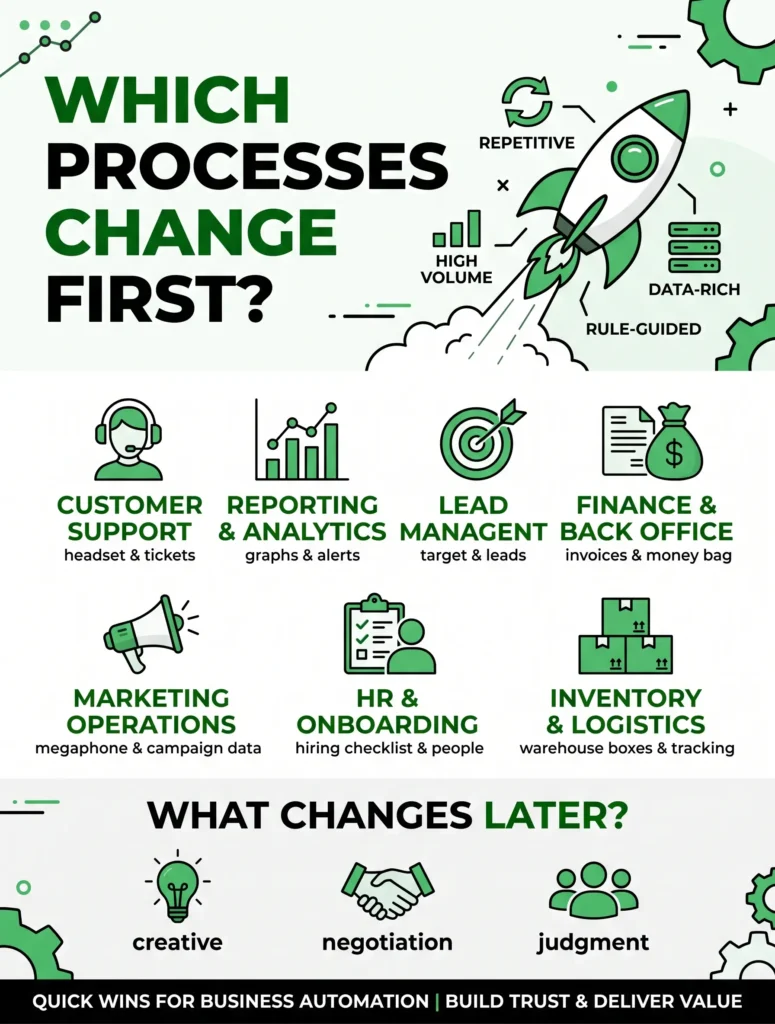
Not everything should be automated at once. The first processes to change are usually repetitive, high-volume, rule-guided, and rich in data. This is where business automation delivers quick, visible wins that build trust across the company. 

Typical starting points include:

  • Customer support: Ticket tagging, routing, FAQ answers, and reply drafting
  • Reporting and analytics: Scheduled reports, dashboard summaries, and anomaly alerts
  • Lead management: Capturing, scoring, and following up with prospects
  • Finance and back office: Invoice matching, expense checks, and reconciliations
  • Marketing operations: Content repurposing, campaign reporting, and keyword monitoring
  • HR and onboarding: Application screening, policy questions, and new-hire checklists
  • Inventory and logistics: Stock tracking, supplier reminders, and delivery updates

Processes that involve negotiation, creative direction, or ethically sensitive judgment tend to change later, and usually with humans firmly in charge. Picking the right first targets is one of the most important early decisions in any AI business transformation.

How Rule-Based Workflows Evolve Into Smarter Systems

Traditional business automation follows fixed rules: if this happens, do that. It works well when inputs are predictable, but it struggles the moment something unusual appears. Intelligent automation adds AI to the mix, so the system can read documents, understand intent, handle exceptions, and improve over time. The differences are significant:

  • Inputs: Rule-based tools need structured data, while intelligent systems can process emails, PDFs, images, and voice
  • Exceptions: Rule-based tools stop or fail, while intelligent systems flag issues and ask for guidance
  • Learning: Rule-based tools stay the same until someone edits them, while intelligent systems improve with feedback
  • Scope: Rule-based tools handle single steps, while intelligent systems can manage multi-step processes across several tools
  • Interaction: Rule-based tools run silently, while intelligent systems can explain what they did and why

Modern intelligent automation also includes AI agents, which plan and carry out tasks across your software with limited supervision. This progression sits at the heart of AI business transformation, because it moves companies from saving minutes on single tasks to reshaping entire workflows.

Clients and Portfolio: How AI Business Transformation Shows Up in Practice

Technexia’s portfolio spans artificial intelligence, CMS, digital marketing, ecommerce, and mobile apps, with clients across the USA, Australia, Pakistan, the UAE, and Canada. Our industries range from tourism, healthcare, and transportation to real estate, education, finance, sports, jewellery, and skincare. Looking at real client work and reading AI transformation case studies more broadly is the fastest way to understand what is possible. Here is how AI typically applies across the sectors we serve:

  • Tourism and hospitality: Booking portals, personalized itineraries, multilingual assistants, and demand forecasting
  • Real estate and smart property: Lead qualification, property matching, automated follow-ups, and listing content
  • Digital learning and education: Admissions workflows, learning portals, student support assistants, and progress insights
  • Transportation and mobility: Booking and quoting portals, dispatch coordination, and customer status updates
  • Healthcare and wellness: Appointment scheduling, patient intake, and secure information portals, all with strict privacy controls
  • Ecommerce and retail: Product recommendations, inventory forecasting, and automated customer service

Every client starts from a different baseline, so no two journeys look alike. What they share is a clear goal, a phased plan, and a focus on measurable impact, which is the essence of AI business transformation.

What Can AI Transformation Case Studies Teach You?

Well-documented examples are valuable because they reveal the messy middle, not just the polished outcome. Common lessons include:

  • Start with one painful process: A focused pilot beats a vague company-wide initiative
  • Data quality decides results: Clean inputs matter more than fancy models
  • Design for adoption: Tools that people avoid deliver no return
  • Keep humans in the loop: Review points catch errors and build trust
  • Measure from day one: Without a baseline, success is just an opinion
  • Scale in stages: Proven pilots become templates for the next department

Each of these lessons applies to AI business transformation in any sector, from a small clinic to a multi-country enterprise.

Not every success story is equally reliable, so read them critically. Ask these questions:

  • What was the starting point, and how was it measured?
  • Over what time frame were the results achieved?
  • What did the project cost in tools, time, and training?
  • Were the gains sustained, or was it a short-term spike?
  • Would the same approach work with your data and team size?

Applying that filter to AI transformation case studies protects you from unrealistic expectations.

How to Plan Your Journey Step by Step

A clear AI implementation roadmap keeps ambition realistic and progress visible. Use these steps:

  1. Define outcomes: Tie every initiative to a business goal, such as lower cost per ticket, faster reporting, or higher conversion.
  2. Assess readiness: Review your data quality, existing tools, team skills, and security posture.
  3. Prioritize use cases: Score ideas by impact and effort, and begin with high-impact, low-effort candidates.
  4. Fix the data foundation: Clean, connect, and document the data your first use cases depend on.
  5. Choose your approach: Decide what to buy off the shelf, what to customize, and where to partner with specialists.
  6. Pilot small: Test with one team, compare against the manual process, and collect feedback.
  7. Set governance: Define permissions, approval steps, privacy rules, and ownership for each system.
  8. Train your people: Show employees how the new tools help them, and give them a channel for feedback.
  9. Scale and iterate: Expand what works, retire what does not, and revisit priorities every quarter.

A good AI implementation roadmap is a living document, and it keeps AI business transformation tied to business outcomes rather than technology trends.

How Should ROI Be Measured?

Measuring ROI is the discipline that separates successful AI business transformation from expensive experiments. Track two kinds of value.

Hard, quantifiable returns

  • Hours saved per week or month
  • Reduction in cost per task, ticket, or transaction
  • Error and rework rates
  • Cycle time, such as days to close a deal or resolve an issue
  • Revenue lift from better conversion, upselling, or retention

Softer, strategic returns

  • Customer satisfaction and loyalty
  • Employee morale and reduced burnout
  • Speed and quality of decision-making
  • Capacity to grow without proportional hiring

A simple formula helps: ROI = (Total Gain − Total Cost) ÷ Total Cost × 100. Be thorough when counting costs

  • Software licenses and usage fees
  • Integration and development work
  • Data cleaning and preparation
  • Training and change management
  • Ongoing monitoring and maintenance

Follow these habits for trustworthy numbers

  • Record a baseline before launch
  • Choose two or three primary metrics per project
  • Set review points at 30, 90, and 180 days
  • Separate one-time savings from recurring ones
  • Share results openly, including disappointments

Return from business automation often appears first, because time and cost savings are easy to count. Strategic gains such as better decisions or customer loyalty take longer, so track them over quarters rather than weeks. Reliable AI transformation case studies always show baselines and time frames for this reason. Honest measurement keeps AI business transformation credible with your leadership team.

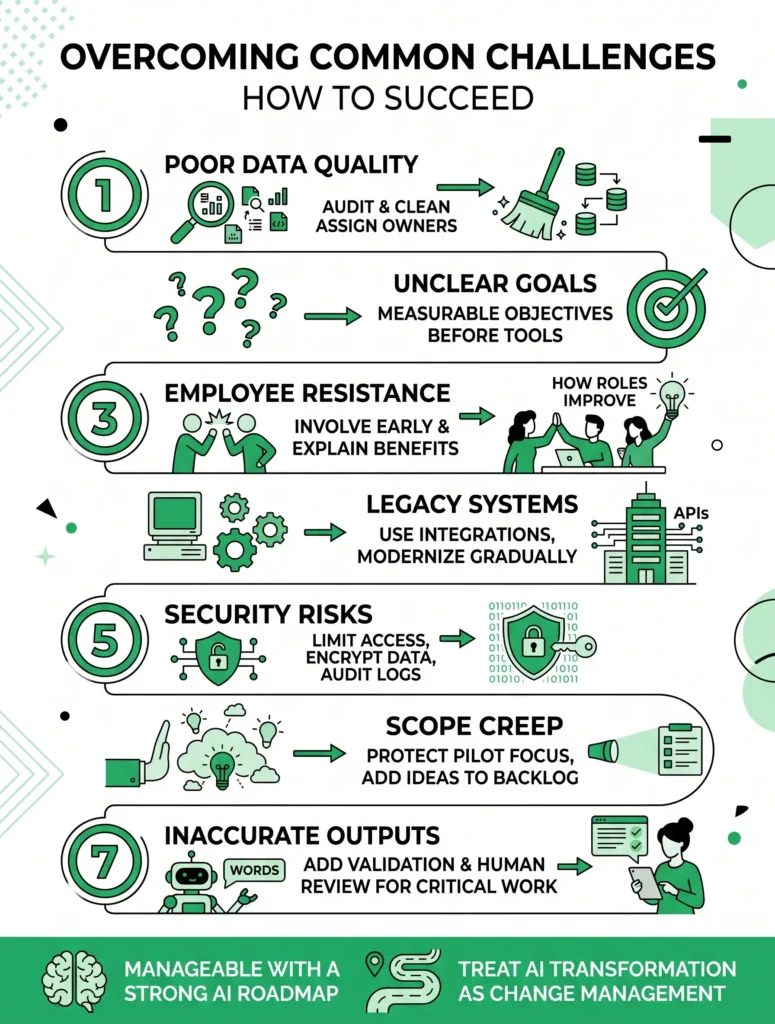
Common Challenges and How to Overcome Them

  • Poor data quality: Audit and clean data before building, and assign data owners
  • Unclear goals: Write measurable objectives before selecting any tool
  • Employee resistance: Involve staff early and explain how roles will improve
  • Legacy systems: Use integrations and APIs, or modernize gradually
  • Security and privacy risks: Limit access, encrypt data, and keep audit logs
  • Scope creep: Protect your pilot’s focus and add new ideas to a backlog
  • Inaccurate outputs: Intelligent automation tools that read documents or write text can misread or invent details, so add validation steps and human review for critical work

Most of these risks are manageable when anticipated early, which is another reason to maintain a strong AI implementation roadmap. Leaders who treat AI business transformation as a change-management exercise, not just a technical one, tend to see better adoption.

Building the Right Team and Culture

Technology alone does not deliver results. People do. Consider these building blocks:

  • Executive sponsor: A leader who removes obstacles and keeps priorities clear
  • Cross-functional team: Members from operations, IT, data, and the departments affected
  • AI champions: Enthusiastic employees who coach colleagues and share tips
  • Continuous training: Short, practical sessions rather than one-off workshops
  • Clear ownership: Every workflow and model has a named responsible person
  • Feedback loops: Simple ways for staff to report errors and suggest improvements

Companies often find that business automation frees people from routine tasks, and that reskilling is easier when employees see the change as an upgrade rather than a threat. Cultural readiness is a quiet driver of long-term AI business transformation.

How Technexia Can Help

Technexia is an AI-powered digital innovation partner that integrates strategy, automation, data intelligence, and AI systems into scalable digital ecosystems. Our Innovation Method guides clients through six steps: Insight and Discovery, Strategy and Architecture, Experience and Design, Intelligent Development, Performance and Optimization, and Growth and Evolution. It is a practical framework for AI business transformation. Our services include:

  • AI & Data: AI portals, automation, data science, intelligent solutions, and smart systems, including intelligent automation workflows that fit your existing tools
  • Development: web and mobile platforms, AI-powered portals, and ecommerce ecosystems built with WordPress, .NET, React, Shopify, and Webflow
  • UI/UX Design: prototyping, branding, motion design, and experience flows that make new systems simple and enjoyable to use
  • Digital Growth: SEO, Google Ads, social media, performance marketing, and analytics to drive visibility and measurable revenue

We help teams shape an AI implementation roadmap that matches their goals, budget, and data maturity, and we stay involved through optimization so results keep improving. Our experience covers tourism and hospitality, real estate and smart property, digital learning, transportation and mobility, and healthcare and wellness. Whether you need one focused business automation project or a company-wide AI business transformation, our team can guide you from discovery to launch and beyond.

What Comes Next for Intelligent Businesses?

The pace of change is not slowing. Watch these developments:

  • AI agents: Software that plans and completes multi-step tasks across your tools
  • Predictive operations: Forecasts that prevent problems instead of reporting them afterward
  • Deeper personalization: Experiences tailored to each customer in real time
  • Conversational interfaces: Asking your data questions in plain language
  • Responsible AI: Stronger expectations around transparency, fairness, and privacy

Preparing for these shifts is easier when intelligent automation is already part of daily operations. Companies that begin AI business transformation now build years of learning, data, and internal skill that latecomers will struggle to match.

Conclusion

AI business transformation is a journey of steady, measurable steps rather than one giant leap. Start with a single, painful process. Clean your data, pilot carefully, measure honestly, and keep people at the center. Over time, those small wins compound into faster operations, happier customers, and a business ready for what comes next.

Ready to begin? Contact Technexia today to explore our portfolio, review AI transformation case studies from the industries we serve, and get a tailored AI implementation roadmap for your company. Let’s turn your goals into a smarter, more scalable operation, and start your AI business transformation together.

Frequently Asked Questions

How long does a typical transformation take?

Timelines vary by size and complexity. A focused pilot can show results in a few weeks, while company-wide change usually unfolds over 12 to 24 months in stages.

Do small and mid-sized companies need to invest heavily?

No. Many begin with a single workflow and modest tools, then expand once savings appear. Starting small keeps risk and cost under control.

Will AI replace my employees?

AI mainly takes over repetitive tasks. Most companies redeploy their people toward analysis, creativity, and customer relationships, often with training to support the move.

What data do I need before starting?

You need accurate, accessible data related to your chosen process, such as customer records, transactions, or support history. It does not have to be perfect, but it should be organized and documented.

How do I keep my company’s data secure?

Choose vendors with strong security certifications, restrict access by role, encrypt sensitive information, keep activity logs, and share only what each system truly needs.

Read More
Learn how to automate customer support with AI using smart workflows, chatbots, and CRM tools to cut response times fast.
AI & Automation
October 2, 2026By Team Technexia

How to Automate Customer Support With AI: 7 Proven Ways

Customers expect fast answers, and support teams are stretched thin. If you are wondering how to automate customer support with AI, the good news is that you don’t need to replace your team. You need smart workflows that handle repetitive work so your people can focus on complex, high-value conversations. Done well, AI customer support cuts response times, lowers costs, and keeps quality consistent across every channel.

This guide covers what AI can do, how to build workflows, when to hand off to a human, and how to connect everything to your existing tools.

What Support Tasks Can AI Handle?

Modern support automation works best on high-volume, repeatable tasks. Common examples include:

  • Answering FAQs about pricing, shipping, returns, and account settings
  • Tagging and categorizing tickets by topic and urgency
  • Routing tickets to the right team or agent
  • Drafting replies for agents to review and send
  • Summarizing long email threads and chat histories
  • Collecting order numbers and account details before a human joins
  • Sending status updates and post-resolution surveys
  • Translating messages for multilingual customers

Tasks that need empathy, negotiation, or careful judgment should stay with people.

Why Businesses Are Investing in AI Customer Support

The appeal of AI customer support is practical rather than trendy:

  • 24/7 availability: Customers get help outside office hours
  • Faster first response: Simple questions are answered in seconds
  • Lower cost per ticket: Agents spend less time on repetitive work
  • Consistent answers: Every customer gets the same accurate information
  • Easy scaling: Ticket spikes during sales or launches no longer overwhelm the team

Understanding how to automate customer support with AI starts with these benefits, because they tell you which metrics to track later.

How to Automate Customer Support With AI: Step by Step

Follow this sequence to build a system that works and can grow.

  1. Audit your tickets: Review three to six months of conversations and group them by topic. You will usually find that a handful of question types make up most of the volume.
  2. Pick your first use cases: Start with low-risk, high-volume requests such as order status, password resets, and store hours.
  3. Build a clean knowledge base: AI is only as good as the content behind it. Update help articles, policies, and product details before you automate anything.
  4. Choose your tools: You will typically need a helpdesk, an AI chatbot for customer conversations, and an automation layer that connects them to your other systems.
  5. Design your workflows: Map each request from start to finish. Well-built customer support workflows follow a simple pattern: the customer writes in, AI detects the intent, it pulls an answer from the knowledge base, and it either resolves the request or escalates.
  6. Test with a small group: Launch to a limited audience or a single channel first, and have agents review the AI’s responses.
  7. Measure and improve: Review failed conversations every week and update your content and rules accordingly.

Can AI Connect to a CRM?

Yes, and this connection is what turns generic replies into personal ones. Most modern AI tools integrate with popular CRMs like Salesforce, HubSpot, and Zoho through native integrations or APIs. Once connected, AI can:

  • Pull a customer’s purchase history and past tickets into the conversation
  • Update contact records automatically after each interaction
  • Log conversation summaries so agents never start from zero
  • Trigger follow-up tasks, such as a sales call after a product question
  • Personalize answers based on plan type, location, or account status

Whether you are learning how to automate customer support with AI for the first time or upgrading an existing setup, CRM integration is the piece that makes answers feel relevant.

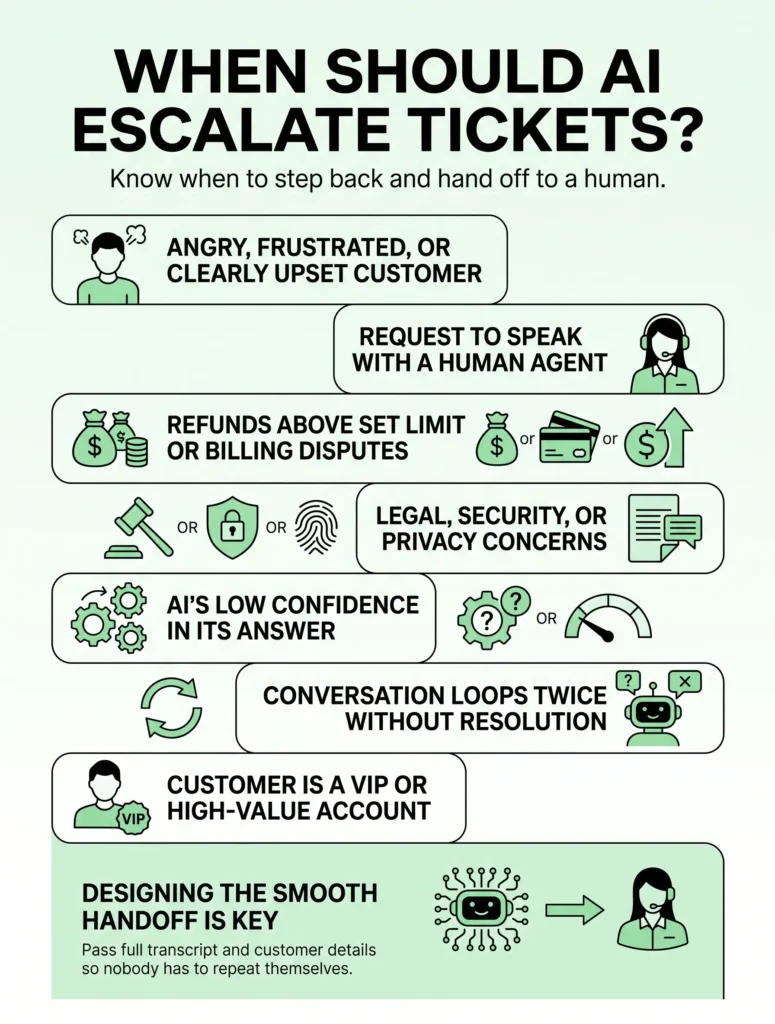
When Should AI Escalate Tickets?

Knowing when to step back is as important as knowing when to act. Set clear rules, so AI hands the conversation to a human when:

  • The customer is angry, frustrated, or clearly upset
  • The customer asks to speak with a person
  • The issue involves refunds above a set amount or billing disputes
  • The request touches legal, security, or privacy matters
  • The AI’s confidence in its answer is low
  • The conversation loops twice without a resolution
  • The customer is a VIP or high-value account

A smooth handoff matters just as much. Pass the full transcript and customer details to the agent so nobody has to repeat themselves. Designing this exit ramp is a key part of how to automate customer support with AI responsibly.

What Metrics Show Your Automation Is Working?

Track a few numbers consistently to judge whether your support automation is paying off:

  • First response time: Should drop noticeably after launch
  • Resolution time: The average time to fully solve an issue
  • Deflection rate: The share of requests solved without an agent
  • Customer satisfaction (CSAT): Must stay steady or improve
  • Escalation rate: Shows where your AI needs better training

Common Mistakes to Avoid

  • Automating everything at once instead of starting small
  • Feeding the system outdated or contradictory help content
  • Hiding the option to reach a human agent
  • Launching an untested AI chatbot that gives confident but wrong answers
  • Ignoring data privacy and compliance requirements

Knowing how to automate customer support with AI also means knowing what not to automate.

How Technexia Can Help

Building this system takes strategy, engineering, and design working together, which is where Technexia fits in. Technexia is an AI-powered digital innovation partner that combines strategy, automation, data intelligence, and AI systems to build scalable digital ecosystems. Here is how our services support your customer support goals:

  • AI & Data: AI portals, automation, data science, intelligent solutions, and smart systems to build and connect custom customer support workflows
  • Development: web and mobile platforms, ecommerce builds, and integrations using WordPress, .NET, React, Shopify, and Webflow
  • UI/UX Design: intuitive help centers, chat experiences, and user flows that make self-service easy
  • Digital Growth: SEO, Google Ads, and analytics to attract customers and measure results

We work with industries including tourism and hospitality, real estate, education, transportation, and healthcare. If you want a partner who understands how to automate customer support with AI from strategy to launch, our team is ready to help.

Conclusion

Learning how to automate customer support with AI is not about removing the human touch. It is about giving your team the time and tools to use it where it counts. Start with a ticket audit, automate simple requests first, connect your CRM, set clear escalation rules, and improve continuously.

Ready to build a smarter support system? Contact Technexia today to discuss your goals and get a tailored automation roadmap for your business.

Frequently Asked Questions

How much does it cost to set up automated support?

Costs depend on your ticket volume, chosen tools, and integration complexity. Many businesses start with a small pilot to keep the initial investment low.

How long does implementation take?

A basic setup can go live in a few weeks. More advanced builds with multiple integrations may take a couple of months.

Will AI replace my human support agents?

No. AI handles repetitive requests, while agents focus on sensitive, complex, and relationship-driven conversations.

Is customer data safe when using AI tools?

It can be, if you choose vendors with strong security standards, limit the data shared with the AI, and follow regulations such as GDPR.

Which channels can be automated?

Website chat, email, WhatsApp, social media messages, and help center search can all be automated, and you can add channels gradually.

Read More
What is an AI agent? Learn how it works, how it differs from chatbots, and 7 smart ways businesses can use it.
AI & Automation
September 30, 2026By Team Technexia

What Is an AI Agent? 7 Smart Ways to Grow Faster

Every few years, a technology changes how work gets done, and AI agents are shaping up to be the next one. So, what is an AI agent, and how can your business put one to work? In short, it is software that can understand a goal, decide on the steps, use tools, and complete tasks with limited human input. This guide explains how agents work, how they differ from chatbots, and where they deliver real value.

What Is an AI Agent?

An AI agent is a software system powered by artificial intelligence that can perceive information, reason about it, and take action to reach a goal. Unlike a basic script that follows fixed rules, an agent adapts to context. Give it an objective such as “research these leads and draft outreach emails,” and it plans the work, gathers data, and produces results. When several agents and tools are connected, they form autonomous AI workflows that run entire processes from start to finish.

How Does an AI Agent Work?

Understanding what is an AI agent also means understanding its core parts:

  • Goal: The outcome the agent is asked to achieve
  • Reasoning: An AI model that breaks the goal into steps and decides what to do next
  • Memory: Stored context, such as past conversations, preferences, and company knowledge
  • Tools: Connections to email, CRMs, databases, calendars, and other software it can use
  • Action loop: The cycle of acting, checking the result, and adjusting the plan
  • Guardrails: Rules and permissions that limit what the agent can do without approval

How Is an Agent Different From a Chatbot?

A common mix-up when learning what an AI agent is is treating it like a chatbot. They are related, but they do different jobs:

  • Purpose: A chatbot answers questions, while an agent completes tasks
  • Autonomy: A chatbot waits for each prompt, while an agent can plan and act on its own
  • Tool use: A chatbot mostly talks, while an agent updates records, sends emails, and runs reports
  • Complexity: A chatbot handles single exchanges, while an agent manages multi-step processes
  • Memory: A chatbot often forgets context, while an agent keeps track of progress and history
  • Oversight: A chatbot needs little supervision, while an agent needs clear permissions and checkpoints

Many businesses use both. A chatbot acts as the friendly front door, and agents do the heavy lifting behind the scenes.

What Business Tasks Can Agents Perform?

Agents perform best on repetitive, rules-guided work that spans several tools. 

Common examples by department include:

  • Customer support: Triaging tickets, drafting replies, updating order details, and escalating complex cases
  • Sales: Researching prospects, enriching CRM records, scheduling meetings, and writing follow-ups
  • Marketing: Compiling campaign reports, repurposing content, and monitoring keyword and ad performance
  • Finance: Matching invoices, flagging unusual expenses, and preparing monthly summaries
  • HR: Screening applications, answering policy questions, and coordinating onboarding steps
  • Operations: Tracking inventory, monitoring supplier deadlines, and routing approvals
  • IT: Resetting passwords, categorizing incidents, and checking system health
  • Data and reporting: Pulling numbers from multiple systems and writing plain-language summaries

Why Businesses Are Adopting AI Agents

Once you know what is an AI agent, the appeal of AI agents for business is easy to see:

  • Time savings: Routine tasks run in the background
  • Round-the-clock coverage: Work continues outside office hours
  • Consistency: Every task follows the same process and standards
  • Scalability: Workloads can grow without a matching increase in headcount
  • Lower operating costs: Less manual effort per task
  • Better use of people: Employees focus on strategy, creativity, and relationships

How to Get Started With AI Agents

Once you understand what is an AI agent, follow these steps to begin:

  1. Pick one process: Choose a repetitive, well-defined task with clear success criteria.
  2. Map the steps: Write down every action, decision, and tool involved.
  3. Prepare data and access. Clean your information and grant only the permissions the agent truly needs.
  4. Choose a platform: Select tools that integrate with your existing software and offer logging and controls.
  5. Set guardrails: Define what the agent can do alone and where a human must approve.
  6. Run a pilot: Test with a small team and compare results against the manual process.
  7. Measure and expand: Track time saved, error rates, and satisfaction, then extend to new tasks.

What Risks Should Businesses Watch For?

Anyone exploring what is an AI agent should also ask where things can go wrong:

  • Inaccurate outputs: Agents can make confident mistakes, so important results need review
  • Data privacy: Sensitive information must be protected and access limited
  • Over-broad permissions: An agent with too much access can cause costly errors
  • Unclear accountability: Every agent needs a human owner
  • Hidden costs: Usage fees and integrations can add up without monitoring
  • Team resistance: Staff need training and reassurance about how their roles will evolve

How Technexia Can Help

Technexia is an AI-powered digital innovation partner that integrates strategy, automation, data intelligence, and AI systems to build scalable digital ecosystems. If you are still asking what an AI agent is in the context of your industry, our team can help you find the right starting point. Our services cover the full journey:

  • AI & Data: AI portals, automation, data science, intelligent solutions, and smart systems, including the design of secure, scalable autonomous AI workflows
  • Development: web and mobile platforms, ecommerce builds, and integrations using WordPress, .NET, React, Shopify, and Webflow
  • UI/UX Design: intuitive interfaces, prototypes, and experience flows that make agent-driven tools easy to use
  • Digital Growth: SEO, Google Ads, performance marketing, and analytics to measure business impact

We work across tourism and hospitality, real estate, education, transportation, mobility, and healthcare, and we build AI agents for business goals that are measurable, secure, and ready to grow.

Conclusion

Knowing what is an AI agent is the first step toward using one wisely. Agents go beyond chatbots by planning, using tools, and completing real work, and the best results come from starting small, setting clear guardrails, and keeping humans in the loop. With the right approach, they can free your team from repetitive tasks and speed up growth.

Ready to explore what agents can do for your company? Contact Technexia today to book a consultation and get a practical roadmap tailored to your goals.

Frequently Asked Questions

Do AI agents replace employees?

No. They take over repetitive tasks so employees can focus on work that requires judgment, creativity, and relationship building.

How much does it cost to build an AI agent?

Costs vary with complexity, the number of integrations, and usage volume. Many companies start with a small pilot to control spending and prove value first.

How long does it take to deploy one?

A simple agent can be live in a few weeks. Systems that touch several tools and departments may take a few months.

Are AI agents secure?

They can be, provided you limit access, encrypt data, keep activity logs, and choose vendors with strong security practices.

Do small businesses need special technical skills to use them?

Not always. Many platforms are designed for non-technical users, though an experienced partner helps with custom integrations and safe setup.

Read More
Discover what business processes can AI automate with 7 powerful ways to identify high-value opportunities, improve efficiency, and streamline daily operations.
AI & Automation
September 24, 2026By Team Technexia

7 Powerful Ways to Find What Business Processes Can AI Automate

Artificial intelligence is changing how businesses approach everyday work. From handling customer inquiries to processing documents and analyzing data, AI can reduce repetitive workloads and help employees focus on more valuable responsibilities.

But successful automation does not begin with choosing an AI tool. It begins with identifying the right processes.

So, what business processes can AI automate effectively? The answer depends on factors such as how repetitive a task is, how much data it involves, how clearly its outcomes can be measured, and how much human judgment it requires.

This guide explores seven practical ways to identify automation candidates and determine where AI can create the most value.

Start With Repetitive, Time-Consuming Tasks

One of the easiest ways to identify automation candidates is to look at tasks employees perform repeatedly.

Think about activities such as entering information into spreadsheets, responding to routine emails, generating reports, categorizing customer requests, or transferring information between software platforms.

If employees spend hours every week performing the same sequence of actions, the process deserves closer attention.

When evaluating what business processes can AI automate, consider both frequency and time consumption. A task that takes five minutes may seem insignificant until employees perform it hundreds or thousands of times each year.

Reducing these repetitive activities can free employees to focus on customer relationships, strategic decisions, problem-solving, and other higher-value work.

Look for Processes With Clear Rules

AI and automation work particularly well when a process follows a recognizable pattern.

For example, a company may have a standard workflow for processing invoices:

  1. Receive the invoice.
  2. Extract relevant information.
  3. Check the purchase order.
  4. Identify discrepancies.
  5. Send the invoice for approval.
  6. Record the transaction.

Because many of these steps follow defined rules, they can be good candidates for automation.

However, businesses should distinguish between predictable activities and decisions that require professional judgment. A process may contain several automatable steps while still requiring an employee to review exceptions.

This is where AI automation opportunities can be particularly valuable. Instead of attempting to automate an entire department, businesses can identify individual activities that are predictable enough for technology to handle reliably.

Examine High-Volume Data Tasks

Processes involving large quantities of digital information are another strong area to investigate.

AI can assist with activities such as:

  • Document classification
  • Data extraction
  • Customer feedback analysis
  • Email categorization
  • Report generation
  • Information summarization
  • Lead qualification
  • Data validation

For example, a customer service team might receive thousands of messages every month. AI could categorize incoming requests and identify urgent cases before routing them to the appropriate employee.

When considering what business processes can AI automate, data-heavy workflows are worth examining because even small improvements can produce substantial savings when applied at scale.

Identify Bottlenecks and Delays

Not every automation opportunity is obvious from the task itself. Sometimes the biggest opportunity is found by examining where work gets stuck.

Ask questions such as:

  • Where do employees regularly wait for information?
  • Which approvals create delays?
  • Where are customers waiting for responses?
  • Which tasks create backlogs?
  • Where does information need to be manually transferred?
  • Which processes frequently require follow-ups?

For example, a sales team may lose valuable time waiting for leads to be reviewed and assigned. An automated workflow could categorize incoming leads, collect relevant information, and send qualified prospects to the appropriate salesperson.

These types of AI automation opportunities can improve both employee productivity and customer experiences.

Calculate the Potential Before Automating

Before investing in automation, estimate the potential return.

A simple approach is to consider:

Annual Automation Value = Time Saved × Employee Cost × Process Frequency

You can then compare the estimated value with implementation, maintenance, integration, and training costs.

Other factors should also be considered, including error reduction, faster response times, improved customer satisfaction, and increased employee capacity.

Determine What Should Stay Human

Knowing what not to automate is just as important as knowing what to automate.

What Processes Should Not Be Automated?

Processes involving sensitive decisions, complex negotiations, ethical considerations, or significant legal and financial consequences often require human oversight.

For example, AI might summarize information for a manager, but the final decision could remain with a qualified employee.

Similarly, customer complaints may be automatically categorized and routed, while sensitive cases are escalated to trained representatives.

Businesses should therefore think beyond full automation. Business process automation can involve AI completing routine steps while employees remain responsible for judgment-heavy decisions.

This approach can reduce risk while still delivering substantial efficiency gains.

Test Before Scaling

Once you have identified promising candidates, avoid automating everything at once.

Start with one well-defined process. Establish a baseline for performance and define measurable goals.

For example, you might want to:

  • Reduce processing time by 30%.
  • Decrease manual data entry.
  • Improve response times.
  • Reduce repetitive employee workload.
  • Lower the number of processing errors.

After implementation, compare the results against the original baseline.

If the pilot delivers measurable improvements and performs reliably, you can consider expanding the approach to other workflows.

This gradual approach also makes AI workflow automation easier to manage because your team can identify technical problems, improve prompts or rules, establish approval controls, and refine the process before expanding it.

Which Tasks Are Best for Automation?

The best candidates are generally tasks that are repetitive, frequent, measurable, digital, and relatively predictable.

Common examples include:

  • Invoice and document processing
  • Appointment scheduling
  • Customer inquiry classification
  • Lead qualification
  • Data entry
  • Report preparation
  • Employee onboarding administration
  • Email categorization
  • Recurring notifications
  • Basic information retrieval

The key is not simply asking what business processes can AI automate. Instead, ask which processes can be automated safely, reliably, and profitably.

How AI Can Support Business Growth

Automation is ultimately about more than reducing manual work. The right implementation can increase organizational capacity.

When employees spend less time copying information, preparing repetitive reports, sorting requests, or searching through documents, they have more time for activities that require creativity, communication, and strategic thinking.

A well-planned business process automation strategy can therefore support productivity without requiring businesses to replace every human activity with technology.

Similarly, AI workflow automation can connect multiple systems and steps, allowing information to move through an organization more efficiently.

The most successful implementations focus on improving the overall workflow rather than adding AI simply because it is available.

Conclusion

Finding what business processes can AI automate requires a practical look at how work gets done. Start by identifying repetitive tasks, high-volume workflows, bottlenecks, and processes with measurable outcomes. Then evaluate potential value, risk, data availability, and the amount of human judgment involved.

The goal should not be to automate everything. Instead, focus on processes where AI can deliver meaningful improvements while keeping people involved where their expertise and judgment matter most.

If you’re exploring automation for your organization, reach out to Technexia and start with a measurable workflow. A focused pilot can help you understand the potential of AI before expanding automation across other areas of the business.

Frequently Asked Questions

What is the first step in identifying an AI automation opportunity?

Start by documenting your existing workflows. Record the tasks involved, how frequently they occur, how much employee time they consume, and where delays or errors occur. This gives you a clear basis for comparing potential automation projects.

Does every repetitive task need AI?

No. Some repetitive tasks can be handled more efficiently with traditional software, rules-based automation, or simple integrations. AI is most useful when a workflow involves activities such as understanding language, analyzing unstructured information, classifying content, or generating responses.

How can businesses prioritize multiple automation ideas?

Rank each process according to potential time savings, frequency, business impact, implementation complexity, data availability, and risk. High-value, low-risk processes are generally good candidates for an initial pilot.

Can AI automation work with existing business software?

Yes. Depending on the systems involved, AI solutions can often be connected to existing applications through integrations, APIs, workflow platforms, or other automation technologies. The available options depend on the software architecture and security requirements.

How should businesses monitor an automated process?

Establish performance metrics before implementation and monitor them after deployment. Useful measures include processing time, error rates, employee hours saved, customer response times, and the number of cases requiring human intervention. Regular reviews can help identify problems and opportunities for improvement.


Read More
  • 1
  • 2

hello@technexia.com

Shaping a better world by taking technology to the next level through artificial intelligence and data.

Facebook-fInstagramLinkedin-inX-twitterYoutubeTiktok

Presence

  Karachi, Pakistan

  Dubai, UAE

Registered Under

Copyright © 2026 | All Rights Reserved

Crafted by TECHNEXIA | Powered by HORIZONTAL 8