AI & Automation
WordPress powers a huge share of the websites on the internet, and for good reason. It is affordable, flexible, and easy to launch. But the same platform that helped your business get online can start holding it back once your needs grow more complex. Knowing when to move beyond WordPress is less about the platform being bad and more about recognizing when your business has simply outgrown it. This guide covers the warning signs, the platform’s real limitations, and how to decide what comes next.
Why WordPress Works So Well at the Start
WordPress became popular because it lowers the barrier to launching a website. A small business can have a professional-looking site running in days, with plugins covering everything from contact forms to basic e-commerce. For blogs, brochure sites, and simple stores, it remains a genuinely good choice. The challenge appears later, when a business needs the platform to do far more than manage pages and posts.
What Are WordPress Limitations?
Every platform has a ceiling, and WordPress limitations tend to surface as a business scales. Common issues include:
- Plugin overload: Dozens of plugins stacked together to fake functionality the platform wasn’t built for
- Performance strain: Pages slow down as content, users, and plugins pile up
- Security patching: Frequent updates are needed across the core, theme, and every plugin
- Limited workflow logic: WordPress struggles with multi-step approvals, complex permissions, or custom business rules
- Database strain: Large volumes of dynamic data can slow the platform noticeably
- Fragile integrations: Connecting to CRMs, ERPs, or custom systems often relies on patchwork plugins
- Maintenance overhead: Keeping everything compatible after updates becomes a recurring task
None of this means WordPress is a poor platform. It means its design, built around content publishing, was never intended to run a highly specialized workflow. This is where the question of when to move beyond WordPress starts to become relevant.
Signs You’ve Outgrown Your Current Setup
Beyond the technical limitations, certain everyday frustrations are strong signals it may be time for a change:
- Pages and dashboards feel slower every month, even after cleanup
- Every new feature request requires stacking another plugin
- Your team spends more time managing updates than building the business
- Custom workflows are forced into tools that were never designed for them
- Security concerns increase as more third-party plugins are added
- Reports and dashboards require manual work because the data doesn’t connect cleanly
- Customers or staff mention friction that basic fixes no longer solve
If several of these feel familiar, it is worth seriously evaluating when to move beyond WordPress rather than adding another plugin to patch the problem.
Can WordPress Support Complex Workflows?
To a point, yes, but with real constraints. WordPress can handle basic automation, simple booking flows, and standard ecommerce through plugins like WooCommerce. Where it struggles is with:
- Multi-step approval chains involving several departments
- Real-time syncing with inventory, finance, or logistics systems
- Highly customized user permissions across many roles
- Workflows that must adapt dynamically based on complex business rules
- High-volume transactional systems that need consistent, fast performance
Plugins can stretch WordPress further, but each added layer increases fragility and maintenance. For businesses whose workflows are simple, this stretching is fine. For businesses whose processes are genuinely complex, it becomes a long-term liability rather than a quick fix.
When Should You Build Custom Software?
A custom web application becomes the stronger option once your business needs outpace what a general content platform can reliably support. Consider making the shift when:
- Your workflows are unique and don’t map to standard plugin functionality
- You need airtight security or compliance controls for sensitive data
- Multiple systems need to talk to each other in real time
- Plugin costs and maintenance time have started rivaling the cost of a custom build
- Your growth plans will only add more complexity, not less
- Performance and reliability directly affect revenue or customer trust
If your needs are modest and stable, staying on WordPress with careful plugin management may still make sense. If your business is scaling into more specialized territory, that is a clear signal for when to move beyond WordPress toward something built specifically for you.
WordPress vs Custom Solutions: A Quick Comparison
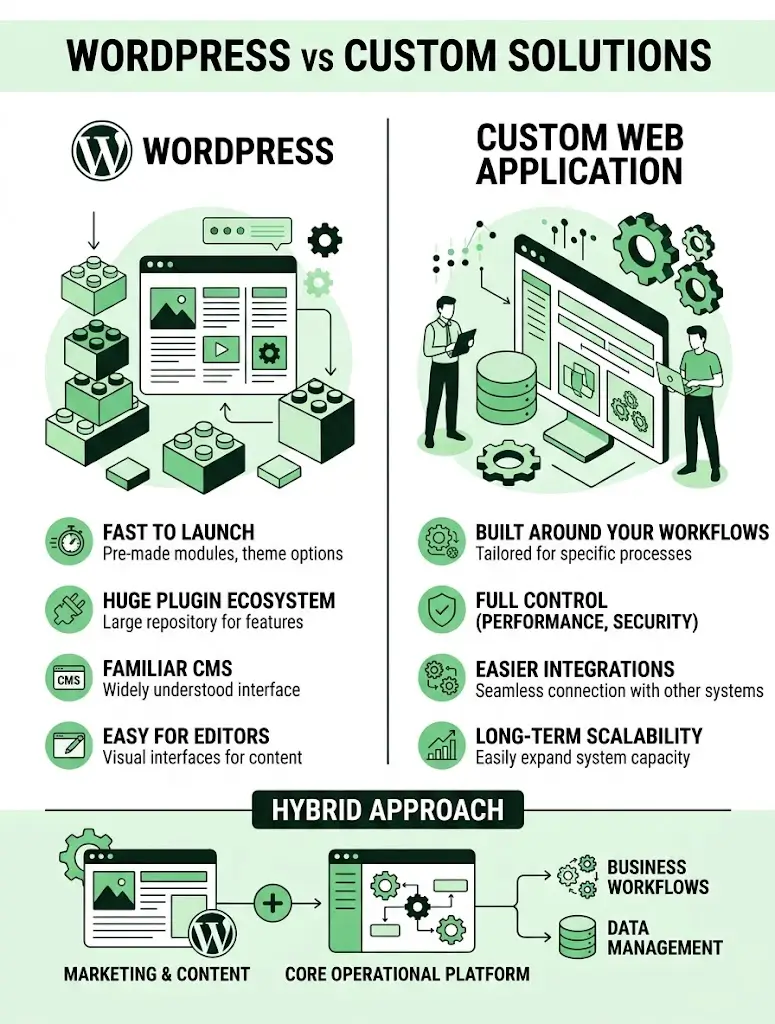
WordPress
- Fast and inexpensive to launch
- Huge plugin ecosystem for common needs
- Familiar for many content editors
- Can become slow and complex as demands grow
- Ongoing maintenance across many moving parts
Custom web application
- Built precisely around your workflows and data
- Full control over performance and security
- Easier long-term integration with other systems
- Higher upfront cost and longer build time
- Requires an ongoing development relationship
Many growing businesses land on a hybrid approach: WordPress for marketing pages and content, paired with a scalable platform or custom system for the core operational workflows that drive the business.
How to Plan the Transition
Moving away from WordPress for core operations doesn’t have to happen all at once. A phased plan reduces risk:
- Audit your current site: List every plugin, integration, and workflow currently running on WordPress.
- Separate content from operations: Decide what genuinely belongs on a content platform versus what needs dedicated software.
- Define requirements: Document the workflows, security needs, and integrations your business actually requires.
- Choose your approach: Decide whether to keep WordPress for marketing content while building custom software for operations, or migrate fully.
- Migrate data carefully: Clean and test data before it moves into any new system.
- Run in parallel briefly: Keep the old setup available while the new system is tested and trusted.
- Train your team: Give staff time to adjust to new interfaces and processes.
Common Mistakes to Avoid
- Adding yet another plugin instead of addressing the root workflow problem
- Migrating without first documenting existing processes and data
- Underestimating the ongoing cost of maintaining a custom build
- Moving everything at once instead of separating content from operations
- Ignoring staff input on what actually slows down their daily work
How Technexia Can Help
Technexia is an AI-powered digital innovation partner that combines strategy, automation, data intelligence, and AI systems to build scalable digital ecosystems. If you’re weighing when to move beyond WordPress, our team can help you make that decision with confidence:
- AI & Data: AI portals, automation, data science, intelligent solutions, and smart systems that replace fragile plugin workarounds with reliable automation
- Development: custom web applications, web and mobile platforms, and ecommerce ecosystems using WordPress, .NET, React, Shopify, and Webflow, so we can build on WordPress where it fits or move you beyond it where it doesn’t
- UI/UX Design: interfaces designed around how your team actually works, not around generic templates
- Digital Growth: SEO, Google Ads, and analytics to keep your content and marketing strong throughout the transition
We work across industries including tourism and hospitality, real estate, education, transportation, and healthcare, helping businesses figure out exactly when to move beyond WordPress and what to build instead.
Conclusion
WordPress is a strong starting point, but it isn’t built to scale with every kind of business forever. Watch for slowing performance, stacked plugins, and workflows that no longer fit, since these are the clearest signs it’s time for a change. Whether that means better plugin management, a hybrid setup, or a fully custom web application, deciding when to move beyond WordPress early saves far more time and cost than waiting for the platform to fail you first.
Ready to find out if your business has outgrown its current site? Contact Technexia today to get an honest assessment and a tailored recommendation for your next step.
Frequently Asked Questions
Does outgrowing WordPress mean the platform failed us?
Not at all. It usually means your business has grown past the use case WordPress was originally designed for, which is a sign of success rather than a mistake.
Can we keep WordPress for our website while using custom software elsewhere?
Yes, this hybrid setup is common. Many businesses keep WordPress for marketing content while running core operations on a separate, purpose-built system.
How disruptive is moving away from WordPress for daily operations?
It depends on scope. A phased approach, where systems run in parallel for a short period, keeps disruption to customers and staff to a minimum.
What happens to our existing content and SEO rankings?
With careful planning, content and SEO value can be preserved through proper redirects and migration practices, especially when only the operational side is being replaced.
Is there a way to test if custom software is worth the investment first?
Yes. Many businesses start with a single problematic workflow as a pilot project before committing to a larger transition, which helps validate the investment with real results.