
AI & Automation
Rolling out automation is only half the job. The other half is proving it worked. Many businesses launch AI tools, feel like things are faster, and stop there, without ever confirming the impact with real numbers. If you want to measure AI productivity gains properly, you need a baseline, the right metrics, and a habit of checking results on a schedule. This guide walks through exactly how to do that.
Why Measurement Matters More Than the Rollout
Automation projects are easy to start and easy to overstate. Without clear numbers, “this saves us time” is just an impression, not a fact. Measuring results protects your budget, guides future investment, and gives your team credit for real improvements. It also reveals when a tool is underperforming, so you can fix it before it quietly becomes a sunk cost.
Which KPIs Should Businesses Track?
Not every metric matters equally. Focus on a short list that connects directly to business outcomes. Common automation KPIs include:
- Time saved per task: The difference between old and new completion times
- Cost per task or ticket: Total cost divided by volume handled
- Error rate: How often the automated process needs correction
- Cycle time: How long a full process takes from start to finish
- Throughput: How many tasks or requests are completed per day or week
- Adoption rate: The share of eligible tasks actually being automated
- Customer satisfaction: Ratings or feedback tied to the automated process
- Employee satisfaction: How staff feel about the tools they now use
Choosing two or three primary KPIs per project keeps reporting focused. Too many metrics make it hard to see what is actually changing, which defeats the purpose of trying to measure AI productivity gains in the first place.
How Do You Measure Employee Time Saved?
Time savings are usually the easiest and most convincing number to report. Follow these steps:
- Record the baseline: Time the manual process across a representative sample, not just one fast attempt.
- Time the new process: Measure the same task after automation, including any review steps.
- Calculate the difference: Subtract new time from old time per task.
- Multiply by volume: Multiply the time saved per task by how often it happens weekly or monthly.
- Convert to cost: Multiply total hours saved by the average hourly cost of the people involved.
A simple formula: Hours Saved = (Old Time per Task − New Time per Task) × Number of Tasks.
Be careful not to double-count. If automation removed a task entirely, count the full time. If it only sped up part of a task, count just that portion. This level of care is essential if you want to measure AI productivity gains in a way leadership will trust.
How Can Automation Quality Be Measured?
Speed alone is not success if quality drops. Automation quality can be tracked through:
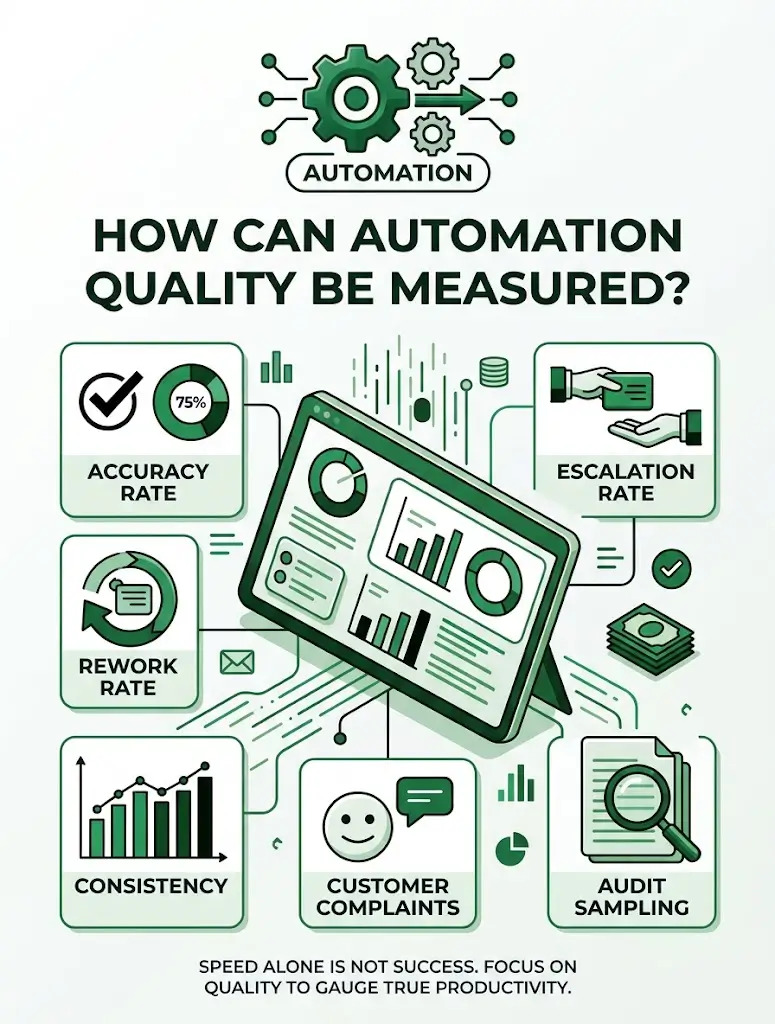
- Accuracy rate: The percentage of outputs that are correct without human correction
- Escalation rate: How often a task still needs a human to step in
- Rework rate: How frequently completed tasks must be redone
- Consistency: Whether similar cases produce similar results
- Customer complaints: Any rise in issues tied to the automated process
- Audit sampling: Regularly checking a random set of outputs by hand
A tool that is fast but frequently wrong can cost more in cleanup than it saves in time. Quality checks are what make it possible to measure AI productivity gains honestly, rather than just celebrating speed.
Building a Simple Measurement Framework
A repeatable framework keeps every project consistent. Use this structure:
- Set a goal: Define what success looks like before launch
- Choose your metrics: Pick two or three KPIs tied directly to that goal
- Record a baseline: Capture current performance before automation begins
- Set review checkpoints: Plan check-ins at 30, 90, and 180 days
- Report in plain language: Translate numbers into time, cost, and customer impact
- Adjust based on findings: Fix what is underperforming instead of ignoring it
This structure works whether you are reviewing one workflow or an entire department, and it turns “we think it’s working” into evidence.
Using AI Productivity Metrics to Guide Decisions
Good AI productivity metrics do more than report the past. They guide what to automate next. Use your results to:
- Identify which processes delivered the strongest returns
- Spot workflows where automation underperformed and needs adjusting
- Decide where to expand automation based on proven success
- Justify budget for new tools with real, documented outcomes
- Compare vendors or platforms using consistent, apples-to-apples data
Reviewing AI productivity metrics regularly, not just once after launch, is what separates a one-time project from an ongoing improvement habit.
Common Mistakes When Measuring Productivity
- Skipping the baseline and comparing against guesses instead of real numbers
- Tracking too many metrics, which buries the ones that matter
- Ignoring quality while focusing only on speed
- Measuring too early, before results have stabilized
- Never revisiting numbers after the initial launch report
Avoiding these mistakes is essential if you want to measure AI productivity gains with confidence your team can act on.
How Technexia Can Help
Technexia is an AI-powered digital innovation partner that combines strategy, automation, data intelligence, and AI systems to build scalable digital ecosystems. Proving results is part of how we work, and our services support every stage:
- AI & Data: AI portals, automation, data science, intelligent solutions, and smart systems built with reporting and metrics in mind from day one
- Development: web and mobile platforms, ecommerce builds, and integrations using WordPress, .NET, React, Shopify, and Webflow
- UI/UX Design: dashboards and interfaces that make performance data easy to read and act on
- Digital Growth: SEO, Google Ads, performance marketing, and analytics to connect operational gains to business growth
We work across industries including tourism and hospitality, real estate, education, transportation, and healthcare, helping teams set up the right automation KPIs before a project even launches, so results are clear from the start.
Conclusion
Automation only proves its worth when you can measure it. Set a baseline, choose a small set of meaningful KPIs, track both speed and quality, and review your numbers on a regular schedule. When you consistently measure AI productivity gains this way, you turn a one-time project into evidence that supports every future investment.
Ready to prove the value of your automation? Contact Technexia today to set up the right AI productivity metrics for your business and get a tailored measurement plan.
Frequently Asked Questions
How soon after launch should results be measured?
Early numbers can be noisy, so an initial check at 30 days is useful, but a more reliable picture usually forms by the 90-day mark.
What if the numbers show automation isn’t helping?
That is valuable information. It points to where the process needs adjusting, whether that means better data, revised rules, or additional training.
Should every automated task be measured individually?
Not necessarily. Group similar tasks and track them together, then measure standout or high-cost processes individually for a clearer picture.
How do I present these results to leadership?
Translate technical metrics into business terms such as hours saved, cost avoided, and customer impact, since those numbers are easiest for decision-makers to act on.
Can measurement itself become too time-consuming?
It can, if tracked manually. Automating the reporting process itself, through dashboards or scheduled summaries, keeps measurement lightweight and sustainable.