
logotype
  • Home
  • About Us
    • Philosophy
    • Evolution
    • Profile
    • News
    • FAQs
    • Privacy
    • Terms
  • Services
  • Portfolio
  • Careers
Get in Touch
logotype
  • Home
  • About Us
    • Philosophy
    • Evolution
    • Profile
    • News
    • FAQs
    • Privacy
    • Terms
  • Services
  • Portfolio
  • Careers
Get in Touch

Menu

  • Home
  • About Us
    • Philosophy
    • Evolution
    • Profile
    • News
    • FAQs
    • Privacy
    • Terms
  • Services
  • Portfolio
  • Careers
  • Home
  • About Us
    • Philosophy
    • Evolution
    • Profile
    • News
    • FAQs
    • Privacy
    • Terms
  • Services
  • Portfolio
  • Careers

Social

  • Facebook
  • Instagram
  • Youtube
  • Tiktok
  • Twitter

Get In Touch

  • hello@technexia.com
Author: Team Technexia
HomeTeam TechnexiaPage 3
AI Automation Business Results 9 Amazing Changes
AI & Automation
October 9, 2026By Team Technexia

AI Automation Business Results: 9 Amazing Changes

Ask any operations manager what a typical Monday looks like, and you will hear about inboxes, spreadsheets, approvals, and follow-ups. Now imagine the same day with much of that work handled automatically. That contrast is where AI automation business results become visible: fewer delays, fewer errors, and more time for work that matters. This guide compares daily operations before and after automation, shows which tasks disappear, and explains how to measure the gains.

AI automation can deliver impressive business results, but achieving sustainable growth requires a broader strategy that connects intelligent technology with business goals. AI business transformation helps organizations identify opportunities for automation, streamline workflows, improve decision-making, and scale operations more effectively. By integrating AI into core business processes rather than treating it as an isolated tool, companies can build more adaptable systems, improve productivity, and create long-term value while maintaining the human oversight needed for successful implementation.

What Changes After Automation?

The biggest change is not speed alone. It is how work flows. AI workflow transformation replaces stop-and-start handoffs with connected processes that move on their own. Here is the before-and-after picture:

  • Data entry: Retyped by hand → captured automatically from forms, emails, and invoices
  • Approvals: Chased through email → routed instantly with automatic reminders
  • Reporting: Built each week manually → generated and refreshed on a schedule
  • Customer replies: Written from scratch → drafted by AI and reviewed by staff
  • Scheduling: Endless back-and-forth → booked automatically based on availability
  • Follow-ups: Forgotten when busy → triggered at exactly the right time

Teams also notice cultural shifts: less firefighting, clearer ownership, and more time for planning. These changes explain why AI automation business results often go beyond simple time savings.

A Day in the Life: Before vs After

The difference is easiest to see across a single workday.

Before automation

  • 8:30 a.m. sorting emails and tagging requests by hand
  • 10:00 a.m. copying data from one system into another
  • 1:00 p.m. compiling a status report from three spreadsheets
  • 4:00 p.m. chasing colleagues for overdue approvals

After automation

  • Requests arrive already sorted, prioritized, and assigned
  • Systems sync data in the background
  • Reports appear ready, with a short AI-written summary
  • Approvals move forward with automatic nudges

The workday does not get shorter because people work faster. It gets lighter because software handles the routine parts. This shift is the practical face of AI automation business results.

Which Manual Tasks Disappear?

Repetitive work is the first to go. Well-designed business process automation removes tasks that follow clear patterns, including:

  • Copy-and-paste data entry between tools
  • Sorting, tagging, and forwarding emails
  • Matching invoices to purchase orders
  • Sending routine status updates
  • Formatting weekly and monthly reports
  • Appointment confirmations and reminders
  • Naming, filing, and organizing documents
  • Answering first-level FAQs from customers and employees
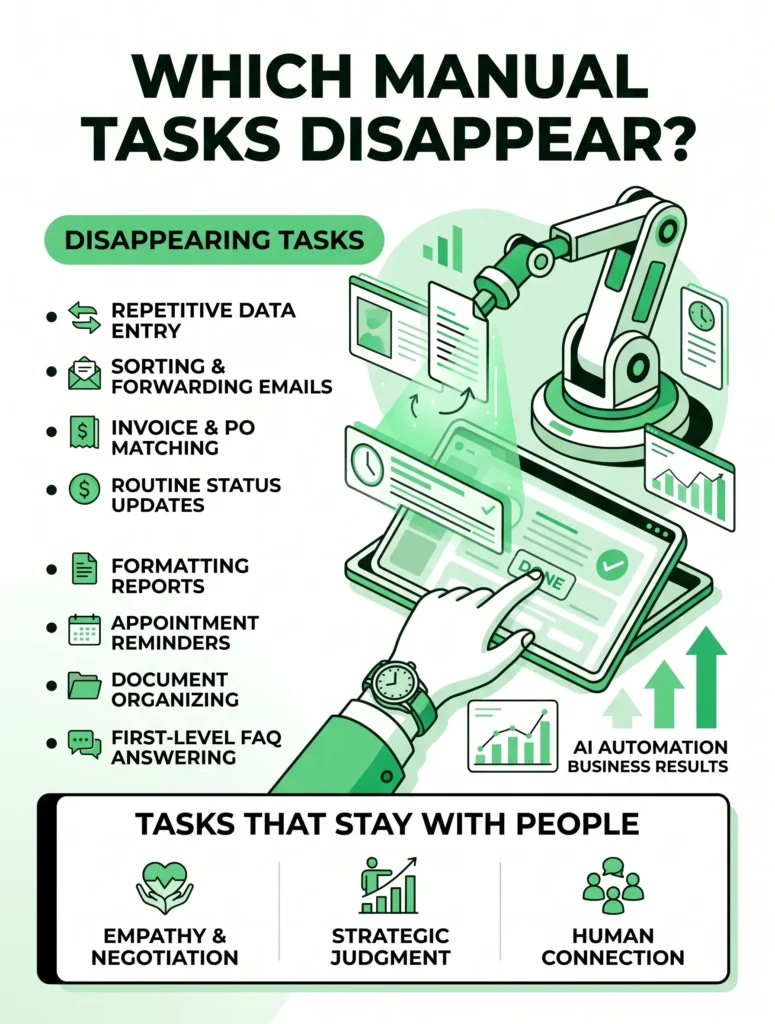
See how AI automation business results show up in daily operations: tasks that vanish, time saved, and how to measure them.

This is manual task automation at its most useful. Some tasks vanish completely, while others turn into short review steps where a person checks the AI‘s work. Tasks that need empathy, negotiation, or strategic judgment stay with people. Removing repetitive work is where AI automation business results start to appear in daily numbers.

How Can Businesses Measure Time Savings?

Without measurement, improvement is just a feeling. To track operational efficiency and time savings, follow these steps:

  1. Record a baseline: Before automating, note how long each task takes, how often it happens, and how many people are involved.
  2. Track the same metrics after launch: Use identical definitions so the comparison is fair.
  3. Calculate hours saved: Use this formula: (old minutes − new minutes) × number of tasks.
  4. Convert time into money: Multiply hours saved by the average hourly cost of the team.
  5. Add quality measures: Track error rates, rework, and customer complaints alongside speed.
  6. Review at 30, 60, and 90 days: Early figures can be misleading, so look for steady trends.

Useful metrics to watch include:

  • Cycle time from request to completion
  • Average response or turnaround time
  • Tasks handled per employee
  • Error and rework rates
  • Size of the backlog

Sharing these numbers helps leaders see AI automation business results in concrete terms instead of vague promises.

What Other Benefits Show Up Beyond Time?

Time is only one part of the story. Companies often report:

  • Higher accuracy: Fewer typos, missed steps, and duplicate entries
  • Faster customer service: Shorter waits and more consistent answers
  • Better employee experience: Less boredom, less burnout, more meaningful work
  • Improved visibility: Real-time dashboards replace outdated reports
  • Easier scaling: Volume grows without a matching rise in workload

How to Get Started

You do not need to automate everything at once. A simple path looks like this:

  • Pick one process: Choose something repetitive, frequent, and clearly defined
  • Map every step: Write down who does what, using which tools
  • Check your data: Clean and organize the information the process depends on
  • Choose the right tools: Look for platforms that integrate with your existing software
  • Set guardrails: Decide where a human must review or approve
  • Run a pilot: Test with a small team and compare against your baseline
  • Expand gradually: Apply what you learn to the next process

Starting with one focused project inside your wider business process automation plan keeps risk low. Small pilots make AI automation business results easier to prove before you scale.

Common Mistakes to Avoid

  • Automating a broken process instead of fixing it first
  • Skipping the baseline, which makes success impossible to prove
  • Removing human review from high-stakes decisions
  • Ignoring employee training and communication
  • Choosing tools that do not connect to your existing systems

How Technexia Can Help

Technexia is an AI-powered digital innovation partner that integrates strategy, automation, data intelligence, and AI systems to build scalable digital ecosystems. Our services support every stage of your automation journey:

  • AI & Data: AI portals, automation, data science, intelligent solutions, and smart systems that connect your tools and remove repetitive work
  • Development: web and mobile platforms, ecommerce builds, and integrations using WordPress, .NET, React, Shopify, and Webflow
  • UI/UX Design: intuitive dashboards, portals, and experience flows that make new systems easy to adopt
  • Digital Growth: SEO, Google Ads, performance marketing, and analytics to measure impact on revenue

We work with industries including tourism and hospitality, real estate, education, transportation, and healthcare. Whether you need to improve a single workflow or transform AI workflows across departments, our team can design a solution around your goals and help you achieve reliable AI automation results.

Conclusion

Automation changes daily operations by removing routine work, connecting systems, and giving people time back. Start with one process, measure the baseline, and track manual task automation gains alongside quality and customer impact. Over time, steady improvements in operational efficiency add up to a business that runs faster and more smoothly.

Ready to see what automation can do for your team? Contact Technexia today to book a consultation and get a tailored plan for achieving real AI automation business results.

Frequently Asked Questions

Is automation only suitable for large companies?

No. Small teams often benefit quickly, because even a few hours saved each week represents a large share of their capacity.

What happens to employees whose tasks are automated?

Most move into analysis, customer relationships, and creative work. Training and open communication make this transition smoother.

How soon can a business expect results?

Simple workflows can show improvement within weeks. Larger, multi-department projects usually take a few months to reach full impact.

Can AI tools work with the software I already use?

In most cases, yes. Modern platforms connect to common CRMs, accounting tools, and communication apps through integrations or APIs.

How do I keep AI outputs accurate?

Use clean data, define clear rules, add human review for important steps, and monitor results regularly so errors are caught and corrected early.

Read More
Automate Business Reporting With AI 7 Proven Ways
AI & Automation
October 7, 2026By Team Technexia

Automate Business Reporting With AI: 7 Proven Ways

Every week, teams lose hours copying numbers between spreadsheets, formatting slides, and chasing colleagues for updates. If you want to automate business reporting with AI, you can hand that routine work to software and spend your time on decisions instead. Done right, reports arrive on schedule, numbers stay consistent, and insights surface without anyone digging through raw data.

This guide explains what AI can do, how to set it up, and how to keep the results accurate. Automating business reporting is an important step toward becoming a more data-driven organization, but its full value becomes clearer when reporting improvements are part of a wider AI transformation strategy. Businesses can combine automated reports with intelligent workflows, connected data systems, customer support automation, and AI-assisted decision-making to improve efficiency across departments. A structured approach to AI business transformation helps companies prioritize high-impact opportunities, measure return on investment, and expand successful initiatives in line with their long-term growth goals.

Why Businesses Should Automate Business Reporting With AI

Manual reporting is slow and easy to get wrong. AI reporting automation connects your data sources, processes the numbers, and delivers finished reports without repetitive effort. The main benefits include:

  • Time savings: Hours of weekly copy-paste work disappear
  • Fewer human errors: Formulas and data pulls run the same way every time
  • Faster insights: Trends and problems show up as soon as the data updates
  • Consistency: Every team works from the same metrics and definitions
  • Scalability: Adding a new region, product, or client doesn’t mean building a new report by hand
  • Better decisions: Leaders get clear summaries instead of overwhelming tables

Can AI Generate Business Reports?

Yes. Modern AI tools can pull data from multiple systems, calculate key metrics, and write a readable narrative around the results. Automated data analysis goes beyond simple number crunching, because AI can compare periods, detect patterns, and explain what changed. Common reports AI can produce include:

  • Weekly and monthly sales performance summaries
  • Marketing campaign and channel reports
  • Financial snapshots and expense breakdowns
  • Customer support and satisfaction reports
  • Inventory and operations updates
  • Executive briefings that condense many reports into one page

This is why more teams choose to automate business reporting with AI rather than rebuild the same documents every month.

How to Automate Business Reporting With AI: Step by Step

A structured approach prevents messy results. Follow these steps:

  1. Define the goal and audience: Decide who reads the report, what decisions it supports, and which metrics matter most.
  2. List your data sources: Include your CRM, accounting software, ad platforms, website analytics, and spreadsheets.
  3. Clean and standardize the data: Fix duplicates, inconsistent names, and missing values before automating anything.
  4. Choose your tools: You will typically need a data warehouse or connector, a BI or dashboard tool, an AI model for summaries, and a scheduler.
  5. Build templates and logic: Set up the layout, calculations, and rules for how the AI should describe results.
  6. Schedule and distribute: Send reports by email, Slack, or a shared portal at the right time for each audience.
  7. Review and refine: Collect feedback and adjust the templates as your business changes.

How Can AI Summarize Dashboards?

Dashboards are powerful but can be hard to read at a glance. AI can turn charts and KPIs into short, plain-language explanations. It can:

  • Read the key numbers and describe the story they tell
  • Highlight unusual spikes or drops and flag possible causes
  • Compare the current period to the previous one or to targets
  • Answer natural-language questions such as “why did revenue dip last week?”
  • Suggest follow-up actions based on the trends

To get useful summaries, give the AI context: metric definitions, target values, and the audience it is writing for. Summaries are a quick entry point if you want to automate business reporting with AI without rebuilding your existing dashboards.

How Should Reports Be Validated?

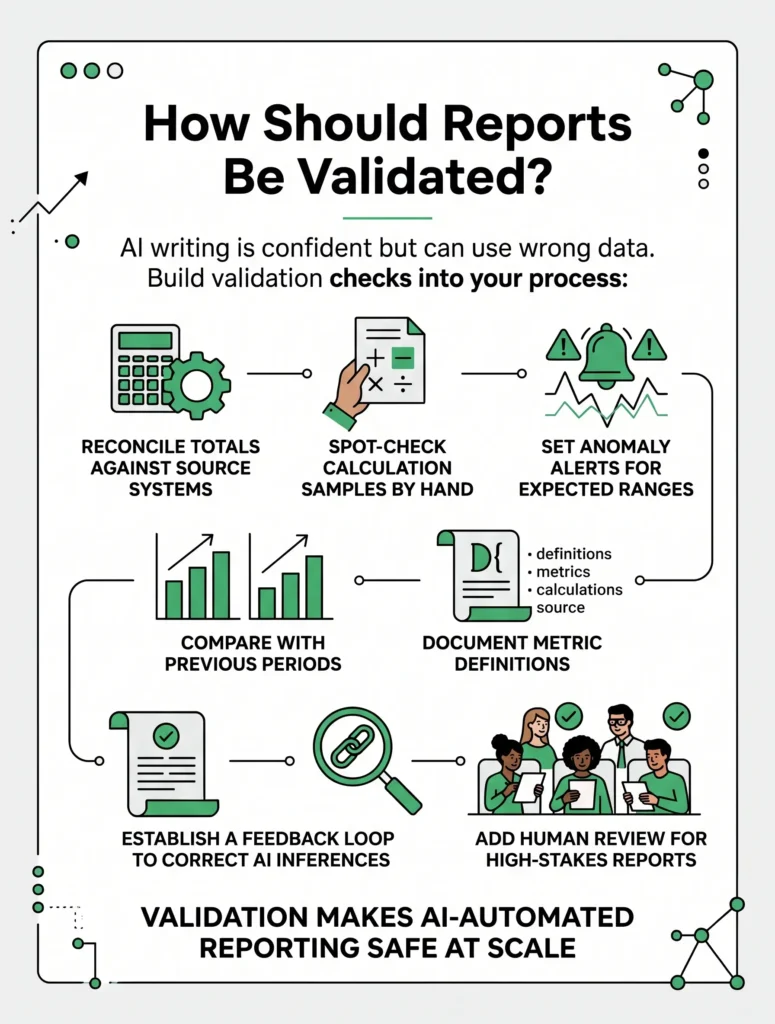
AI can write confidently even when the underlying data is wrong, so validation isn’t optional. Build these checks into your process:

  • Reconcile totals against the source systems
  • Spot-check samples of calculations by hand each cycle
  • Set anomaly alerts for numbers that fall outside expected ranges
  • Compare with previous periods to catch sudden, unexplained changes
  • Document metric definitions so “revenue” or “active user” means the same thing everywhere
  • Keep an audit trail showing where each figure came from
  • Add human review for board reports, financial statements, and other high-stakes documents

Validation is what makes it safe to automate business reporting with AI at scale.

Which Reports Should You Automate First?

Start where the payoff is highest, and the risk is lowest. Good candidates are reports that are:

  • Recurring, such as weekly or monthly updates
  • Based on structured data from reliable systems
  • Time-consuming to build by hand
  • Read by many people, so a small improvement is multiplied

Leave one-off strategic analyses and sensitive documents for later, once your process is proven.

Common Mistakes to Avoid

  • Feeding messy, inconsistent data into the system
  • Skipping metric definitions, which leads to conflicting numbers
  • Trusting automated data analysis without any human checks
  • Creating too many reports that nobody reads
  • Leaving reports without a clear owner
  • Overlooking access controls and data privacy

Avoiding these pitfalls is essential when you automate business reporting with AI.

How Technexia Can Help

Building reliable reporting takes strategy, engineering, and thoughtful design working together, which is where Technexia fits in. Technexia is an AI-powered digital innovation partner that combines strategy, automation, data intelligence, and AI systems to build scalable digital ecosystems. Our services support every stage of the process:

  • AI & Data: AI portals, automation, data science, intelligent solutions, and smart systems that pull your data together and turn it into insight
  • Development: custom web and mobile platforms, ecommerce builds, and integrations using WordPress, .NET, React, Shopify, and Webflow
  • UI/UX Design: clean, intuitive dashboards and report layouts that people actually enjoy using
  • Digital Growth: SEO, Google Ads, performance marketing, and analytics to track what drives revenue

We support industries including tourism and hospitality, real estate, education, transportation, and healthcare. If you plan to automate business reporting with AI, our team can design AI reporting automation that fits your tools, your data, and your goals.

Conclusion

Reporting should help you make decisions, not slow you down. The path is straightforward: choose your first reports, clean your data, connect your sources, let AI draft the analysis, and validate every output. Over time, you will automate business reporting with AI with growing confidence, freeing your team for strategic work.

Ready to turn scattered data into clear, automated insights? Contact Technexia today to discuss your reporting needs and get a tailored roadmap for your business.

Frequently Asked Questions

Do I need a data science team to get started?

Not necessarily. Many tools are built for non-technical users, though a specialist partner helps when you have complex systems or custom requirements.

Is it safe to use sensitive company data with AI tools?

It can be, provided you choose vendors with strong security standards, restrict access by role, and avoid sharing more data than the task requires.

How often should automated reports refresh?

It depends on the decision. Operational metrics may need daily or real-time updates, while financial and strategic reports are usually fine weekly or monthly.

Can small businesses benefit from this?

Yes. Even a small team can save hours each week by automating a few recurring reports, and starting small keeps costs manageable.

What if my data is scattered across many tools?

That is common. Connectors and integrations can pull data from different platforms into one place, and cleaning it first ensures the reports are trustworthy.

Read More
AI Business Transformation 7 Proven Ways to Scale
AI & Automation
October 5, 2026By Team Technexia

AI Business Transformation: 7 Proven Ways to Scale

Every industry is under pressure to do more with less, and artificial intelligence has become the most practical way to make that happen. AI business transformation is the shift from running a company on manual effort, disconnected tools, and gut feeling to running it on connected data, intelligent systems, and automated decisions. It is not a single software purchase. It is a change in how work moves through your organization.

This guide explains what that change looks like, which processes shift first, how to build a plan, and how to measure ROI. It also draws on the work Technexia does to show how AI business transformation plays out in the real world. Use it as a reference hub for every stage of your journey.

What Is AI Business Transformation?

AI business transformation means building artificial intelligence into the operations, products, and decisions that drive your company. Rather than treating AI as an occasional add-on, you make it part of daily work. Five layers usually make this possible:

  • Data layer: Clean, connected data from your CRM, ERP, website, finance tools, and spreadsheets
  • Automation layer: Workflows that move information and trigger actions without manual effort
  • Intelligence layer: Models that predict, classify, summarize, and generate content
  • Experience layer: Portals, apps, dashboards, and assistants that employees and customers actually use
  • Governance layer: Security, privacy rules, access controls, and human oversight

Unlike a one-off software upgrade, this kind of change never really ends. Models learn, data grows, and processes are refined again and again. That is why the most successful programs treat transformation as a capability to build, not a project to finish.

What Does AI Transformation Look Like?

The clearest way to picture it is to compare a company before and after. In practice, AI business transformation shows up in every corner of the organization:

  • Reporting: From copying numbers into spreadsheets to dashboards that refresh and explain themselves
  • Customer support: From crowded inboxes to instant answers, smart routing, and faster resolutions
  • Sales: From cold lists to scored leads and personalized follow-ups
  • Operations: From reactive firefighting to forecasts, alerts, and planned action
  • Decision-making: From opinions and delays to evidence and speed
  • Customer experience: From one-size-fits-all messaging to personalized journeys

Most companies move through five stages:

  1. Explore: Teams experiment with AI tools on individual tasks
  2. Automate: Repetitive workflows are handed to software
  3. Integrate: Systems share data, and AI works across departments
  4. Optimize: Performance is tracked, tuned, and improved continuously
  5. Reinvent: New products, services, and revenue models become possible

Few organizations sit at a single stage across the whole company. Finance might be at stage three while marketing is still at stage one, and that is perfectly normal.

Automate Business Reporting With AI: 7 Proven Ways

Automating business reporting with AI helps organizations turn raw data into timely, actionable insights without relying on repetitive manual work. AI-powered reporting workflows can collect information from different systems, generate report summaries, highlight unusual changes, and help teams identify trends more efficiently. When integrated into a broader business transformation strategy, these capabilities can improve decision-making, reduce reporting delays, and give leaders a clearer view of operational performance. Businesses can start with recurring reports and gradually expand automation as their data systems and reporting processes mature.

Why Companies Are Prioritizing AI Business Transformation Now

Several forces are pushing leaders to act:

  • Rising operating costs: Manual work is expensive and hard to scale
  • Higher customer expectations: People expect instant, personalized service at any hour
  • Data overload: Companies collect more information than teams can analyze by hand
  • Mature tools: AI platforms are now accessible, affordable, and easier to integrate
  • Competitive pressure: Rivals who move first gain speed and efficiency advantages
  • Talent gaps: Automation lets small teams deliver the output of much larger ones

None of these pressures is going away, which is why AI business transformation has moved from an innovation experiment to a board-level priority.

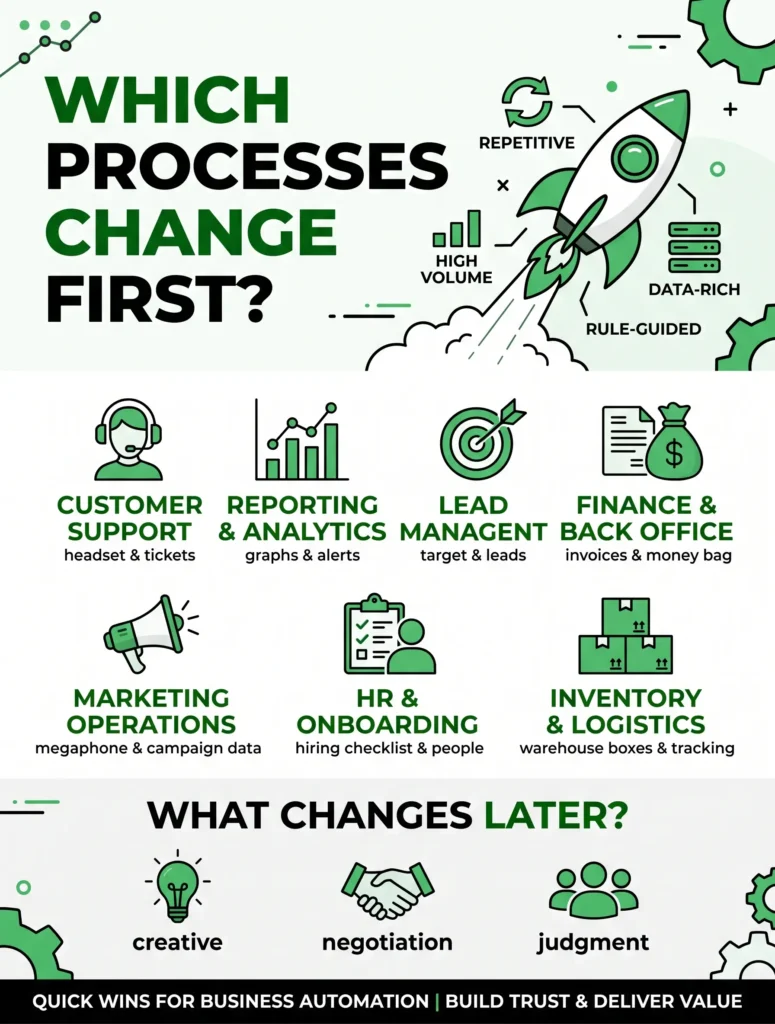
Which Processes Change First?

Not everything should be automated at once. The first processes to change are usually repetitive, high-volume, rule-guided, and rich in data. This is where business automation delivers quick, visible wins that build trust across the company. 

Typical starting points include:

  • Customer support: Ticket tagging, routing, FAQ answers, and reply drafting
  • Reporting and analytics: Scheduled reports, dashboard summaries, and anomaly alerts
  • Lead management: Capturing, scoring, and following up with prospects
  • Finance and back office: Invoice matching, expense checks, and reconciliations
  • Marketing operations: Content repurposing, campaign reporting, and keyword monitoring
  • HR and onboarding: Application screening, policy questions, and new-hire checklists
  • Inventory and logistics: Stock tracking, supplier reminders, and delivery updates

Processes that involve negotiation, creative direction, or ethically sensitive judgment tend to change later, and usually with humans firmly in charge. Picking the right first targets is one of the most important early decisions in any AI business transformation.

How to Automate Customer Support With AI

AI-powered customer support is a practical way to transform business operations while improving the customer experience. Businesses can use AI to answer frequently asked questions, categorize support tickets, route requests to the right teams, and provide faster responses across multiple channels. By automating repetitive inquiries while allowing human agents to handle sensitive or complex issues, organizations can improve service efficiency and scale customer support as demand grows. This makes customer support automation a valuable starting point for businesses pursuing AI-driven transformation.

How Rule-Based Workflows Evolve Into Smarter Systems

Traditional business automation follows fixed rules: if this happens, do that. It works well when inputs are predictable, but it struggles the moment something unusual appears. Intelligent automation adds AI to the mix, so the system can read documents, understand intent, handle exceptions, and improve over time. The differences are significant:

  • Inputs: Rule-based tools need structured data, while intelligent systems can process emails, PDFs, images, and voice
  • Exceptions: Rule-based tools stop or fail, while intelligent systems flag issues and ask for guidance
  • Learning: Rule-based tools stay the same until someone edits them, while intelligent systems improve with feedback
  • Scope: Rule-based tools handle single steps, while intelligent systems can manage multi-step processes across several tools
  • Interaction: Rule-based tools run silently, while intelligent systems can explain what they did and why

Modern intelligent automation also includes AI agents, which plan and carry out tasks across your software with limited supervision. This progression sits at the heart of AI business transformation, because it moves companies from saving minutes on single tasks to reshaping entire workflows.

AI automation can transform business operations by reducing repetitive work, improving efficiency, and helping teams make faster, data-driven decisions. From streamlining customer service and marketing to improving reporting and daily workflows, automation can deliver measurable benefits when it is aligned with clear business goals. If you want to understand how to implement these improvements as part of a broader strategy, explore how AI business transformation helps companies integrate intelligent systems, scale operations, and measure return on investment while maintaining human oversight.

Clients and Portfolio: How AI Business Transformation Shows Up in Practice

Technexia’s portfolio spans artificial intelligence, CMS, digital marketing, ecommerce, and mobile apps, with clients across the USA, Australia, Pakistan, the UAE, and Canada. Our industries range from tourism, healthcare, and transportation to real estate, education, finance, sports, jewellery, and skincare. Looking at real client work and reading AI transformation case studies more broadly is the fastest way to understand what is possible. Here is how AI typically applies across the sectors we serve:

  • Tourism and hospitality: Booking portals, personalized itineraries, multilingual assistants, and demand forecasting
  • Real estate and smart property: Lead qualification, property matching, automated follow-ups, and listing content
  • Digital learning and education: Admissions workflows, learning portals, student support assistants, and progress insights
  • Transportation and mobility: Booking and quoting portals, dispatch coordination, and customer status updates
  • Healthcare and wellness: Appointment scheduling, patient intake, and secure information portals, all with strict privacy controls
  • Ecommerce and retail: Product recommendations, inventory forecasting, and automated customer service

Every client starts from a different baseline, so no two journeys look alike. What they share is a clear goal, a phased plan, and a focus on measurable impact, which is the essence of AI business transformation.

What Can AI Transformation Case Studies Teach You?

Well-documented examples are valuable because they reveal the messy middle, not just the polished outcome. Common lessons include:

  • Start with one painful process: A focused pilot beats a vague company-wide initiative
  • Data quality decides results: Clean inputs matter more than fancy models
  • Design for adoption: Tools that people avoid deliver no return
  • Keep humans in the loop: Review points catch errors and build trust
  • Measure from day one: Without a baseline, success is just an opinion
  • Scale in stages: Proven pilots become templates for the next department

Each of these lessons applies to AI business transformation in any sector, from a small clinic to a multi-country enterprise.

Not every success story is equally reliable, so read them critically. Ask these questions:

  • What was the starting point, and how was it measured?
  • Over what time frame were the results achieved?
  • What did the project cost in tools, time, and training?
  • Were the gains sustained, or was it a short-term spike?
  • Would the same approach work with your data and team size?

Applying that filter to AI transformation case studies protects you from unrealistic expectations.

How to Plan Your Journey Step by Step

A clear AI implementation roadmap keeps ambition realistic and progress visible. Use these steps:

  1. Define outcomes: Tie every initiative to a business goal, such as lower cost per ticket, faster reporting, or higher conversion.
  2. Assess readiness: Review your data quality, existing tools, team skills, and security posture.
  3. Prioritize use cases: Score ideas by impact and effort, and begin with high-impact, low-effort candidates.
  4. Fix the data foundation: Clean, connect, and document the data your first use cases depend on.
  5. Choose your approach: Decide what to buy off the shelf, what to customize, and where to partner with specialists.
  6. Pilot small: Test with one team, compare against the manual process, and collect feedback.
  7. Set governance: Define permissions, approval steps, privacy rules, and ownership for each system.
  8. Train your people: Show employees how the new tools help them, and give them a channel for feedback.
  9. Scale and iterate: Expand what works, retire what does not, and revisit priorities every quarter.

A good AI implementation roadmap is a living document, and it keeps AI business transformation tied to business outcomes rather than technology trends.

How Should ROI Be Measured?

Measuring ROI is the discipline that separates successful AI business transformation from expensive experiments. Track two kinds of value.

Hard, quantifiable returns

  • Hours saved per week or month
  • Reduction in cost per task, ticket, or transaction
  • Error and rework rates
  • Cycle time, such as days to close a deal or resolve an issue
  • Revenue lift from better conversion, upselling, or retention

Softer, strategic returns

  • Customer satisfaction and loyalty
  • Employee morale and reduced burnout
  • Speed and quality of decision-making
  • Capacity to grow without proportional hiring

A simple formula helps: ROI = (Total Gain − Total Cost) ÷ Total Cost × 100. Be thorough when counting costs

  • Software licenses and usage fees
  • Integration and development work
  • Data cleaning and preparation
  • Training and change management
  • Ongoing monitoring and maintenance

Follow these habits for trustworthy numbers

  • Record a baseline before launch
  • Choose two or three primary metrics per project
  • Set review points at 30, 90, and 180 days
  • Separate one-time savings from recurring ones
  • Share results openly, including disappointments

Return from business automation often appears first, because time and cost savings are easy to count. Strategic gains such as better decisions or customer loyalty take longer, so track them over quarters rather than weeks. Reliable AI transformation case studies always show baselines and time frames for this reason. Honest measurement keeps AI business transformation credible with your leadership team.

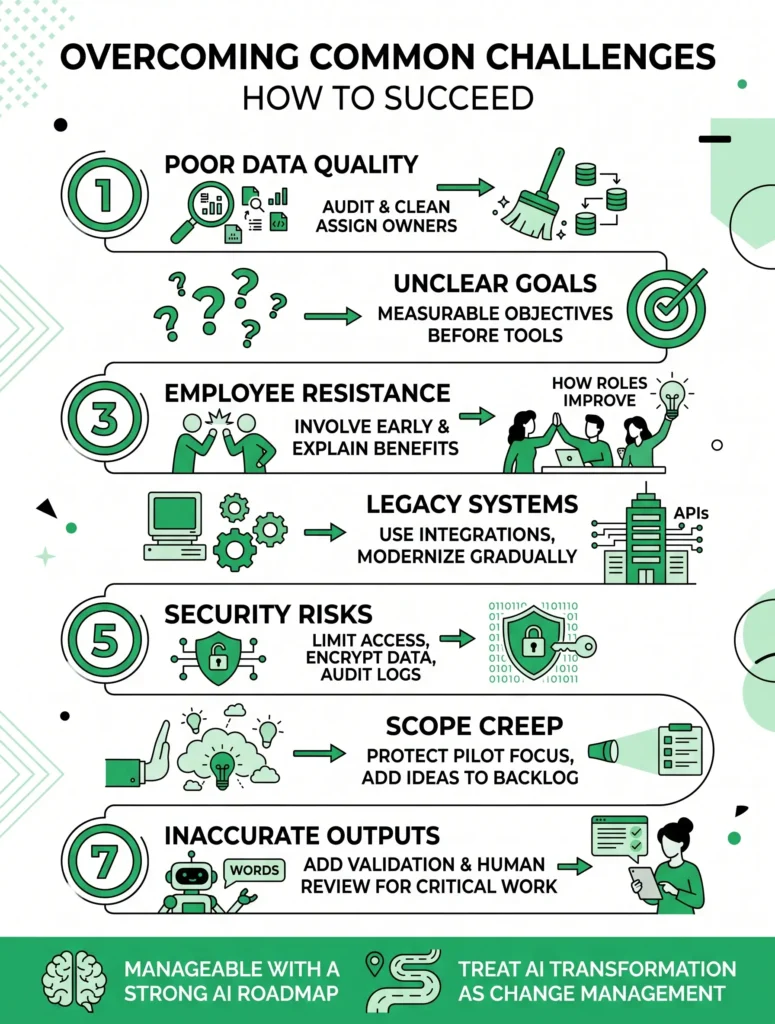
Common Challenges and How to Overcome Them

  • Poor data quality: Audit and clean data before building, and assign data owners
  • Unclear goals: Write measurable objectives before selecting any tool
  • Employee resistance: Involve staff early and explain how roles will improve
  • Legacy systems: Use integrations and APIs, or modernize gradually
  • Security and privacy risks: Limit access, encrypt data, and keep audit logs
  • Scope creep: Protect your pilot’s focus and add new ideas to a backlog
  • Inaccurate outputs: Intelligent automation tools that read documents or write text can misread or invent details, so add validation steps and human review for critical work

Most of these risks are manageable when anticipated early, which is another reason to maintain a strong AI implementation roadmap. Leaders who treat AI business transformation as a change-management exercise, not just a technical one, tend to see better adoption.

Building the Right Team and Culture

Technology alone does not deliver results. People do. Consider these building blocks:

  • Executive sponsor: A leader who removes obstacles and keeps priorities clear
  • Cross-functional team: Members from operations, IT, data, and the departments affected
  • AI champions: Enthusiastic employees who coach colleagues and share tips
  • Continuous training: Short, practical sessions rather than one-off workshops
  • Clear ownership: Every workflow and model has a named responsible person
  • Feedback loops: Simple ways for staff to report errors and suggest improvements

Companies often find that business automation frees people from routine tasks, and that reskilling is easier when employees see the change as an upgrade rather than a threat. Cultural readiness is a quiet driver of long-term AI business transformation.

How Technexia Can Help

Technexia is an AI-powered digital innovation partner that integrates strategy, automation, data intelligence, and AI systems into scalable digital ecosystems. Our Innovation Method guides clients through six steps: Insight and Discovery, Strategy and Architecture, Experience and Design, Intelligent Development, Performance and Optimization, and Growth and Evolution. It is a practical framework for AI business transformation. Our services include:

  • AI & Data: AI portals, automation, data science, intelligent solutions, and smart systems, including intelligent automation workflows that fit your existing tools
  • Development: web and mobile platforms, AI-powered portals, and ecommerce ecosystems built with WordPress, .NET, React, Shopify, and Webflow
  • UI/UX Design: prototyping, branding, motion design, and experience flows that make new systems simple and enjoyable to use
  • Digital Growth: SEO, Google Ads, social media, performance marketing, and analytics to drive visibility and measurable revenue

We help teams shape an AI implementation roadmap that matches their goals, budget, and data maturity, and we stay involved through optimization so results keep improving. Our experience covers tourism and hospitality, real estate and smart property, digital learning, transportation and mobility, and healthcare and wellness. Whether you need one focused business automation project or a company-wide AI business transformation, our team can guide you from discovery to launch and beyond.

What Comes Next for Intelligent Businesses?

The pace of change is not slowing. Watch these developments:

  • AI agents: Software that plans and completes multi-step tasks across your tools
  • Predictive operations: Forecasts that prevent problems instead of reporting them afterward
  • Deeper personalization: Experiences tailored to each customer in real time
  • Conversational interfaces: Asking your data questions in plain language
  • Responsible AI: Stronger expectations around transparency, fairness, and privacy

Preparing for these shifts is easier when intelligent automation is already part of daily operations. Companies that begin AI business transformation now build years of learning, data, and internal skill that latecomers will struggle to match.

Conclusion

AI business transformation is a journey of steady, measurable steps rather than one giant leap. Start with a single, painful process. Clean your data, pilot carefully, measure honestly, and keep people at the center. Over time, those small wins compound into faster operations, happier customers, and a business ready for what comes next.

Ready to begin? Contact Technexia today to explore our portfolio, review AI transformation case studies from the industries we serve, and get a tailored AI implementation roadmap for your company. Let’s turn your goals into a smarter, more scalable operation, and start your AI business transformation together.

Frequently Asked Questions

How long does a typical transformation take?

Timelines vary by size and complexity. A focused pilot can show results in a few weeks, while company-wide change usually unfolds over 12 to 24 months in stages.

Do small and mid-sized companies need to invest heavily?

No. Many begin with a single workflow and modest tools, then expand once savings appear. Starting small keeps risk and cost under control.

Will AI replace my employees?

AI mainly takes over repetitive tasks. Most companies redeploy their people toward analysis, creativity, and customer relationships, often with training to support the move.

What data do I need before starting?

You need accurate, accessible data related to your chosen process, such as customer records, transactions, or support history. It does not have to be perfect, but it should be organized and documented.

How do I keep my company’s data secure?

Choose vendors with strong security certifications, restrict access by role, encrypt sensitive information, keep activity logs, and share only what each system truly needs.

Read More
How to Automate Customer Support With AI 7 Proven Ways
AI & Automation
October 2, 2026By Team Technexia

How to Automate Customer Support With AI: 7 Proven Ways

Customers expect fast answers, and support teams are stretched thin. If you are wondering how to automate customer support with AI, the good news is that you don’t need to replace your team. You need smart workflows that handle repetitive work so your people can focus on complex, high-value conversations. Done well, AI customer support cuts response times, lowers costs, and keeps quality consistent across every channel.

This guide covers what AI can do, how to build workflows, when to hand off to a human, and how to connect everything to your existing tools.

What Support Tasks Can AI Handle?

Modern support automation works best on high-volume, repeatable tasks. Common examples include:

  • Answering FAQs about pricing, shipping, returns, and account settings
  • Tagging and categorizing tickets by topic and urgency
  • Routing tickets to the right team or agent
  • Drafting replies for agents to review and send
  • Summarizing long email threads and chat histories
  • Collecting order numbers and account details before a human joins
  • Sending status updates and post-resolution surveys
  • Translating messages for multilingual customers

Tasks that need empathy, negotiation, or careful judgment should stay with people. Customer support automation can improve response times and reduce repetitive workloads, but it is only one part of a successful AI implementation strategy. Businesses can achieve broader operational improvements by integrating AI into reporting, sales, data analysis, and other core workflows. Understanding how AI business transformation works helps organizations identify the right processes to improve, develop a practical implementation roadmap, and scale successful automation initiatives while keeping customer experience and business objectives at the center of every decision.

Why Businesses Are Investing in AI Customer Support

The appeal of AI customer support is practical rather than trendy:

  • 24/7 availability: Customers get help outside office hours
  • Faster first response: Simple questions are answered in seconds
  • Lower cost per ticket: Agents spend less time on repetitive work
  • Consistent answers: Every customer gets the same accurate information
  • Easy scaling: Ticket spikes during sales or launches no longer overwhelm the team

Understanding how to automate customer support with AI starts with these benefits, because they tell you which metrics to track later.

How to Automate Customer Support With AI: Step by Step

Follow this sequence to build a system that works and can grow.

  1. Audit your tickets: Review three to six months of conversations and group them by topic. You will usually find that a handful of question types make up most of the volume.
  2. Pick your first use cases: Start with low-risk, high-volume requests such as order status, password resets, and store hours.
  3. Build a clean knowledge base: AI is only as good as the content behind it. Update help articles, policies, and product details before you automate anything.
  4. Choose your tools: You will typically need a helpdesk, an AI chatbot for customer conversations, and an automation layer that connects them to your other systems.
  5. Design your workflows: Map each request from start to finish. Well-built customer support workflows follow a simple pattern: the customer writes in, AI detects the intent, it pulls an answer from the knowledge base, and it either resolves the request or escalates.
  6. Test with a small group: Launch to a limited audience or a single channel first, and have agents review the AI’s responses.
  7. Measure and improve: Review failed conversations every week and update your content and rules accordingly.

Can AI Connect to a CRM?

Yes, and this connection is what turns generic replies into personal ones. Most modern AI tools integrate with popular CRMs like Salesforce, HubSpot, and Zoho through native integrations or APIs. Once connected, AI can:

  • Pull a customer’s purchase history and past tickets into the conversation
  • Update contact records automatically after each interaction
  • Log conversation summaries so agents never start from zero
  • Trigger follow-up tasks, such as a sales call after a product question
  • Personalize answers based on plan type, location, or account status

Whether you are learning how to automate customer support with AI for the first time or upgrading an existing setup, CRM integration is the piece that makes answers feel relevant.

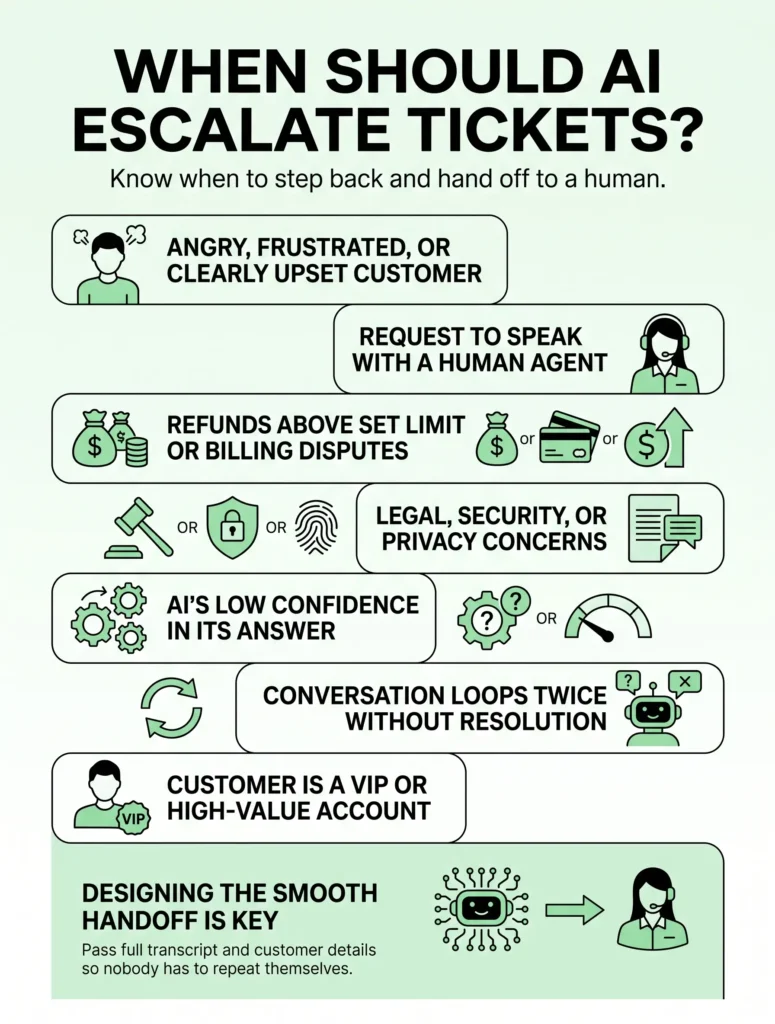
When Should AI Escalate Tickets?

Knowing when to step back is as important as knowing when to act. Set clear rules, so AI hands the conversation to a human when:

  • The customer is angry, frustrated, or clearly upset
  • The customer asks to speak with a person
  • The issue involves refunds above a set amount or billing disputes
  • The request touches legal, security, or privacy matters
  • The AI’s confidence in its answer is low
  • The conversation loops twice without a resolution
  • The customer is a VIP or high-value account

A smooth handoff matters just as much. Pass the full transcript and customer details to the agent so nobody has to repeat themselves. Designing this exit ramp is a key part of how to automate customer support with AI responsibly.

What Metrics Show Your Automation Is Working?

Track a few numbers consistently to judge whether your support automation is paying off:

  • First response time: Should drop noticeably after launch
  • Resolution time: The average time to fully solve an issue
  • Deflection rate: The share of requests solved without an agent
  • Customer satisfaction (CSAT): Must stay steady or improve
  • Escalation rate: Shows where your AI needs better training

Common Mistakes to Avoid

  • Automating everything at once instead of starting small
  • Feeding the system outdated or contradictory help content
  • Hiding the option to reach a human agent
  • Launching an untested AI chatbot that gives confident but wrong answers
  • Ignoring data privacy and compliance requirements

Knowing how to automate customer support with AI also means knowing what not to automate.

How Technexia Can Help

Building this system takes strategy, engineering, and design working together, which is where Technexia fits in. Technexia is an AI-powered digital innovation partner that combines strategy, automation, data intelligence, and AI systems to build scalable digital ecosystems. Here is how our services support your customer support goals:

  • AI & Data: AI portals, automation, data science, intelligent solutions, and smart systems to build and connect custom customer support workflows
  • Development: web and mobile platforms, ecommerce builds, and integrations using WordPress, .NET, React, Shopify, and Webflow
  • UI/UX Design: intuitive help centers, chat experiences, and user flows that make self-service easy
  • Digital Growth: SEO, Google Ads, and analytics to attract customers and measure results

We work with industries including tourism and hospitality, real estate, education, transportation, and healthcare. If you want a partner who understands how to automate customer support with AI from strategy to launch, our team is ready to help.

Conclusion

Learning how to automate customer support with AI is not about removing the human touch. It is about giving your team the time and tools to use it where it counts. Start with a ticket audit, automate simple requests first, connect your CRM, set clear escalation rules, and improve continuously.

Ready to build a smarter support system? Contact Technexia today to discuss your goals and get a tailored automation roadmap for your business.

Frequently Asked Questions

How much does it cost to set up automated support?

Costs depend on your ticket volume, chosen tools, and integration complexity. Many businesses start with a small pilot to keep the initial investment low.

How long does implementation take?

A basic setup can go live in a few weeks. More advanced builds with multiple integrations may take a couple of months.

Will AI replace my human support agents?

No. AI handles repetitive requests, while agents focus on sensitive, complex, and relationship-driven conversations.

Is customer data safe when using AI tools?

It can be, if you choose vendors with strong security standards, limit the data shared with the AI, and follow regulations such as GDPR.

Which channels can be automated?

Website chat, email, WhatsApp, social media messages, and help center search can all be automated, and you can add channels gradually.

Read More
What Is an AI Agent 7 Smart Ways to Grow Faster
AI & Automation
September 30, 2026By Team Technexia

What Is an AI Agent? 7 Smart Ways to Grow Faster

Every few years, a technology changes how work gets done, and AI agents are shaping up to be the next one. So, what is an AI agent, and how can your business put one to work? In short, it is software that can understand a goal, decide on the steps, use tools, and complete tasks with limited human input. This guide explains how agents work, how they differ from chatbots, and where they deliver real value.

What Is an AI Agent?

An AI agent is a software system powered by artificial intelligence that can perceive information, reason about it, and take action to reach a goal. Unlike a basic script that follows fixed rules, an agent adapts to context. Give it an objective such as “research these leads and draft outreach emails,” and it plans the work, gathers data, and produces results. When several agents and tools are connected, they form autonomous AI workflows that run entire processes from start to finish.

How Does an AI Agent Work?

Understanding what is an AI agent also means understanding its core parts:

  • Goal: The outcome the agent is asked to achieve
  • Reasoning: An AI model that breaks the goal into steps and decides what to do next
  • Memory: Stored context, such as past conversations, preferences, and company knowledge
  • Tools: Connections to email, CRMs, databases, calendars, and other software it can use
  • Action loop: The cycle of acting, checking the result, and adjusting the plan
  • Guardrails: Rules and permissions that limit what the agent can do without approval

How Is an Agent Different From a Chatbot?

A common mix-up when learning what an AI agent is is treating it like a chatbot. They are related, but they do different jobs:

  • Purpose: A chatbot answers questions, while an agent completes tasks
  • Autonomy: A chatbot waits for each prompt, while an agent can plan and act on its own
  • Tool use: A chatbot mostly talks, while an agent updates records, sends emails, and runs reports
  • Complexity: A chatbot handles single exchanges, while an agent manages multi-step processes
  • Memory: A chatbot often forgets context, while an agent keeps track of progress and history
  • Oversight: A chatbot needs little supervision, while an agent needs clear permissions and checkpoints

Many businesses use both. A chatbot acts as the friendly front door, and agents do the heavy lifting behind the scenes.

What Business Tasks Can Agents Perform?

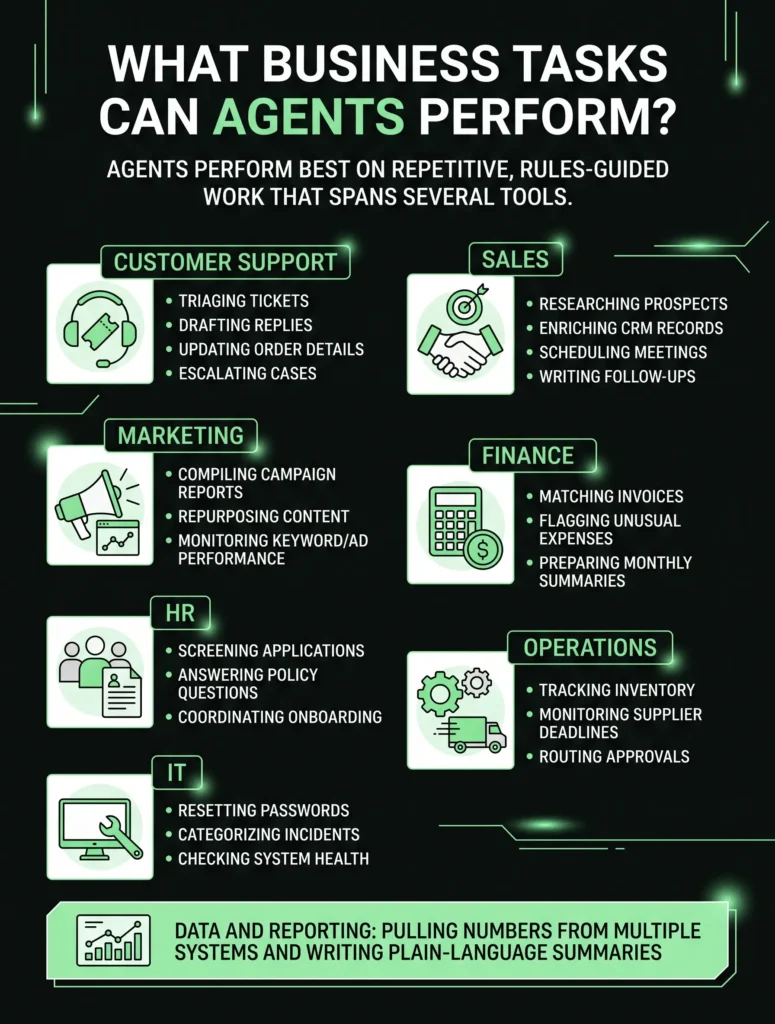
Agents perform best on repetitive, rules-guided work that spans several tools. 

Common examples by department include:

  • Customer support: Triaging tickets, drafting replies, updating order details, and escalating complex cases
  • Sales: Researching prospects, enriching CRM records, scheduling meetings, and writing follow-ups
  • Marketing: Compiling campaign reports, repurposing content, and monitoring keyword and ad performance
  • Finance: Matching invoices, flagging unusual expenses, and preparing monthly summaries
  • HR: Screening applications, answering policy questions, and coordinating onboarding steps
  • Operations: Tracking inventory, monitoring supplier deadlines, and routing approvals
  • IT: Resetting passwords, categorizing incidents, and checking system health
  • Data and reporting: Pulling numbers from multiple systems and writing plain-language summaries

Why Businesses Are Adopting AI Agents

Once you know what is an AI agent, the appeal of AI agents for business is easy to see:

  • Time savings: Routine tasks run in the background
  • Round-the-clock coverage: Work continues outside office hours
  • Consistency: Every task follows the same process and standards
  • Scalability: Workloads can grow without a matching increase in headcount
  • Lower operating costs: Less manual effort per task
  • Better use of people: Employees focus on strategy, creativity, and relationships

How to Get Started With AI Agents

Once you understand what is an AI agent, follow these steps to begin:

  1. Pick one process: Choose a repetitive, well-defined task with clear success criteria.
  2. Map the steps: Write down every action, decision, and tool involved.
  3. Prepare data and access. Clean your information and grant only the permissions the agent truly needs.
  4. Choose a platform: Select tools that integrate with your existing software and offer logging and controls.
  5. Set guardrails: Define what the agent can do alone and where a human must approve.
  6. Run a pilot: Test with a small team and compare results against the manual process.
  7. Measure and expand: Track time saved, error rates, and satisfaction, then extend to new tasks.

What Risks Should Businesses Watch For?

Anyone exploring what is an AI agent should also ask where things can go wrong:

  • Inaccurate outputs: Agents can make confident mistakes, so important results need review
  • Data privacy: Sensitive information must be protected and access limited
  • Over-broad permissions: An agent with too much access can cause costly errors
  • Unclear accountability: Every agent needs a human owner
  • Hidden costs: Usage fees and integrations can add up without monitoring
  • Team resistance: Staff need training and reassurance about how their roles will evolve

How Technexia Can Help

Technexia is an AI-powered digital innovation partner that integrates strategy, automation, data intelligence, and AI systems to build scalable digital ecosystems. If you are still asking what an AI agent is in the context of your industry, our team can help you find the right starting point. Our services cover the full journey:

  • AI & Data: AI portals, automation, data science, intelligent solutions, and smart systems, including the design of secure, scalable autonomous AI workflows
  • Development: web and mobile platforms, ecommerce builds, and integrations using WordPress, .NET, React, Shopify, and Webflow
  • UI/UX Design: intuitive interfaces, prototypes, and experience flows that make agent-driven tools easy to use
  • Digital Growth: SEO, Google Ads, performance marketing, and analytics to measure business impact

We work across tourism and hospitality, real estate, education, transportation, mobility, and healthcare, and we build AI agents for business goals that are measurable, secure, and ready to grow.

Conclusion

Knowing what is an AI agent is the first step toward using one wisely. Agents go beyond chatbots by planning, using tools, and completing real work, and the best results come from starting small, setting clear guardrails, and keeping humans in the loop. With the right approach, they can free your team from repetitive tasks and speed up growth.

Ready to explore what agents can do for your company? Contact Technexia today to book a consultation and get a practical roadmap tailored to your goals.

Frequently Asked Questions

Do AI agents replace employees?

No. They take over repetitive tasks so employees can focus on work that requires judgment, creativity, and relationship building.

How much does it cost to build an AI agent?

Costs vary with complexity, the number of integrations, and usage volume. Many companies start with a small pilot to control spending and prove value first.

How long does it take to deploy one?

A simple agent can be live in a few weeks. Systems that touch several tools and departments may take a few months.

Are AI agents secure?

They can be, provided you limit access, encrypt data, keep activity logs, and choose vendors with strong security practices.

Do small businesses need special technical skills to use them?

Not always. Many platforms are designed for non-technical users, though an experienced partner helps with custom integrations and safe setup.

Read More
7 Powerful Ways to Find What Business Processes Can AI Automate
AI & Automation
September 24, 2026By Team Technexia

7 Powerful Ways to Find What Business Processes Can AI Automate

Artificial intelligence is changing how businesses approach everyday work. From handling customer inquiries to processing documents and analyzing data, AI can reduce repetitive workloads and help employees focus on more valuable responsibilities.

But successful automation does not begin with choosing an AI tool. It begins with identifying the right processes.

So, what business processes can AI automate effectively? The answer depends on factors such as how repetitive a task is, how much data it involves, how clearly its outcomes can be measured, and how much human judgment it requires.

This guide explores seven practical ways to identify automation candidates and determine where AI can create the most value.

Start With Repetitive, Time-Consuming Tasks

One of the easiest ways to identify automation candidates is to look at tasks employees perform repeatedly.

Think about activities such as entering information into spreadsheets, responding to routine emails, generating reports, categorizing customer requests, or transferring information between software platforms.

If employees spend hours every week performing the same sequence of actions, the process deserves closer attention.

When evaluating what business processes can AI automate, consider both frequency and time consumption. A task that takes five minutes may seem insignificant until employees perform it hundreds or thousands of times each year.

Reducing these repetitive activities can free employees to focus on customer relationships, strategic decisions, problem-solving, and other higher-value work.

Look for Processes With Clear Rules

AI and automation work particularly well when a process follows a recognizable pattern.

For example, a company may have a standard workflow for processing invoices:

  1. Receive the invoice.
  2. Extract relevant information.
  3. Check the purchase order.
  4. Identify discrepancies.
  5. Send the invoice for approval.
  6. Record the transaction.

Because many of these steps follow defined rules, they can be good candidates for automation.

However, businesses should distinguish between predictable activities and decisions that require professional judgment. A process may contain several automatable steps while still requiring an employee to review exceptions.

This is where AI automation opportunities can be particularly valuable. Instead of attempting to automate an entire department, businesses can identify individual activities that are predictable enough for technology to handle reliably.

Examine High-Volume Data Tasks

Processes involving large quantities of digital information are another strong area to investigate.

AI can assist with activities such as:

  • Document classification
  • Data extraction
  • Customer feedback analysis
  • Email categorization
  • Report generation
  • Information summarization
  • Lead qualification
  • Data validation

For example, a customer service team might receive thousands of messages every month. AI could categorize incoming requests and identify urgent cases before routing them to the appropriate employee.

When considering what business processes can AI automate, data-heavy workflows are worth examining because even small improvements can produce substantial savings when applied at scale.

Identify Bottlenecks and Delays

Not every automation opportunity is obvious from the task itself. Sometimes the biggest opportunity is found by examining where work gets stuck.

Ask questions such as:

  • Where do employees regularly wait for information?
  • Which approvals create delays?
  • Where are customers waiting for responses?
  • Which tasks create backlogs?
  • Where does information need to be manually transferred?
  • Which processes frequently require follow-ups?

For example, a sales team may lose valuable time waiting for leads to be reviewed and assigned. An automated workflow could categorize incoming leads, collect relevant information, and send qualified prospects to the appropriate salesperson.

These types of AI automation opportunities can improve both employee productivity and customer experiences.

Calculate the Potential Before Automating

Before investing in automation, estimate the potential return.

A simple approach is to consider:

Annual Automation Value = Time Saved × Employee Cost × Process Frequency

You can then compare the estimated value with implementation, maintenance, integration, and training costs.

Other factors should also be considered, including error reduction, faster response times, improved customer satisfaction, and increased employee capacity.

Determine What Should Stay Human

Knowing what not to automate is just as important as knowing what to automate.

What Processes Should Not Be Automated?

Processes involving sensitive decisions, complex negotiations, ethical considerations, or significant legal and financial consequences often require human oversight.

For example, AI might summarize information for a manager, but the final decision could remain with a qualified employee.

Similarly, customer complaints may be automatically categorized and routed, while sensitive cases are escalated to trained representatives.

Businesses should therefore think beyond full automation. Business process automation can involve AI completing routine steps while employees remain responsible for judgment-heavy decisions.

This approach can reduce risk while still delivering substantial efficiency gains.

Test Before Scaling

Once you have identified promising candidates, avoid automating everything at once.

Start with one well-defined process. Establish a baseline for performance and define measurable goals.

For example, you might want to:

  • Reduce processing time by 30%.
  • Decrease manual data entry.
  • Improve response times.
  • Reduce repetitive employee workload.
  • Lower the number of processing errors.

After implementation, compare the results against the original baseline.

If the pilot delivers measurable improvements and performs reliably, you can consider expanding the approach to other workflows.

This gradual approach also makes AI workflow automation easier to manage because your team can identify technical problems, improve prompts or rules, establish approval controls, and refine the process before expanding it.

Which Tasks Are Best for Automation?

The best candidates are generally tasks that are repetitive, frequent, measurable, digital, and relatively predictable.

Common examples include:

  • Invoice and document processing
  • Appointment scheduling
  • Customer inquiry classification
  • Lead qualification
  • Data entry
  • Report preparation
  • Employee onboarding administration
  • Email categorization
  • Recurring notifications
  • Basic information retrieval

The key is not simply asking what business processes can AI automate. Instead, ask which processes can be automated safely, reliably, and profitably.

How AI Can Support Business Growth

Automation is ultimately about more than reducing manual work. The right implementation can increase organizational capacity.

When employees spend less time copying information, preparing repetitive reports, sorting requests, or searching through documents, they have more time for activities that require creativity, communication, and strategic thinking.

A well-planned business process automation strategy can therefore support productivity without requiring businesses to replace every human activity with technology.

Similarly, AI workflow automation can connect multiple systems and steps, allowing information to move through an organization more efficiently.

The most successful implementations focus on improving the overall workflow rather than adding AI simply because it is available.

Conclusion

Finding what business processes can AI automate requires a practical look at how work gets done. Start by identifying repetitive tasks, high-volume workflows, bottlenecks, and processes with measurable outcomes. Then evaluate potential value, risk, data availability, and the amount of human judgment involved.

The goal should not be to automate everything. Instead, focus on processes where AI can deliver meaningful improvements while keeping people involved where their expertise and judgment matter most.

If you’re exploring automation for your organization, reach out to Technexia and start with a measurable workflow. A focused pilot can help you understand the potential of AI before expanding automation across other areas of the business.

Frequently Asked Questions

What is the first step in identifying an AI automation opportunity?

Start by documenting your existing workflows. Record the tasks involved, how frequently they occur, how much employee time they consume, and where delays or errors occur. This gives you a clear basis for comparing potential automation projects.

Does every repetitive task need AI?

No. Some repetitive tasks can be handled more efficiently with traditional software, rules-based automation, or simple integrations. AI is most useful when a workflow involves activities such as understanding language, analyzing unstructured information, classifying content, or generating responses.

How can businesses prioritize multiple automation ideas?

Rank each process according to potential time savings, frequency, business impact, implementation complexity, data availability, and risk. High-value, low-risk processes are generally good candidates for an initial pilot.

Can AI automation work with existing business software?

Yes. Depending on the systems involved, AI solutions can often be connected to existing applications through integrations, APIs, workflow platforms, or other automation technologies. The available options depend on the software architecture and security requirements.

How should businesses monitor an automated process?

Establish performance metrics before implementation and monitor them after deployment. Useful measures include processing time, error rates, employee hours saved, customer response times, and the number of cases requiring human intervention. Regular reviews can help identify problems and opportunities for improvement.


Read More
How to Automate SEO Audits With AI 7 Proven Winning Ways
AI & Automation
September 18, 2026By Team Technexia

How to Automate SEO Audits With AI: 7 Proven Winning Ways

SEO audits can uncover everything from broken links and indexation problems to weak metadata and content gaps. The problem is that a large audit can create more data than a team can review efficiently. Claude and GPT can help turn that data into a structured, prioritized workflow.

Use trusted SEO tools for evidence, AI for analysis, and humans for judgment and implementation. If your goal is to automate SEO audits with AI, the best approach is to combine automation with expert oversight and learn how to automate SEO audits with AI.

Why Use AI for SEO Audits?

A traditional audit may contain hundreds of findings. Learning how to automate SEO audits with AI starts with deciding which findings deserve attention. AI can group issues and summarize patterns.

A practical AI review should answer three questions: What is wrong? How important is it? What should be fixed first? Claude can process structured crawl exports, while GPT can challenge assumptions and improve prioritization. Together, they can help you automate SEO audits with AI.

Step 1: Collect Reliable SEO Data

AI is only as reliable as its inputs. Start with data from your crawler, Google Search Console, analytics, page-speed tools, and keyword or backlink platforms.

Useful fields include URLs, status codes, indexability, canonicals, redirects, titles, meta descriptions, headings, word counts, internal links, sitemap URLs, performance data, Search Console metrics, and structured-data findings.

Keep original exports untouched and create a clean analysis copy. This makes automated SEO analysis easier to repeat and compare.

Step 2: Build a Structured Claude Prompt

Claude performs better when you define the role, data, criteria, and output format. Instead of saying “audit my website,” provide the crawl data and specify exactly what you want.

Ask Claude to:

  1. Group issues by category.
  2. Mark severity as critical, high, medium, or low.
  3. Show evidence for every finding.
  4. List affected URLs.
  5. Explain likely SEO impact.
  6. Recommend a practical next step.

Divide the report into technical, on-page, content, internal linking, and performance. This structure supports how to automate SEO audits with AI without producing a generic checklist.

Step 3: Use GPT as a Second Reviewer

GPT can review Claude’s output against the original data. Ask it to identify unsupported claims, duplicate recommendations, missing issues, and incorrect priorities.

A useful prompt is:

“Review this SEO audit. Separate confirmed issues from assumptions. Prioritize problems by indexability, traffic potential, business value, and implementation difficulty. Do not recommend a fix unless the evidence supports it.”

This second pass shows how to automate SEO audits with AI more reliably and strengthens automated SEO analysis.

Step 4: Automate Repetitive Checks

Once your prompts work, standardize the workflow. Save the instructions, use consistent CSV columns, and apply the same severity rules each time.

An SEO audit automation workflow can flag:

  • Missing or duplicate titles
  • Missing meta descriptions
  • Status-code errors
  • Canonical inconsistencies
  • Thin or duplicate pages
  • Weak internal linking
  • Heading issues
  • Sitemap mismatches
  • Structured-data problems
  • Recurring issues between audit periods

The goal is to automate SEO audits with AI so repetitive analysis takes minutes, not hours.

What can AI check in an SEO audit?

AI can check many signals when the necessary data is supplied. These include metadata, headings, duplicate content, internal links, indexability, canonical tags, redirects, sitemap inconsistencies, structured data, content depth, keyword alignment, and page-level patterns.

It can also compare groups of URLs and highlight unusual patterns. AI should not invent missing evidence; unsupported conclusions are hypotheses.

That evidence-first rule is central to how to automate SEO audits with AI safely.

SEO audits help identify problems and opportunities, but maintaining strong search performance requires more than technical checks alone. AI can also support keyword research, content planning, content optimization, and internal linking, creating a more complete approach to website improvement. By exploring how Claude and GPT can automate SEO across these different areas, you can understand how to connect audit findings with practical optimization tasks and develop a repeatable process for maintaining website quality and improving organic search performance.

Can GPT analyze technical SEO?

Yes. GPT can analyze crawl exports containing status codes, indexability, canonicals, redirects, metadata, internal links, and structured-data findings.

However, GPT is an analysis layer, not automatically a complete crawler or monitoring platform. Give it real technical data instead of asking it to guess what is happening.

For larger workflows, how to automate SEO audits with AI at scale is to provide scheduled exports and compare audit periods. This can turn an AI SEO audit into a repeatable review process.

What should humans review?

Humans should review recommendations involving business context, search intent, technical risk, and implementation.

An SEO professional should validate whether an issue affects valuable pages, whether redirects or canonical changes are safe, whether content satisfies search intent, whether opportunities support business goals, and whether AI misunderstood the data.

People should approve major changes to robots directives, templates, redirects, canonicals, and page groups.

An AI-powered SEO audit is most valuable when it speeds up analysis while humans retain control over important decisions.

Step 5: Create an Action-Oriented Report

Do not ask AI for a huge list of problems and stop there. A useful report should include an executive summary, critical issues, opportunities, evidence, fixes, and priorities.

Ask Claude or GPT for a “fix first” list of five to ten issues. A strong SEO audit automation system should make priorities obvious, not simply produce more information.

Step 6: Turn the Audit Into a Recurring Process

Use a consistent sequence:

Data collection → AI analysis → human validation → fixes → re-crawl → comparison.

Run the workflow on a schedule or after major site releases, then compare findings. That is how to automate SEO audits with AI as an ongoing quality-control system rather than a one-time report.

Common Mistakes to Avoid

Avoid messy datasets, unsupported recommendations, and treating every warning as equally important.

Instead, clean exports, batch very large sites, require evidence, use consistent severity rules, cross-check major conclusions, keep humans responsible for implementation, and re-run audits after significant changes. An AI-powered SEO audit should make your team faster without making the process careless.

Conclusion

AI can make SEO auditing faster, more consistent, and easier to scale. Learning how to automate SEO audits with AI makes that process easier to standardize.

Claude can organize large datasets and create structured findings, while GPT can challenge those findings and improve prioritization. The result is a more efficient workflow that still keeps strategic decisions in human hands.

If you want to automate SEO audits with AI, begin with one repeatable workflow: standardize your data, create a strong prompt, test the output against a recent crawl, connect with Technexia. Once the process is reliable, expand it into continuous monitoring. For teams improving their SEO operations, a well-designed AI workflow can turn overwhelming audit data into clear priorities and faster action.

FAQs

Is AI accurate enough for SEO audits?

AI is useful for pattern recognition and prioritization, but important findings should still be verified.

Can AI audit a large website?

Yes. Divide large sites by URL group, template, directory, or issue type.

Can AI identify content gaps?

Yes. AI can compare pages with target topics and queries. Humans should confirm search intent and business value.

How often should an AI SEO audit run?

Monthly reviews suit stable sites; active sites can run them more often or after major releases.

Does AI replace SEO tools?

No. SEO tools provide the evidence; AI interprets, organizes, and prioritizes it.

Read More
How to Create SEO Content Briefs With AI For 2026
AI & Automation
September 16, 2026By Team Technexia

How to Create SEO Content Briefs With AI For 2026

Writing a solid content brief used to take a lot of manual work. Someone had to research the topic, check competitor pages, pull out common questions, and map out a structure before a writer even started. Today, more teams are learning how to create SEO content briefs with AI to speed up this exact process. If you have been wondering how to create SEO content briefs with AI using tools like Claude or GPT, this guide walks you through it in simple, practical steps.

This topic connects closely to a bigger picture. If you want to see how content briefs fit into the full SEO process, read How to Automate SEO With AI, which covers everything from keyword research to technical audits, with content briefs being one important piece of that larger workflow.

What Should an SEO Brief Contain?

Before looking at how AI fits in, it helps to know what a good brief actually needs. A solid SEO content brief usually includes the target keyword, related terms to cover, the search intent behind the topic, a suggested word count, a list of questions the content should answer, and a rough outline of headings.

Good briefs also include notes on tone, audience, and any internal links or products worth mentioning. Without these details, writers end up guessing, which often leads to content that misses the mark on search intent. This is exactly where AI content briefs can help, since AI is fast at pulling together this kind of structured information once it understands the topic and goal.

When teams first start using AI content briefs, it helps to build a simple template first, then feed that same structure into the AI tool every time. This keeps every brief looking and feeling consistent, no matter which writer picks it up or which AI model helped build it.

Can AI Analyze Competitors?

Yes, AI can review competitor content and pull out useful patterns. You can paste in a few top-ranking pages for your target keyword and ask an AI tool to summarize their structure, the topics they cover, and any gaps you could fill with a stronger piece of content.

This kind of competitor analysis used to take a researcher a good chunk of time, especially when comparing several pages at once. Now it can be done in minutes, which speeds up the early research stage significantly. AI cannot browse live rankings on its own in most basic setups, so you still need to gather the competing pages yourself, but once you have them, analysis becomes fast and simple.

This step is a key part of learning how to create SEO content briefs with AI, since a brief built without any competitor insight is often missing important angles that readers expect to see covered.

How Can Claude Help With Content Briefs?

Claude is well suited for this kind of structured work because it follows detailed instructions closely and writes in a clear, organized way. Claude SEO work often centers on turning messy research into a clean, usable brief.

You can give Claude a target keyword, a few competitor pages, and your audience details, and ask it to build a full brief including suggested headings, questions to answer, and a rough word count. Claude tends to stick closely to the format you request, which makes it reliable when you need consistency across many briefs for different writers.

Claude is also useful for reviewing a brief after it is built, checking it against your original guidelines to make sure nothing important was missed before it gets handed off to a writer. Many teams treat this final Claude SEO check as a simple quality gate before any brief moves forward.

How Can GPT Help With Content Briefs?

GPT is another strong option, especially when you need to move quickly. A GPT content brief is often built by feeding it a topic, a few key questions, and asking it to draft a full structure in one go. It works well for generating a first version fast, which you can then refine.

GPT is particularly useful for brainstorming angles you might not have considered, since it can quickly suggest related subtopics, common objections, or follow-up questions readers might have. Many teams use GPT for the first rough draft of a brief and then polish it further using another tool or a quick human review. A rough GPT content brief is rarely the final version, but it gives writers a strong head start instead of a blank page.

Both tools work well together. Learning how to create SEO content briefs with AI often means combining GPT for fast brainstorming with more structured tools for the final polished version.

How Do You Create Content Outlines With AI?

Once your research is gathered, building an outline is the next step. Start by giving the AI tool your target keyword, the questions readers are likely searching for, and any competitor insights you gathered earlier. Ask it to organize this into a logical structure with clear headings, arranged in the order a reader would naturally want the information.

A good AI content outline usually starts with an introduction that addresses the main question, followed by supporting sections that cover related subtopics, and ends with a clear takeaway or next step. Review the outline to check that it flows well and that no major point is missing before passing it along to a writer.

This step is often where AI saves the most time, since building a clear outline from scratch is usually one of the slower parts of the writing process. A well-built AI content outline also makes it much easier for a new writer to jump into a topic without needing a long briefing call first.

This is really the whole idea behind learning how to create SEO content briefs with AI, since a strong brief sets the direction for everything that follows in the writing process.

Creating effective content briefs is an important step in an AI-powered SEO strategy, but it is only one stage of the overall process. Once your briefs are ready, you can use AI to support content production, on-page optimization, internal linking, and ongoing website analysis. Learning how to automate SEO with Claude and GPT provides a broader understanding of how these tasks work together, helping you move from keyword research and content planning to optimization and technical review through a more structured approach.

Step by Step: How to Create SEO Content Briefs With AI

Here is a simple process you can start using right away.

Step one: Define your target keyword and search intent clearly before starting. 

Step two: Gather two or three top-ranking competitor pages for that keyword. 

Step three: Ask an AI tool to summarize competitor structure and identify content gaps. 

Step four: Build a full outline including headings, questions to answer, and suggested word count. 

Step five: Review the finished brief against your guidelines before handing it to a writer.

Following this process keeps briefs consistent, even when several writers are working on different topics at the same time. Once your team gets comfortable with how to create SEO content briefs with AI, it becomes a natural part of the planning stage rather than an extra task on top of everything else.

Conclusion

Learning how to create SEO content briefs with AI does not mean cutting corners on research. It means using smart tools to speed up the repetitive parts of the process, like competitor analysis and outline building, so your team can focus more time on strategy and quality writing. Claude and GPT each bring something useful here, and combining them with a clear process gives you consistent, well-structured briefs every time.

If you want help building this into your regular workflow, Technexia’s Digital Growth team can set up a full content and SEO system tailored to your business, combining AI speed with real strategy. Get in touch with Technexia today and let us help you turn content planning into a faster, more consistent part of your growth process.

FAQs

How long should a content brief be? 

Most briefs work well at one to two pages. Enough detail to guide a writer clearly, without so much information that it becomes another piece of content to read through before the actual writing starts.

How often should a brief be updated once it is created? 

If the target page has not been published yet, update the brief any time new competitor content appears or the keyword strategy shifts. Once the content is live, briefs are usually left as is and only revisited if the page is being refreshed later.

Can AI create briefs for content that is not SEO focused, like email or social posts? 

Yes. The same approach works for other formats. You simply swap the keyword and search intent details for goals like open rate or engagement, and ask the AI tool to structure the brief around that instead.

How many competitor pages should you review before building a brief? 

Two or three top-ranking pages is usually enough to spot common patterns and gaps. Reviewing too many can slow things down without adding much new insight, since most top-ranking pages tend to cover similar ground.

Should freelance writers be given access to the AI tool, or just the finished brief? 

Both approaches work. Some teams prefer handing writers a finished, reviewed brief for consistency. Others give experienced writers access to the AI tool itself so they can ask follow-up questions or adjust the brief slightly as they write.

Read More
How to Build an AI SEO Workflow for Your Business in 2026
AI & Automation
September 14, 2026By Team Technexia

How to Build an AI SEO Workflow for Your Business in 2026

SEO now requires research, content optimization, technical checks, performance monitoring, and fast decisions. For a growing website, doing every task manually can quickly become inefficient.

It brings these activities into a repeatable process, connecting research, analysis, content creation, optimization, review, and reporting while keeping human judgment at important checkpoints for an AI SEO workflow.

What is an AI SEO workflow?

An AI SEO workflow is a structured sequence of SEO tasks in which artificial intelligence helps collect information, analyze data, generate recommendations, or complete repetitive work. The workflow can begin with keyword research and end with content publishing, performance tracking, or a scheduled optimization task.

A workflow is more than an AI tool: it defines the sequence, data flow, decisions, and review points. For example, it can collect keyword opportunities, group them by intent, create a brief, generate a draft, check on-page elements, and send content for approval.

Step 1: Define your SEO goals and inputs

Before automating anything, define the outcome: more organic traffic, better commercial rankings, consistent publishing, content refreshes, or faster reporting.

Then list the inputs:

  • Target keywords and topic clusters
  • Search intent
  • Existing website content
  • Competitor observations
  • Search performance data
  • Brand guidelines
  • Conversion goals
  • Publishing requirements

Start with business objectives and map each activity to a measurable outcome.

Step 2: Automate keyword research and topic planning

A well-designed AI SEO workflow can turn raw keyword data into a prioritized content roadmap.

Keyword research is a strong automation candidate because it involves repetitive collection, sorting, grouping, and prioritization. AI can classify keywords by intent, identify related questions, and organize opportunities into clusters.

Do not select keywords based only on volume; consider relevance, competition, business value, authority, and buyer journey.

You can build an SEO automation workflow that collects keyword data, removes irrelevant terms, groups similar queries, and assigns priority scores. This creates a cleaner editorial roadmap and reduces manual data handling.

Step 3: Create content briefs before drafts

Your AI SEO workflow should turn strategy into a clear brief before any writing begins.

Once topics are prioritized, turn them into useful briefs. AI can identify important subtopics, suggest headings, and organize questions that the content should answer.

A good brief should define the primary keyword, supporting terms, search intent, structure, internal-link opportunities, content angle, and conversion goal. This separates strategy from writing. Instead of asking AI to produce a generic article, you give it a structured objective, making the output easier to review and more aligned with your SEO strategy.

Step 4: Build an automated SEO workflow for content production

At this stage, the AI SEO workflow moves approved inputs through research, writing, optimization, and review.

Content production involves research, outlining, drafting, editing, optimization, formatting, and publishing. An automated SEO workflow connects these stages so one step feeds the next.

For example:

  1. A topic enters the workflow.
  2. Research data is gathered.
  3. AI creates a structured brief.
  4. A draft is generated using brand and SEO guidelines.
  5. An optimization step checks headings, metadata, keyword coverage, readability, and structure.
  6. A human reviews the draft.
  7. Approved content moves to publishing.
  8. Performance data is recorded for future improvements.

The goal is to remove unnecessary handoffs so your team can focus on strategy, expertise, and quality control.

Which SEO tasks should be automated?

The best candidates are repetitive, rules-based, data-heavy, or time-consuming tasks where consistent execution matters.

Useful areas include:

  • Keyword clustering and categorization
  • Content brief generation
  • Meta title and description suggestions
  • Internal-link recommendations
  • Content audits
  • Technical issue alerts
  • Rank monitoring
  • Competitor tracking
  • Performance reporting
  • Content refresh identification

Tasks requiring nuanced brand decisions, original expertise, legal review, or major strategic changes should remain under human supervision.

A practical SEO automation system therefore uses automation for speed and humans for judgment. This balance helps prevent irrelevant recommendations and changes that could harm your SEO strategy.

Building a reliable AI SEO workflow becomes easier when you understand the full range of tasks that can be automated and how they connect. From discovering keyword opportunities and preparing content briefs to optimizing pages, managing internal links, and running technical audits, each activity contributes to a more organized SEO process. A comprehensive guide to automating SEO with Claude and GPT can help you explore these individual applications and understand how to integrate them into your business workflow without losing the human oversight needed for quality and accuracy.

Step 5: Add SEO content automation with quality checks

AI can accelerate content creation, but speed alone does not create strong SEO results. Every generated asset should pass checks for factual accuracy, originality, search intent, brand voice, readability, keyword placement, internal linking, and usefulness.

This is where AI-powered SEO automation becomes more reliable. Instead of asking an AI model to make every decision, give it defined responsibilities and checkpoints. This makes AI-powered SEO automation easier to audit and improve.

SEO content automation can also standardize formatting, optimization checks, and approval processes, helping teams maintain consistency as publishing volume increases.

How do you connect AI tools?

Connecting AI tools means designing a flow in which different platforms exchange information automatically. For example, a keyword research platform can provide data to an AI model, the AI can create a brief, a document system can store the draft, and a CMS can receive approved content.

Integration platforms, APIs, webhooks, spreadsheets, and CMS connectors can all be used depending on your setup.

Start with the simplest connection that solves a real bottleneck. Define permissions, error handling, and approval rules so failed or incomplete inputs do not pass silently to the next step.

Step 6: Monitor results and improve the system

Treat the AI SEO workflow as a living system that improves as performance data accumulates.

Track organic traffic, rankings, clicks, conversions, indexed pages, and content performance. Use these signals to decide what should be refreshed, expanded, consolidated, or deprioritized.

If a page receives impressions but few clicks, for example, the workflow might flag its title and description for review.

This turns SEO from a production process into a continuous improvement cycle.

Conclusion

A practical AI SEO workflow is easier to manage when each step has a clear owner, input, output, and success metric.

Building an AI SEO workflow is about creating a smarter operating process, not simply adding more AI tools. Start with a clear SEO objective, automate repetitive work, connect your tools carefully, add quality controls, and use performance data to improve the system over time.

If your business wants to make SEO more scalable and measurable, exploring a tailored SEO automation system with an AI and digital innovation partner such as Technexia can be a practical next step.

FAQs

Can small businesses use AI for SEO?

Yes. Start with keyword clustering, content briefs, reporting, or refresh alerts, then expand as your SEO program grows.

Does AI replace SEO professionals?

No. AI handles repetitive analysis and production, while professionals provide strategy, judgment, brand alignment, and business context.

How often should an SEO automation workflow be reviewed?

Review it regularly after major search, website, or business changes. Monthly performance reviews are a practical starting point.

What should be included in an AI SEO quality checklist?

Check accuracy, intent, originality, usefulness, keyword usage, links, metadata, readability, brand voice, and technical requirements. High-impact pages should receive human review.

Is SEO automation useful if my website has little content?

Yes. It can organize topics, identify opportunities, and create repeatable processes. Strategy should still come before publishing at scale.

Read More
How to Automate Internal Linking With AI in 2026
AI & Automation
September 11, 2026By Team Technexia

How to Automate Internal Linking With AI in 2026

Internal linking becomes surprisingly difficult as a site grows. A team managing 50 pages can usually find relevant links manually; a publisher with 5,000 pages cannot. AI changes the equation by allowing software to analyse content semantically, identify relevant connections, and surface linking opportunities at scale. This guide breaks down how to automate internal linking using AI, what’s actually changed in 2026, and how to build a system that keeps working without you babysitting it every week.

What Is Automated Internal Linking?

Automated internal linking is the process of using software, usually powered by natural language processing or large language models, to scan your existing content, understand what each page is about, and insert contextually relevant links between pages without a human manually deciding each placement. Instead of an editor combing through old articles to find where a new post fits, an AI system reads the content, maps semantic relationships, and suggests (or directly inserts) links where they add real value to the reader.

The distinction matters: this is not the same as old-school “related posts” widgets that just pull the newest five articles in a category. Automated internal links are chosen based on meaning, not metadata tags or publish dates, which is why the results tend to read far more naturally.

Why Teams Are Adopting AI Internal Linking in 2026

Three developments are making AI internal linking increasingly practical in 2026.

  1. Higher content production volume
  2. Better semantic models
  3. Lower cost of embeddings/LLM processing

First, content volume exploded; teams publishing at AI-assisted speed simply cannot keep manual link maps updated. Second, search engines have gotten better at detecting thin, templated internal linking patterns, so genuinely relevant links now carry more weight than link volume alone. Third, embedding-based tools have become cheap and accurate enough that even small teams can run semantic content analysis without a data science background.

The practical effect is that sites using AI-driven linking are updating their link graphs in near real time, rather than during quarterly content audits.

How to Automate Internal Linking: A Step-by-Step Process

If you are wondering how to automate internal linking without breaking your existing site structure, the process generally follows five stages:

1. Build a content inventory

Before any automation can work, you need a clean list of every URL, its title, primary topic, and current outbound/inbound link count. Most crawlers (Screaming Frog, Sitebulb, or a custom script) can generate this in an afternoon.

2. Generate semantic embeddings

This is the technical core of how to automate internal linking effectively. In simple terms, an embedding turns a page into a numerical representation of its meaning, allowing software to compare the subject matter of thousands of pages even when they use different words. 

3. Set linking rules

Decide on guardrails, maximum links per page, minimum relevance score, no linking from cornerstone pages to thin content, and so on. This step is where most automation efforts fail if skipped; without clear rules, automated systems can produce too many links or surface links that are only loosely relevant. 

4. Run suggestions or auto-insertion

Depending on how much control you want, the tool either surfaces a list of suggested links for human approval or inserts them directly using pre-approved anchor text patterns.

5. Monitor and refine

Automated systems need periodic review; broken links, orphaned pages, and over-optimized anchors can creep in if nobody checks the output monthly.

Following this sequence is really the entire answer to how to automate internal linking without sacrificing quality control.

Example: Automating links for a SaaS blog

Imagine your site has:

  • “What Is Email Deliverability?”
  • “Cold Email Automation Guide”
  • “How to Warm Up an Email Domain”
  • “Best Email Verification Tools”

A semantic linking system might identify:

Cold Email Automation Guide → Email Deliverability

with the anchor “improve email deliverability” rather than simply: “click here”. Then explain why the link is useful.

Can AI Identify Linking Opportunities?

Yes, and this is where AI-driven content analysis genuinely outperforms manual review. Because embedding models compare meaning across your entire site at once, they can surface opportunities a human editor would likely miss, especially in large archives. A three-year-old blog post about “email deliverability” might be a perfect link target for a brand-new page on “cold outreach automation,” even though the two were never manually connected before.

AI tools also catch orphaned pages, i.e., content with zero internal links pointing to it, by flagging any URL that does not appear in the recommended link map. That’s a task most teams only do once a year, if ever, through manual audits.

Where AI still needs oversight is judgment calls: whether a link genuinely helps the reader, or whether it’s just topically adjacent. This is why most mature setups keep a human-in-the-loop approval step rather than full auto-publish, at least for high-traffic pages.

Automating internal links is one way to improve your SEO process, but it works best when combined with a broader optimization strategy. AI tools like Claude and GPT can assist with several connected tasks, including keyword research, content creation, on-page optimization, and technical SEO analysis. Understanding how to automate SEO with AI helps you bring these activities together, making it easier to build a consistent process for improving website structure, content relevance, and overall search performance.

How Should Anchor Text Be Selected?

Anchor text selection is where automated internal links most often go wrong, so it deserves its own rules rather than defaulting to exact-match keywords everywhere. A few principles hold up well in 2026:

  • Vary anchor phrasing. Using the same exact-match anchor repeatedly can make your internal linking feel unnatural and overly optimized. AI tools should be configured to rotate between exact-match, partial-match, and natural-language anchors.
  • Prioritize readability over optimization. If the anchor doesn’t read naturally in the sentence, it shouldn’t be used, even if it scores well for relevance.
  • Avoid generic anchors. “Click here” or “read more” waste an opportunity. AI should default to descriptive phrases that tell the reader what they’ll find.
  • Match anchor to destination intent. A link into a comparison page should use comparison-style language, not a generic product name.

Most AI-powered internal linking tools let you set anchor text templates or blocklists, which is worth doing before any bulk run rather than fixing it after the fact.

Where Pillar Content Fits Into the Picture

Any real internal linking strategy in 2026 still relies on a strong pillar-and-cluster structure underneath the automation. A pillar post is a comprehensive, authoritative piece covering a broad topic, surrounded by narrower “cluster” articles that each cover a subtopic in depth and link back to the pillar. AI tools are excellent at reinforcing this structure automatically; once you designate a page as a pillar, the system can prioritize linking new and existing cluster content back to it, keeping the hierarchy intact even as your site grows. Without that pillar framework in place first, your link structure tends to drift toward a flat, directionless web rather than one that clearly signals topical authority to search engines.

Tools and Practical Considerations

Most AI-powered internal linking tools on the market today fall into two categories: standalone SaaS platforms that crawl your site and generate a link map, and plugins built directly into CMS platforms like WordPress. The right choice depends on site size: smaller sites often do fine with plugin-based automation, while larger publishers or ecommerce catalogs usually need a dedicated crawler-based tool that can handle thousands of URLs without timing out.

Before committing to any tool on your shortlist, check whether it supports your CMS natively or requires custom API work; that alone often decides how long setup actually takes. Whichever route you choose, run a small pilot on a subset of pages before turning your full internal linking strategy over to automation.

For teams still deciding how to automate internal linking, the smartest first move is usually the pilot itself: it’s far easier to catch anchor text or relevance issues on fifty pages than to unwind them across five thousand.

Final Thoughts

Learning how to automate internal linking is not about replacing editorial judgment; it’s about giving your team a system that catches what manual reviews never had time to find. Start with a clean content inventory, set sensible linking rules, and keep a human checkpoint on your highest-value pages. If you’d like help auditing your current link structure or setting up an AI-assisted workflow, the team at Technexia can walk through what that looks like for your site.

Frequently Asked Questions

Does automated internal linking hurt SEO if done poorly? 

Yes, over-linking, repetitive anchor text, or linking irrelevant pages can look manipulative to search engines and confuse readers. Guardrails and periodic review are essential regardless of which tool you use.

How many internal links should a single page have? 

There’s no universal number, but most practitioners aim for enough links to guide readers to genuinely related content without cluttering the page, often somewhere between three and ten, depending on article length.

Can automated internal linking work on a small blog with under 50 posts? 

It can, though the value is smaller at that scale since manual linking is manageable. Automation becomes more useful once a site crosses a few hundred pages, where manual tracking becomes impractical.

Do AI-driven linking tools work across multiple languages? 

Many modern tools support multilingual embeddings, but accuracy can vary by language pair, so it’s worth testing on a small sample before rolling automation out across a multilingual site.

How often should an internal linking audit run after automation is set up? 

A monthly check is a reasonable baseline for most sites, with a deeper quarterly audit to catch orphaned pages, broken links, or anchor text patterns that have drifted over time.

Read More
  • 1
  • 2
  • 3
  • 4

hello@technexia.com

Shaping a better world by taking technology to the next level through artificial intelligence and data.

Facebook-fInstagramLinkedin-inX-twitterYoutubeTiktok

Presence

  Karachi, Pakistan

  Dubai, UAE

Registered Under

Copyright © 2026 | All Rights Reserved

Crafted by TECHNEXIA | Powered by HORIZONTAL 8